
Vandaag of morgen in huis

Kwaliteit gegarandeerd

Welkomstaanbiedingen ontgrendelen: GRATIS bezorging | Tot 80% korting | Gratis 30 dagen JoyPlus-proefperiode
Download de app
A gaming keyboard needs to do more than just look striking. Its size, layout, switches and connection type determine how comfortable your typing and gaming experience is every day. Yet many buyers are mainly drawn in by RGB lighting or terms like “mechanical feeling”. As a result, they sometimes end up with an awkward layout, too much noise or not enough desk space.
With this practical guide, you can focus on the features that really make a difference. Below, you’ll find some popular choices for different usage profiles.
A keyboard may claim to offer a mechanical feel in its product description, while actually using membrane keys. This is the case, for example, with the MageGee TS91. This type can be fine for everyday use and casual gaming, but it doesn’t have the same construction or replaceability as a mechanical keyboard.
Do you want to be able to swap switches or adjust your actuation? Then look for hot-swappable switches and check whether the product is genuinely described as mechanical.
A compact 60% keyboard typically has no numeric keypad and often no separate arrow keys or function row. This gives you more room for your mouse, but can be less practical for spreadsheets, programming or fast typing.
A 75% keyboard usually keeps the arrow keys and a function row, while remaining narrower than a full-size model. Do check the exact key layout though: sizes aren’t identical across every brand.
An RGB keyboard can offer ambient lighting and various effects, but RGB doesn’t determine how stable or quiet the keys feel. Focus first on the switch technology, keycaps, stabilisers and connection method. Treat lighting as an extra feature, not a reason to skip over the technical specifications.
Choose based on your desk and tasks:
Also check whether you’re comfortable with a QWERTY US keyboard. An ANSI-US layout can differ from the layout you’re used to, for example in the position and shape of the Enter key, Shift key and certain symbols. The Trust Ody II uses a US International QWERTY layout according to its product description.
Mechanical switches often provide a clearer actuation point, but the noise level depends on the switch type, keycaps and housing. A quiet keyboard is therefore not automatically mechanical. Membrane and scissor-switch keyboards are often a logical choice for shared spaces, working from home or video calls.
With a keyboard that has hot-swappable switches, you can replace compatible 3- or 5-pin switches without soldering. Just check whether the switches you want are compatible. The AJAZZ AK820 and AJAZZ AK980 are supplied with a hot-swappable PCB according to their product descriptions.
A wired model usually works directly via USB and avoids the need to charge or replace batteries. A wireless gaming keyboard gives you a tidier desk, but check whether it works via Bluetooth, a 2.4GHz receiver or both.
For PC and Mac, it’s not just the operating system that matters. Also look at:
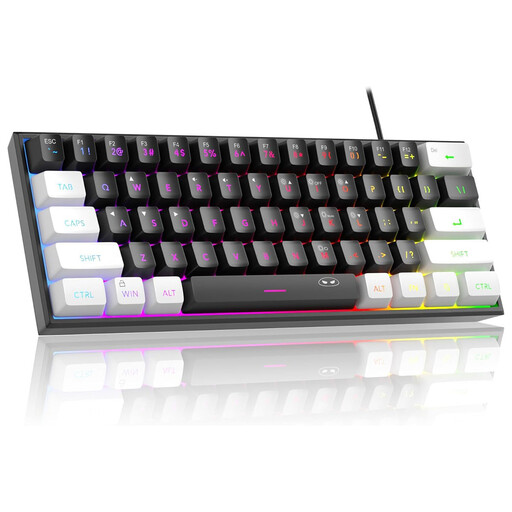
Why this fits the profile: This wired 60% model takes up little desk space and offers RGB lighting for a relatively simple gaming setup. According to the product description, it works with Windows and Mac OS.
The product description mentions membrane keys with a mechanical feel. By not choosing it as a fully mechanical model, you avoid having the wrong expectations.
61 keys, wired USB connection, RGB modes and a compact size of approximately 29.2 × 10.1 cm.
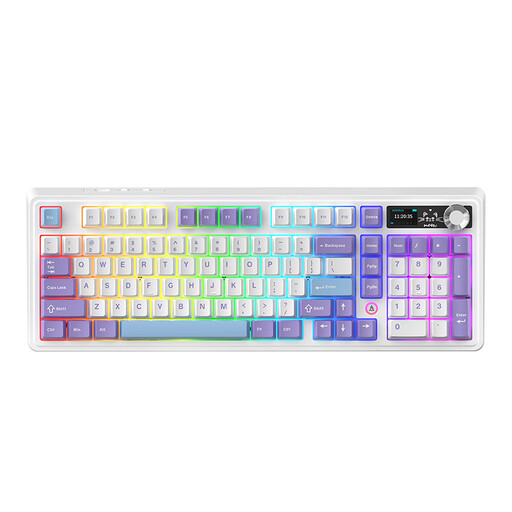
Why this fits the profile: This model combines a 98% layout with mechanical switches, a volume knob and three connection options for use in the office and during gaming.
The specifications explicitly mention hot-swappable functionality and mechanical construction, rather than just “mechanical feel”.
97 keys, Bluetooth, 2.4GHz and USB connection, plus a volume knob and RGB lighting according to the product description.
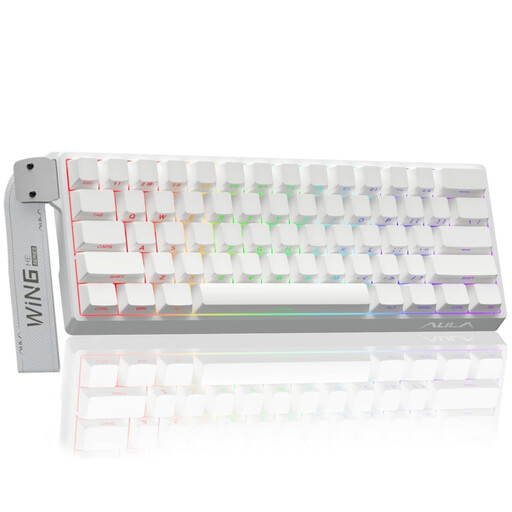
Why this fits the profile: This compact, wired model focuses on Hall Effect Magnetic Switch, Rapid Trigger and adjustable actuation according to the product name and description, for users who deliberately seek these features.
The technical features are stated concretely. Do check the software support before buying and whether your games benefit from these settings.
60% size, RGB lighting, Hall Effect Magnetic Switches and a stated polling rate of 8K.
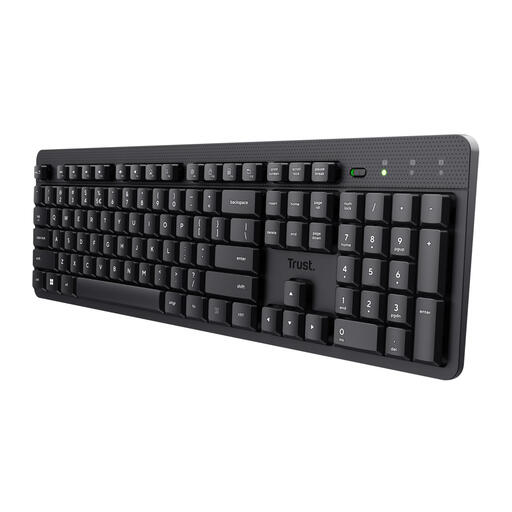
Why this fits the profile: This full-size model is designed for quiet typing, working from home and use with a numeric keypad. It connects via a USB receiver.
The product description mentions membrane keys and quiet, low-profile keys. So don’t expect mechanical switches or gaming lighting.
104 keys, numeric keypad, wireless USB connection up to 8 metres according to the product description and support for Windows, MacOS and ChromeOS.
We’ve put together a full, up-to-date list of products that fully meet these strict selection criteria and comply with current European safety regulations.
It can be, but the noise level varies depending on the switch and housing. For shared spaces, quiet membrane or scissor-switch keys are often more practical. Also check whether the manufacturer mentions low-noise switches and look at user reviews.
The lifespan depends on usage, switch quality, maintenance and cable or battery strain. A hot-swappable model can remain usable for longer when compatible switches can be replaced individually. Treat a stated number of keystrokes as a manufacturer’s product specification, not a guarantee for every user.
Many models support Windows and Mac, but the shortcut keys and software features can differ. Check the compatible operating systems, the key layout and whether you need a USB port, Bluetooth or a specific receiver before buying.
