Choose based on the keys you want to reach quickly while playing: a full-size keyboard gives you more physical keys, while TKL saves space and retains the function row. If you play with headphones in a shared space, check the exact switch variant. If you want to adjust the volume quickly, make sure the keyboard has physical media controls. Some manufacturers describe certain variants as quiet, but these claims are not based on comparable sound measurements.
Who is this keyboard for?
Strategy gamer in a shared space
Wants to keep keyboard noise down for others without giving up control while wearing headphones. Check the specific switch variant; SteelSeries, Razer and CHERRY describe different keys or switches, but those product descriptions are not comparable sound measurements.
Frequent shortcut user
Wants quick access to commands and headphone volume controls. Check the function row, any macro keys and physical media controls; Corsair and Logitech G describe these features on specific models.
Gamer with limited desk space
Is looking for a compact keyboard and wants to decide in advance which keys can be less readily accessible. TKL omits the number pad; a 60% keyboard also lacks a dedicated function row and navigation cluster.
What should you look for when choosing?
Start with the keys you use often in your game, then weigh up noise, desk space and audio controls.
| What to consider |
What to look for |
Who should pay particular attention? |
| Keyboard noise |
Check the switch type of the exact variant; if possible, try the feel of the keys for yourself. |
If I play with headphones in a shared space, I want to consider how much noise others can hear. Around 31% of consumers prioritise quieter keys. |
| Shortcuts |
Check which keys your game uses and whether they are readily accessible on the keyboard. |
Anyone who wants to use commands without extra key combinations will prioritise physical access to them. Around 31% of consumers put readily accessible game commands first. |
| Size and layout |
Check the function row, navigation cluster and keyboard layout. |
If desk space is limited, decide which readily accessible keys you can do without. Around 23% of consumers choose desk space as their main consideration. |
| Volume and connectivity |
Check whether the keyboard has physical volume controls and whether its connection is compatible with your PC. |
If I want to adjust the volume quickly while using headphones, physical controls and a suitable connection are important. Around 15% of consumers prioritise volume and connection controls. |
Common buying mistakes
-
Assuming headphones make a keyboard quiet
Headphones do not change how much keyboard noise others in the room can hear. Manufacturers also describe switch variants in different ways.
Check the exact switch and, if possible, try the keys in a similar environment to the one where you plan to use them.
-
Choosing a 60% keyboard without checking your shortcuts
On the Razer Huntsman Mini, the function row and navigation cluster are accessed through secondary functions. This can be inconvenient if your game uses those keys often.
Before choosing a very compact model, compare the keys you use in your game with the physical layout.
-
Assuming similar model names mean the same variant
Switch variants can differ: Razer describes the BlackWidow V4 Yellow as smooth and quiet, while the Green variant is clicky. A Huntsman Mini with purple switches is not the same variant as a model with Red switches.
Compare the full model name, switch and layout before ordering.
-
Confusing an extra warranty service with your statutory rights
An additional warranty is separate from your rights against the retailer if a product is faulty.
Check the terms of the additional service separately and do not treat it as a replacement for your statutory rights.
Brands to consider
SteelSeries
The Apex 3 TKL is a compact option; SteelSeries describes this model as quiet. According to the manufacturer, the full-size Apex 3 has a volume roller.
- The TKL variant retains the function row and omits the number pad.
- The description of the full-size Apex 3 does not automatically apply to the TKL variant; no comparative sound measurement is available.
Corsair
The K55 RGB PRO is a full-size keyboard with macro keys and separate media and volume controls.
- Corsair specifies six macro keys, rubber dome keys and a wired USB-A connection.
- This model does not have mechanical switches and takes up more space than a TKL keyboard.
Razer
The BlackWidow V4 is available with different switch variants; the Huntsman Mini is designed for anyone looking for a 60% layout.
- According to Razer, the BlackWidow V4 Yellow is smooth and quiet, while the Green is clicky.
- On the Huntsman Mini, the function row and navigation cluster are only accessible through secondary functions.
Logitech G
The full-size G915 X LIGHTSPEED has programmable G-keys and several connection options.
- Logitech lists nine G-keys and connectivity via 2.4 GHz, Bluetooth or cable.
- Check whether you are looking at the full-size version or the TKL variant, and which switch has been selected.
HyperX
The Alloy Core RGB is a membrane keyboard with physical media controls.
- HyperX describes the keys as quiet and lists separate media controls.
- This model does not have mechanical switches; the manufacturer's claim is not a comparative sound measurement.
Joybuy keyboards for this play style
This selection includes keyboards for anyone looking for a quieter typing experience, physical audio controls or a more compact layout. Check the switches, layout and accessibility of the keys you use for each model.
 No image available
Corsair K55 CORE TKL Gaming Keyboard - US QWERTY
A good fit if you want a TKL layout and easy access to audio controls. The product information lists quiet membrane keys and four dedicated media keys, including volume and mute controls.
The layout is US QWERTY; check that it suits your typing habits.
View at Joybuy
 No image available
Ticktype DP104 Custom Tri-Mode Wireless Mechanical Keyboard, 108 Keys, Silent Tactile Switches, US Layout
A good fit if a full-size layout matters more to you than a compact design and you want a quieter mechanical typing experience.
The product name lists 108 keys, Silent Tactile Switches and a US Layout. Check that the layout suits your typing habits.
View at Joybuy
 No image available
AJAZZ AK820 MAX 75% Wireless Mechanical Gaming Keyboard
A good fit if you want a more compact layout while retaining the function row, arrow keys and volume controls.
The product name lists tri-mode connectivity, a volume knob and US QWERTY. Check the exact layout and connection options for your setup.
View at Joybuy
 No image available
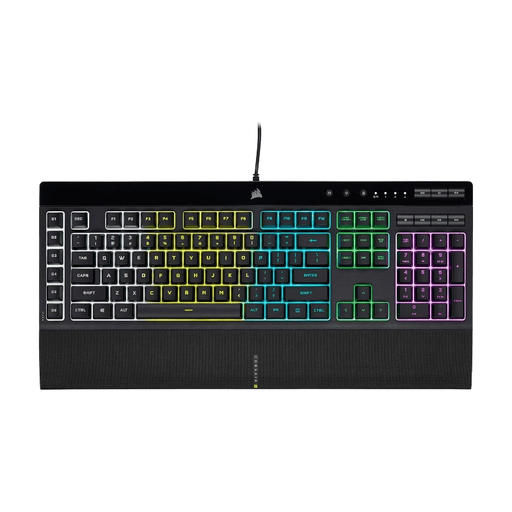
Corsair K55 RGB PRO Gaming Keyboard - US QWERTY
A good fit if you want dedicated macro and media keys and have room for a full-size keyboard.
Corsair specifies six macro keys, rubber dome keys, and separate media and volume keys. The connection is USB-A.
View at Joybuy
 No image available
Corsair K70 CORE TKL Mechanical Gaming Keyboard - BE AZERTY - MLX Red - Black
A good fit if you want a TKL layout with physical audio controls. The product information lists a rotary dial and sound-dampening foam.
This variant has a BE AZERTY layout and MLX Red switches; check that the layout suits your typing habits.
View at Joybuy
Frequently asked questions
Is TKL or 60% more practical for my grand strategy game?
TKL is a good fit if you want direct access to the function row but do not need a number pad. Choose 60% only if you are happy to use secondary functions for the missing function row and navigation keys; check your game's shortcuts first.
How do I set up macro keys without triggering commands by mistake?
Start with a simple key command and test it in your game's settings and in a safe in-game situation. Corsair describes both on-keyboard recording and more advanced programming through iCUE for the K55 RGB PRO; check for yourself that the command works in your game.
What return and warranty rights apply when buying online in the Netherlands?
For online purchases from a business, a 14-day cooling-off period applies in many cases, as explained by the Dutch government. If a product is faulty, you also have statutory rights against the retailer; an additional warranty offered does not replace those rights.


