
Footage reviewer who uses lots of shortcuts
If you regularly review and mark clips, keys that suit your workflow can be helpful. Adobe documents its shortcuts and explains how to customise them.


For reviewing footage, a compact, quieter keyboard is a good choice if you value space for your mouse and a shared workspace more than a number pad. Choose a larger keyboard with dedicated macro keys if you want to assign them to repetitive tasks. Adobe Premiere supports customisable shortcuts, but check that the keys you want to use and the configuration software work with your programme and computer. Manufacturer descriptions such as ‘quiet’ are not comparative sound measurements.
If you regularly review and mark clips, keys that suit your workflow can be helpful. Adobe documents its shortcuts and explains how to customise them.
If you type during calls or in a room where others can hear you, the stated switch type or keyboard construction may be worth considering. Manufacturers describe these features for each model, but their descriptions are not comparative sound measurements.
If you need space for your mouse and notes, weigh up the keyboard size against your need for a number pad and extra keys within easy reach.
When reviewing footage in a home office, your choice largely comes down to the tasks you repeat, key noise, desk space and how you use your keyboard.
Suitable if: you value space for your mouse and a quieter typing experience, and don’t need a number pad.
Trade-off: TKL keyboards don’t have a number pad; ‘quiet’ doesn’t prove that a keyboard is quieter than another model.
Suitable if: you want to assign your own keys to repetitive playback or marking tasks and have enough desk space.
Trade-off: extra keys take up space and are only useful if the configuration works with your computer and video software.
| What to consider | What to look for | Who is this most important for? |
|---|---|---|
| Shortcuts | Check your video software’s shortcuts and whether you can customise the keys. | If I perform the same playback and marking tasks often, I want to start them without having to search for the right command. Around 31% of consumers give programmable shortcuts top priority. |
| Key noise | Compare the specific switch type and construction; try the keyboard if noise is a deciding factor. | In a shared home working space, I want to be able to type without the keyboard drowning out conversations. Around 31% of consumers put quieter keys first. |
| Size and layout | Check whether you need a number pad and whether frequently used keys will still be within easy reach. | With limited desk space, I want to move my mouse freely without losing sight of important keys. Around 23% of consumers say size and key layout are their top priority. |
| Connection | Check which connections your computer supports and whether you move your keyboard regularly. | If I rearrange my workspace regularly, I want a connection that suits the way I work. Around 15% of consumers give portability and connectivity top priority. |
TKL keyboards don’t have a number pad, while even more compact keyboards may have a different layout for keys within easy reach.
Compare the physical layout with your video software’s shortcuts before choosing a size.
Manufacturers may describe different switches and constructions, but these specifications don’t compare models under the same conditions.
Check the exact switch and construction. If noise is a major consideration, try the keyboard for yourself if possible.
A different switch or key layout can change how a keyboard feels and which keys are within easy reach.
Before buying, compare the full model name, switch and physical layout of the version on offer.
The Apex 3 TKL is a compact option for anyone looking for quiet switches, according to SteelSeries.
The G515 TKL is a compact wired model, while the larger G915 X LIGHTSPEED has dedicated G keys and several connection options.
The K55 RGB PRO is a wired, full-size model for anyone who wants dedicated macro and media keys.
The BlackWidow V4 is a mechanical option with dedicated macro keys and a choice of switches.
The Alloy Core RGB is a membrane keyboard with media controls for anyone who values this feature.
These Joybuy products are for anyone looking for a compact size, a different key layout or programmable controls for reviewing footage. Check the version on offer and its software before choosing.
 No image available
Could suit you if you’re looking for a compact layout and don’t need a number pad.
Layout: TKL, US QWERTY.
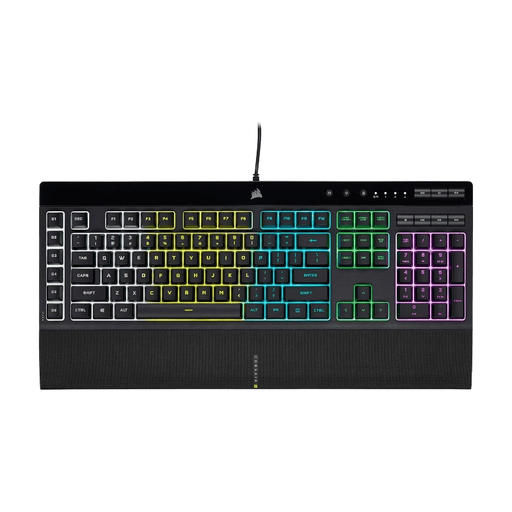 No image available
Could suit you if you want dedicated keys for recurring tasks and have room for a larger keyboard.
Layout: full-size, US QWERTY. Check that iCUE works with your computer before setting up macros.
 No image available
Could suit you if you’re looking for a compact mechanical keyboard with a BE AZERTY layout.
Layout: TKL, BE AZERTY. Switch: MLX Red.
 No image available
Could suit you if you’re looking for a compact mechanical keyboard with a US QWERTY layout.
Layout: 75%. Connection: wired. Switches: Hot-Swappable Linear Switches.
 No image available
Could suit you if you’re looking for dedicated macro keys; check that the software for the features you want works with your computer.
Switch: Yellow Switch. Layout: US QWERTY. The product information lists Razer Synapse for full functionality and setting up macros.
No, dedicated macro keys aren’t essential. First, check your video software’s shortcuts: Adobe explains that you can customise shortcuts in Premiere and describes J, K and L for specific playback and trimming tasks.
Check the keyboard layout on offer, your operating system and the configuration software required. For the K55 RGB PRO, Corsair lists iCUE for more advanced macro configuration; then test your key assignments in the video software you use.
Set up your entire workspace to suit you; a keyboard on its own can’t guarantee an ergonomic workspace. Arboportaal says the same guidelines apply to a home workspace as to a screen-work station in an office.
For an online consumer purchase, ACM ConsuWijzer describes a 14-day cooling-off period from delivery, subject to legal exceptions. This is separate from your rights if a product is faulty: the Authority for Consumers and Markets states that the seller is responsible for providing a suitable solution, such as a free repair or replacement.
Radio equipment placed on the market in the EU must meet the requirements of the Radio Equipment Directive, including those relating to safety and electromagnetic compatibility. According to the European Union, CE marking is required for products covered by applicable EU rules. Check the documentation for the version on offer; don’t assume it complies based only on a foreign model page.