Choose a keyboard based on the playback and navigation keys used by your video software; shortcuts differ between programmes such as VLC and Adobe Premiere. Then consider how much desk space you have and which keys need to be within easy reach. A compact model saves space, but may put function and navigation keys behind key combinations.
Who is this relevant to?
Frequent video navigator
You often pause, rewind and search recordings for specific moments. Start by checking the shortcuts in your own media player, then make sure the relevant keys are easy to reach. VideoLAN and Adobe document shortcuts for their video programmes.
Note-taker during long sessions
You switch between watching footage and typing. So consider key positioning and your whole workstation, not just whether a wrist rest is included. The Occupational Safety and Health Administration highlights how keyboard and mouse placement relate to your workstation setup.
Reviewer with limited desk space
You want to keep space free for mouse movement or take your keyboard with you. Compare TKL and 60% layouts by considering which keys you need to access directly while reviewing footage. SteelSeries and Razer describe these layouts for their own models.
What should you look for when buying?
First, check that the video commands you want are easy to access. Then choose a size, key feel and connection that suit your workspace and long sessions.
| What to consider |
What to look for when buying |
Who is this important for? |
| Playback and navigation controls |
Make a note of the commands in your media player or editor, then check whether you can access them directly, via Fn or with configurable keys. |
If I pause and search footage often, I want to use my video commands quickly and easily. Around 29% of consumers give navigating through footage their top priority. |
| Posture and key feel |
Consider the keyboard’s height and position alongside your chair, desk and mouse, and check whether you can keep your wrists straight. |
During a long session, I want my keyboard and mouse to fit comfortably into my workspace, without relying on a wrist rest as a complete solution. Around 23% of consumers prioritise posture and key positioning. |
| Quiet keystrokes |
Check the switch type on the exact model and, where possible, assess its sound and feel for yourself. |
When I’m listening and taking notes, I want keys that aren’t unnecessarily distracting. Around 18% of consumers give quiet typing their top priority. |
| Size and accessible keys |
Compare TKL, 60% and full-size layouts based on how you enter timecodes and which shortcuts you use most. |
I want space for my mouse, but I don’t want to keep searching for a function key that’s hard to reach. Around 18% of consumers prioritise saving desk space. |
| Connection |
Check whether the exact model connects via cable, receiver or Bluetooth, and how you’ll use or charge it during a long session. |
If I want to connect my keyboard in a particular way, its connection options need to suit my setup. Around 12% of consumers give their preferred connection their top priority. |
Pitfalls
-
Confusing a media key with precise video navigation
Basic media controls don’t necessarily let you move frame by frame or jump to a specific point. VideoLAN and Adobe document shortcuts for their own programmes, and these may differ.
Write down the video actions you use most and compare them one by one with the keyboard’s keys and customisation options.
-
Choosing a 60% keyboard just to free up desk space
The Razer Huntsman Mini has no dedicated function row, home cluster or number pad. These functions are accessed using secondary key combinations, which can be awkward if you use them often.
If you regularly navigate or enter timecodes, compare a 60% layout with TKL too.
-
Thinking a wrist rest is a complete ergonomic solution
According to the Occupational Safety and Health Administration, hand position also depends on how your keyboard, desk, chair and mouse are arranged. A wrist rest won’t automatically make an unsuitable workstation setup right for you.
Consider your whole workstation and let your hands move freely while typing; don’t rest your wrists on the desk.
-
Assuming the manufacturer’s warranty covers all your legal rights
The Dutch Government distinguishes between your legal rights when a product is faulty and any additional warranties. The Netherlands has no fixed statutory warranty period.
Check what an additional warranty covers. If a product is faulty, contact the seller.
An additional warranty could mean unnecessary expense if it offers no relevant extra cover.
Brands to consider
SteelSeries
The Apex 3 TKL is an example of a compact TKL model with a volume roller and media keys.
- SteelSeries describes this model as having Whisper Quiet switches and an IP32 rating.
- The TKL layout has no number pad. The description of its sound level is a manufacturer claim, not an independent measurement.
Logitech G
The G915 X LIGHTSPEED is worth considering if you’re looking for a low-profile mechanical keyboard with extra programmable controls and several connection options.
- Logitech G lists nine G-keys, media keys and connectivity via LIGHTSPEED, Bluetooth or cable.
- Check the layout and make sure the model will fit your desk. The description of its wireless performance comes from the manufacturer, not an independent test.
Razer
The Huntsman Mini is designed around a portable 60% layout; according to Razer, the BlackWidow V4 Pro offers extra controls.
- On the Huntsman Mini, functions for missing key clusters are accessed via secondary functions. Razer lists a command dial and macro keys on the BlackWidow V4 Pro.
- The extra controls on the BlackWidow V4 Pro aren’t a feature of the Huntsman Mini.
Corsair
The K55 RGB PRO is a full-size keyboard with dedicated macro keys and media controls.
- Corsair says saved macros on the K55 RGB PRO can work in hardware mode when iCUE isn’t running.
- A full-size keyboard takes up more desk space than a compact layout.
HyperX
The Alloy Core RGB is a membrane keyboard with dedicated media controls.
- HyperX describes the keys as quiet and lists media keys for this model.
- The description of its sound comes from the manufacturer, not an independent measurement. HyperX says spill resistance has been tested up to 120 ml; this isn’t a guarantee against liquid damage.
Products at Joybuy
This selection includes keyboards for reviewing footage and taking notes, with a focus on direct media controls, compact layouts and extra programmable controls.
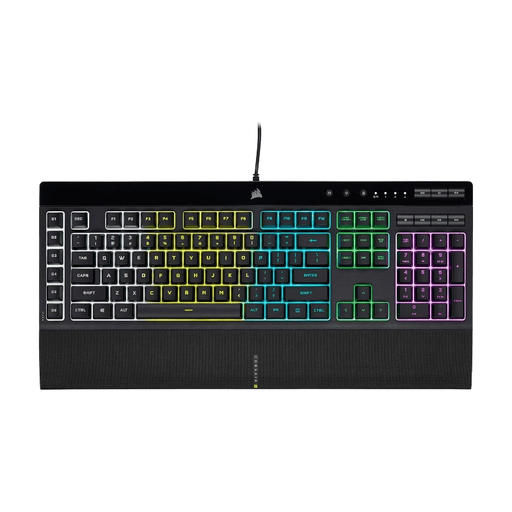 Image unavailable
Corsair K55 RGB PRO Gaming Keyboard, US QWERTY
A good fit if you want physical media controls and quiet keys while reviewing footage.
Full-size layout with US QWERTY keys, membrane switches, six macro keys and dedicated media controls.
The product information lists a detachable palm rest. The full-size layout takes up more desk space than a compact one.
Joybuy
 Image unavailable
Corsair K70 CORE TKL Mechanical Gaming Keyboard, BE AZERTY, MLX Red, Black
A good fit if you want to leave space for your mouse while keeping media controls within easy reach.
TKL layout without a number pad, with linear MLX Red switches, a rotary dial and a programmable media button.
The product information lists two layers of sound-dampening foam. Customising the button’s controls requires setup in iCUE.
Joybuy
 Image unavailable
Ajazz AK820 Pro 75% Mechanical Tri-Mode Keyboard, QWERTY US, Flying Fish Switch Purple
A good fit if you want to save space while keeping the arrow and function keys in a compact layout.
The product information lists a 75% layout with 82 keys, a rotary dial and connectivity via cable, Bluetooth or 2.4G.
According to the product information, the rotary dial is for volume and media controls. Compatibility is listed for Win, Mac and PC.
Joybuy
 Image unavailable
Razer BlackWidow V4 Mechanical Gaming Keyboard, Yellow Switch, US Layout
A good fit if you want to assign repeated commands to programmable keys.
The product description lists linear Razer Yellow switches, six programmable macro keys and a multifunction scroll wheel.
The description of the controls as quiet comes from the product description and isn’t based on an independent sound measurement.
Joybuy
 Image unavailable
Razer Huntsman V3 Pro Keyboard, US QWERTY Layout
A good fit if you want a full-size keyboard with direct media controls and a multifunction rotary dial.
The product information lists media and shortcut keys, a digital rotary dial and a magnetic wrist rest.
The full-size layout takes up more desk space than a compact one.
Joybuy
Frequently asked questions
Do you need dedicated media keys to review tournament footage?
No, not necessarily. VideoLAN documents shortcuts for actions such as pausing and skipping; Adobe also documents shortcuts and explains how to customise them. Check the commands in your programme, as a physical media key won’t necessarily perform the same action as a timeline shortcut.
How should you set up your keyboard for a long session?
Position your keyboard so your shoulders stay relaxed and your wrists are as straight as possible, and consider your chair, desk and mouse too. If you use a palm rest, let your hands move freely while you type. These are ergonomic guidelines, not a guarantee that a particular keyboard will prevent discomfort.
Can you use macros without keeping the configuration software open?
It depends on the model. Corsair says saved macros on the K55 RGB PRO can work in hardware mode when iCUE isn’t running. Check that the keys you’ve set up match the commands in your video programme.
What warranty and cooling-off period apply to online purchases in the Netherlands?
According to the Dutch Government, when you buy as a consumer you’re entitled to a product that works properly; there’s no fixed statutory warranty period in the Netherlands. When you buy online from a business, a 14-day cooling-off period applies in many cases. Check the terms and any exceptions that apply to your purchase.


