Choose a keyboard whose key legends are easy to make out in daylight at your desk; RGB lighting alone doesn’t prove that the letters are legible. Then compare quiet membrane keys, a more compact TKL layout or extra macro keys, based on the space available and the controls your games actually support. Check the exact keyboard layout and version too.
Who is this keyboard for?
Player at a sunny desk
You want to be able to make out the key legends when there’s plenty of daylight at your desk. Compare the lettering with the lighting switched on and off. MonsGeek explains that a manufacturing method such as double-shot doesn’t, on its own, mean that light shines through the letters.
Player in a shared room
You want to play deck-building games without a noticeably loud keystroke. Some manufacturers describe their membrane keys or switches as quiet; the sound and feel of a particular version should suit your preference.
Player with limited desk space
You want to leave room for your mouse without giving up keys you need. A TKL layout leaves out the number pad. Check which other keys you need for your games and everyday use.
What should you look for when choosing?
For a bright gaming room, don’t just look at RGB: the key legends, feel, layout and any macro keys each answer a different buying question.
| What to consider |
What to look for |
Who is this important for? |
| Legibility in daylight |
Look at the lettering on the exact version with the lighting switched on and off, from your usual viewing angle. MonsGeek points out that double-shot doesn’t automatically mean the letters let light through. |
If I play in bright daylight, I want to be able to make out the legends easily. Around 42% of consumers put legibility in daylight at the top of their buying priorities. |
| Quiet keystrokes |
Check which key or switch type is listed and, if possible, try the feel for yourself. Corsair, SteelSeries and HyperX describe specific models as quiet. |
When I play in a shared room, I want keystrokes that sound pleasant to me and the people around me. Around 25% of consumers prioritise quiet keystrokes. |
| Size and keys |
Check whether the model is TKL or full-size, and look at the exact keyboard layout of the version you’re ordering. |
I want to keep space free for my mouse while retaining the keys I use. Around 25% of consumers give top priority to size and the available keys. |
| Shortcut keys and macros |
First check whether your games support and allow the shortcuts you want. Only then look at macro keys and any configuration software. |
If my games support allowed shortcuts, extra programmable controls could be useful. Around 8% of consumers put shortcut keys first. |
Common buying mistakes
-
Assuming RGB means the letters are easy to read
Lighting between the keys and light shining through the legends are two different things. MonsGeek notes that double-shot alone doesn’t guarantee that the letters let light through.
Assess the lettering on the exact version in a bright environment, and check separately whether light shines through the letters.
Brands to compare
Corsair
The K55 RGB PRO is a wired membrane model worth considering if dedicated macro keys and media controls are important to you.
- Corsair lists six macro keys, five RGB zones and membrane keys described as quiet.
- The five lighting zones aren’t per-key lighting; check the legibility of the legends separately.
SteelSeries
The Apex 3 TKL is worth comparing if a more compact layout and switches described as quiet are priorities.
- SteelSeries lists a TKL layout, Whisper Quiet switches and IP32 resistance.
- TKL leaves out the number pad. IP32 doesn’t mean spills can’t cause damage.
HyperX
The Alloy Core RGB offers membrane keys, lighting zones and dedicated media controls.
- HyperX lists quiet keys, three brightness levels and its own spill-resistance test up to 120 ml.
- The test isn’t a guarantee against every spill, and doesn’t tell you whether the key legends are legible in bright daylight.
Logitech G
The G213 Prodigy is a larger model to compare if you’re looking for an integrated palm rest and adjustable lighting zones.
- Logitech G lists five lighting zones, an integrated palm rest and spill resistance up to 60 ml.
- The stated spill resistance is a manufacturer specification, not a comparative test against other models.
Razer
The Ornata V3 X is worth considering if you’re looking for low-profile keys and a membrane feel described as quiet.
- For the listed US version, Razer specifies low-profile keys, quiet membrane switches and UV-coated keycaps.
- These features don’t establish how legible the legends are in daylight.
Joybuy keyboards for this use case
These Joybuy products offer keyboards to compare by size, feel, key layout and extra gaming controls.
 Image unavailable
GXTrust Thado TKL gaming keyboard, QWERTY, black
A TKL option to compare if you want to keep desk space free for your mouse.
TKL layout without a number pad; membrane keys; adjustable multi-colour RGB lighting; PC and PS5 compatibility; anti-ghosting for up to 10 simultaneous key presses.
Joybuy
 Image unavailable
Corsair K55 CORE TKL gaming keyboard, US QWERTY
A compact model to compare if you want quiet membrane keystrokes and room for your mouse.
TKL layout without a number pad; quiet membrane keys; eight RGB zones; four dedicated media keys; US QWERTY layout.
Joybuy
 Image unavailable
Ticktype DP104 Custom Tri-Mode, 108 keys, US layout
A full-size model to compare if you want a complete keyboard and a feel described as quiet.
Mechanical keyboard with 108 keys; silent tactile switches; US layout; three connection options: 2.4 GHz, Bluetooth and USB-C.
Joybuy
 Image unavailable
AJAZZ AK820 MAX 75%, US QWERTY
A compact layout to compare if you want to save desk space while keeping the function keys.
Mechanical keyboard with 82 keys, function row and arrow keys; RGB lighting; Bluetooth, 2.4 GHz and USB-C.
Joybuy
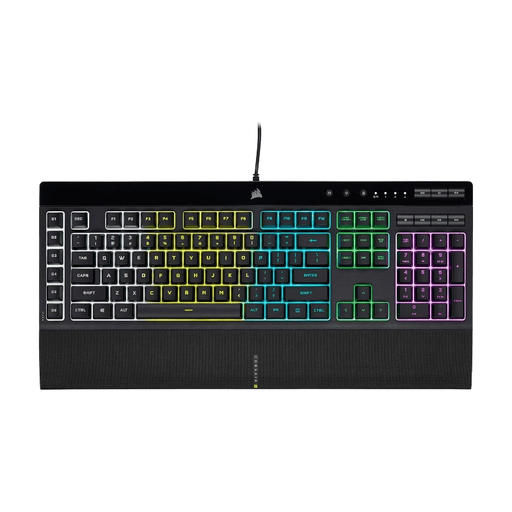 Image unavailable
Corsair K55 RGB PRO gaming keyboard, US QWERTY
A full-size model to compare if you want dedicated macro keys and quiet membrane keystrokes.
Full-size US QWERTY layout; six macro keys; five RGB zones; detachable wrist rest. The product description describes the membrane keys as quiet.
Joybuy
Frequently asked questions
Does RGB lighting always help in bright daylight?
No, an RGB specification doesn’t automatically mean the letters are easy to read. Some keycaps don’t let light through the legends. So also look at the lettering with the lighting switched off, and assess the exact version in lighting similar to the conditions at your desk.
How do you set up the lighting and shortcuts?
It depends on the model. Corsair lists built-in lighting effects and iCUE for more advanced lighting and macros on the K55 RGB PRO; SteelSeries mentions a macro editor for the Apex 3 TKL. Also check whether your game supports and allows the commands you want.
What protection does a keyboard offer against spills?
Follow the manufacturer’s care instructions and treat any stated resistance as specific to that model. IP32 on the SteelSeries Apex 3 TKL and the test up to 120 ml cited by HyperX for the Alloy Core RGB are different specifications; neither promises that every spill will happen without causing damage.
What cooling-off period and warranty apply to an online purchase in the Netherlands?
According to ACM ConsuWijzer, online product purchases generally come with a 14-day cooling-off period after delivery. If a product breaks too soon during normal use, ACM ConsuWijzer says the seller must resolve the problem free of charge. A manufacturer’s warranty doesn’t replace your statutory rights.


