Who is this important for?

Builders who play in the dark

You want to find the right keys when moving around, selecting items and opening your inventory. Clear legends and brightness you can adjust comfortably are key. Logitech describes keyboard lighting as a way to make keys easier to see in a dark room.

Builders short on desk space

You want to leave room for your mouse without losing access to important gaming keys. A TKL layout could be a good fit if you don’t need a number pad; SteelSeries describes the Apex 3 TKL as having a more compact layout.

Night-time gamers with housemates

You want keys that are easy to see, while also keeping an eye on the noise they make during repeated presses. Compare the exact version and switch type, as a manufacturer’s description such as ‘quiet’ is not the same as an independent noise test.

What should you look for when choosing?

What to consider What to look for when buying Who should pay extra attention?
Clear, adjustable lighting Check whether the legends themselves are illuminated and how you can adjust the brightness. Lighting effects are not the same as keys that are easy to read. In a dark room, I want to see the legends quickly and set the brightness to a comfortable level, without needing lots of effects. Around 36% of consumers give clear, adjustable lighting their top priority.
Gaming keys and size Compare the layout with your own game settings. In Minecraft: Java Edition, keys 1–9 select a hotbar slot and E opens the inventory, according to Minecraft Help. TKL keyboards don’t have a number pad. When I’m building and often switching between movement, inventory and the hotbar, I want those keys within easy reach while still leaving room for my mouse. Around 29% of consumers give accessible gaming keys and a suitable size their top priority.
Key feel and noise Check the switch type on the exact version and, if possible, compare how the keys feel and sound. Manufacturers’ claims about quiet operation are not a comparative noise test. When I’m gaming in the evening with housemates nearby, I want a quiet-feeling keypress and keys that remain comfortable during longer sessions. Around 21% of consumers give quiet operation and comfort their top priority.
Wireless use and battery For a wireless model, check the connection and battery life with the lighting settings you plan to use. RTINGS notes that RGB effects, particularly customised ones, can drain the battery more quickly. If I want to keep my desk free of cables, I weigh up the freedom to move against having to recharge or turn down the lighting. Around 14% of consumers give a cable-free setup their top priority.

Common mistakes

  • Assuming lots of RGB effects make keys easier to read

    For gaming in the dark, visible legends and comfortable brightness matter more directly than the number of effects.

    First check whether the legends are illuminated and how you can adjust the brightness. Then compare the extra effects.

  • Choosing a compact keyboard without checking your gaming keys

    Compact layouts vary. Easy access to the keys you use can matter more than a smaller footprint.

    Compare the layout with your own game settings and check that it includes the numbers and other keys you need. TKL leaves out the number pad.

  • Assuming versions with the same model name are identical

    Corsair says the K100 RGB is available with both optical-mechanical and mechanical switches. The model name alone doesn’t tell you how the keys on a particular version will feel.

    Before buying, check the full model number and switch type of the version on offer.

  • Choosing wireless RGB lighting without considering the battery

    RTINGS warns that RGB, particularly with customised effects, can drain the battery of wireless keyboards more quickly.

    Compare battery life using the lighting setting you want, rather than relying on a figure with no clear test conditions.

    Custom lighting may mean you need to recharge more often or turn down the brightness.

Brands to consider

Logitech G

The G213 is worth comparing if you’re looking for a full-size illuminated keyboard with a wrist rest.

  • Logitech lists five adjustable lighting zones, membrane keys and an integrated wrist rest for the G213.
  • The G213’s features don’t automatically apply to other Logitech G models. Its lighting zones are also different from per-key lighting.

SteelSeries

The Apex 3 TKL is worth comparing if you’re looking for an illuminated keyboard without a number pad.

  • SteelSeries describes the switches on this version as quiet and lists RGB lighting.
  • The TKL layout doesn’t have a number pad. ‘Quiet’ is the manufacturer’s description, not an independent noise test.

Razer

The Ornata V3 X is worth considering if you want to compare a low-profile keyboard with membrane keys.

  • Razer describes the Ornata V3 X as quiet.
  • That is the manufacturer’s description, not a comparative noise test. Razer describes the Ornata V3 separately as clicky, so don’t confuse it with the V3 X.

Corsair

The K100 RGB is worth considering if per-key lighting and extra controls matter more to you than a compact size.

  • RTINGS discusses the K100 RGB’s lighting settings, and Corsair says the model is full-size.
  • Corsair lists both an optical-mechanical and a mechanical version. Check the switch type on the exact model.

Gaming keyboards at Joybuy

This Joybuy selection includes gaming keyboards with a range of layouts and connection options. Check each version to make sure its lighting, key layout and connection suit the way you plan to use it.

GXTrust Thado wired gaming keyboard, TKL, PC/PS5, QWERTY, black

GXTrust Thado wired gaming keyboard, TKL, PC/PS5, QWERTY, black

The TKL layout could be a good fit if you want to leave room for your mouse and don’t need a number pad.

The product name specifies a wired connection, PC/PS5, QWERTY and TKL. Check that the layout matches the gaming keys you use.

View at Joybuy

Corsair K55 CORE TKL gaming keyboard, US QWERTY

Corsair K55 CORE TKL gaming keyboard, US QWERTY

This TKL version is worth considering if you don’t use a number pad and want more space beside your keyboard.

The product name specifies a TKL layout and US QWERTY. Check the letter and symbol layout if you’re used to a different keyboard variant.

View at Joybuy

AJAZZ AK980 V2 wireless mechanical keyboard, 98% QWERTY, Starry Night Gray

AJAZZ AK980 V2 wireless mechanical keyboard, 98% QWERTY, Starry Night Gray

This version could be a good fit if you’re considering a mechanical keyboard with wireless connection options and a compact layout.

The product name specifies a 98% layout, a 10000mAh battery and wired, Bluetooth and 2.4G connections. It also lists Gift Switch V2 and Starry Night Gray.

View at Joybuy

Redragon M68 mechanical gaming keyboard with magnetic switches, 68 keys, US layout

Redragon M68 mechanical gaming keyboard with magnetic switches, 68 keys, US layout

A compact keyboard could be a good fit if you want to leave room for your mouse on your desk. Check first that the layout works with the gaming keys you use.

The product name specifies 68 keys, magnetic switches, a US layout, an 8000Hz polling rate and Rapid Trigger.

View at Joybuy
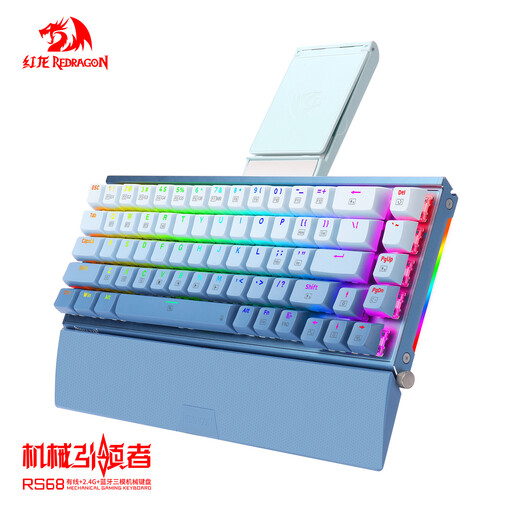
RS68 The Third Mock Examination wireless mechanical keyboard, aluminium alloy, Gradient Blue

RS68 The Third Mock Examination wireless mechanical keyboard, aluminium alloy, Gradient Blue

This version could be a good fit if you want to compare a wireless mechanical keyboard that can also be used with a cable.

The product name specifies an aluminium alloy case and wired, wireless and Bluetooth connections. Check the exact layout and connection method you want for the product variant.

View at Joybuy

Frequently asked questions

Do you need per-key lighting for a sandbox game?

No, not just for this kind of use. Start with clear legends and brightness you can adjust comfortably. Per-key lighting gives you more ways to customise the keyboard, so consider whether you need them.

Which keys should you check for Minecraft: Java Edition?

The default controls include 1–9 to select a hotbar slot and E to open the inventory, according to Minecraft Help. Check your own settings if you’ve changed the keys or play another sandbox game.

Can you return a keyboard bought online if you don’t like the layout?

Many online purchases from a business come with a 14-day cooling-off period. Before buying, check with the seller which returns procedure applies. A purchase from a private individual is not covered by the same distance-selling rule.

Which product marking is relevant for an electronic keyboard in the Netherlands?

Electrical and electronic equipment placed on the market in the Netherlands must carry the correct CE marking, according to the Dutch Digital Infrastructure Inspectorate. The marking indicates the manufacturer’s declaration that the product meets applicable EU requirements; it is not an independent assessment of how the keys feel or how well the keyboard performs.

What can you do in the Netherlands if your keyboard develops a fault?

The seller must provide a product that conforms to the agreement. According to the Dutch government, statutory guarantee in the Netherlands has no fixed end date: what you can reasonably expect from the product depends, among other things, on the product itself and the circumstances.
