
Watching in a dark room
You want to find the keys without lighting the whole room with the keyboard. Assess the lighting alongside the ambient light (SteelSeries; Arboportaal).


Start with keys that are easy to see in your room’s lighting, and controls for the playback functions you use. A quiet, compact keyboard may suit a shared or small workspace; customisable keys are most useful if you regularly use shortcuts. Keyboard lighting is no substitute for suitable workspace lighting during prolonged screen use, as Arboportaal points out.
You want to find the keys without lighting the whole room with the keyboard. Assess the lighting alongside the ambient light (SteelSeries; Arboportaal).
You use playback or shortcut commands repeatedly and want to check that the controls work with your video software (Corsair; Logitech G).
You need to consider key noise and the desk space available beside your screen (SteelSeries; Razer; Trust).
Start by checking how visible the keys are in your room, then decide which playback controls you use and weigh up key noise and keyboard size.
| What to consider | What should you check? | Who might care most? |
|---|---|---|
| Easy-to-see keys in low light | Check how visible the key legends are and which lighting modes are available. Make sure the light does not distract you from the footage. | When I watch tournament footage in a dark room, I want to find the keys without the lighting overpowering the footage. Around 36% of consumers say easy-to-see keys in low light are their main concern. |
| Playback controls and shortcuts | Check which buttons control playback and volume, whether they need to be assigned, and whether they work with your computer and software. | When I repeatedly pause and play footage, I want to use the controls easily without taking my attention away from it. Around 29% of consumers say controls are their top priority. |
| Key noise | Compare the feel of the keys on the version you are considering; the word ‘quiet’ is not an independent noise measurement. | If other people are watching or working in the same room, I want my typing to cause as little disruption as possible. Around 21% of consumers prioritise quieter keys. |
| Space and layout | Check whether you need a number pad and compare the exact layout of the version you are considering. | At a small desk, I want to keep space beside the keyboard without losing keys I use for other tasks. Around 14% of consumers prioritise a more compact layout. |
Keyboard lighting will not automatically make up for poor lighting or an unsuitable contrast between your screen and its surroundings. Arboportaal highlights adequate workspace lighting as an important consideration when working with screens.
First assess the lighting in your room, then adjust the keyboard lighting to suit it, especially if you spend long periods using a screen.
A TKL layout leaves out the number pad. This can free up desk space, but may not suit you if you use those keys for other tasks.
Compare the full layout of the version you are considering with your regular shortcuts and other tasks.
The standard Corsair K55 CORE and the K55 CORE TKL differ in size. With a Razer Ornata V3, too, check that the version listed matches the model you are looking for.
Before buying, compare the full model name, key layout and specifications of the exact version you are considering.
Paid-for extended cover does not replace your existing rights when buying as a consumer. The Rijksoverheid states that there is no fixed statutory warranty period in the Netherlands.
Check what additional rights the cover actually provides, and keep your proof of purchase.
The Apex 3 TKL is a compact option with lighting and dedicated media controls.
The Ornata V3 X is designed for anyone considering a backlit keyboard with membrane switches.
The K55 CORE has dedicated playback and brightness controls.
The wired G915 X is worth considering if you want customisable keys and media controls.
The GXT 833 Thado is a compact option with lighting and media keys.
These Joybuy products offer a range of RGB lighting, keyboard layouts and volume controls. Check which features matter for the way you review footage on each version.
 No image available
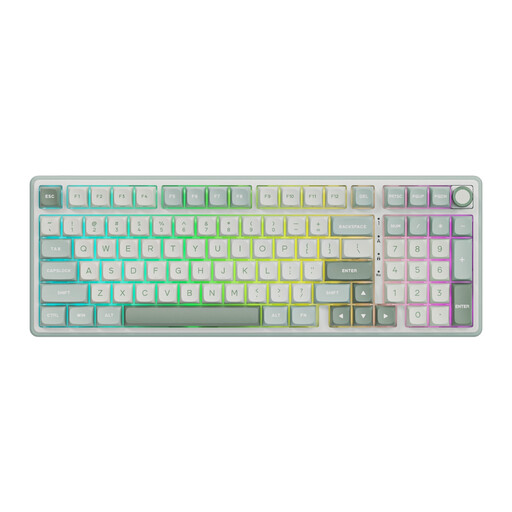
The RGB lighting may help you find the keys in low light; check that the lighting mode is comfortable in your room.
The product name describes a wired mechanical keyboard with a number pad, volume knob, gasket mount and hot-swappable keys. This version has Beige Switch switches and comes in Sky Cyan.
 No image available
The RGB lighting and volume knob may suit you if you want to find the keys and adjust the volume while reviewing footage.
The product name describes a mechanical keyboard with a 98% layout, TFT display and 10,000 mAh battery. The listed connection options are wired, Bluetooth and 2.4 GHz.
 No image available
The RGB lighting and compact layout may suit you if you want to find the keys while keeping desk space free.
The product name lists magnetic switches, 68 keys and a US layout. Rapid Trigger and an 8000 Hz polling rate are also listed.
 No image available
The 75% layout and volume knob are worth considering if you want a more compact layout and easy volume adjustment.
The product name describes a mechanical keyboard with three connection options, RGB lighting, an 8000 mAh battery and hot-swappable keys. It has a US QWERTY layout.
 No image available
The RGB lighting and 82-key layout may suit you if you want to find the keys on a smaller keyboard.
The product name describes a wired keyboard with magnetic switches, hot-swappable keys and an 8000 Hz polling rate.
No. Do not assume that keyboard lighting replaces suitable workspace lighting. Arboportaal recommends adequate lighting and a suitable contrast between the screen and its surroundings, so adjust the lighting in your room accordingly.
According to Corsair’s manual, connect the K55 CORE to an available USB Type-A port that supports USB 2.0 or higher. Check that your computer has one, and whether you are choosing the standard K55 CORE or the TKL version.
This has not been confirmed for every piece of video software. Check the playback and volume commands in your software, and find out whether they work with the keys or any configuration software for the model you choose.
Corsair’s manual describes the controls and settings saved in hardware mode when iCUE is not running. For another model, check separately which settings are retained.
No. When you buy as a consumer, you are already entitled to a product that works as it should. The Rijksoverheid states that the Netherlands has no fixed statutory warranty period; if you buy extended cover, check what additional rights it actually provides.
Rules for employees who work with screens may be relevant, but they do not automatically apply to every private viewer. Arboportaal states that when screen work exceeds two hours a day, the screen and keyboard must not be attached to each other, and the workspace must be adequately lit.