Start with a layout that keeps the game keys you use most within easy reach, while leaving enough room for your mouse. A full-size keyboard with macro keys is a good fit if you want to assign commands to dedicated keys; a TKL or 75% model takes up less space, but may omit or move some keys. Then consider the typing feel and sound. Features designed for competitive speed are not necessarily a priority for this type of game.
Who might value different keyboard features?
Players who enjoy long sessions
You’re looking for comfortable keys and a setup you can vary. A product claim about comfort is no substitute for a suitable posture or taking breaks; Arboportaal provides information about working with display screens.
Players who set up keyboard shortcuts
You use lots of in-game commands and want them within easy reach. The official Factorio Wiki explains how to customise key bindings; check the binding options for other games too.
Players who want less noise or more desk space
You want quieter keystrokes or more room for your mouse, and need to weigh that against the switch feel and the keys omitted from a compact keyboard.
What should you look for in a gaming keyboard?
Full-size with macro keys
A good fit if: you want to keep the number pad and assign your own game commands to dedicated keys. Razer lists six programmable macro keys for the BlackWidow V4.
Keep in mind: a full-size keyboard takes up more desk space; a wrist rest is no guarantee against discomfort.
Wired, low-profile TKL
A good fit if: you don’t need a number pad and are looking for a lower-profile keyboard. Logitech lists the wired G515 TKL as 22 mm high and says its keys can be programmed via G HUB.
Keep in mind: there’s no number pad, and a low-profile design doesn’t guarantee a comfortable posture for everyone.
Compact 75% with multiple connection options
A good fit if: you want a smaller keyboard and the choice of wired or wireless connection. AULA lists Bluetooth, 2.4 GHz and USB for the F75 model described.
Keep in mind: the layout and switches can vary between F75 versions, so check the exact variant.
Quiet TKL with membrane switches
A good fit if: quieter keystrokes matter more to you than a mechanical switch feel. SteelSeries describes the Apex 3 TKL’s switches as Whisper-Quiet.
Keep in mind: this model has neither mechanical switches nor a number pad.
| What to consider |
What to check before buying |
Who is this most important to? |
| Comfort during long sessions |
Compare the height and switch variant, and check how the keyboard and mouse will fit together on your desk. |
If I play for a long time, I want a key feel and setup that suit me; neither a wrist rest nor a low-profile design guarantees that I’ll avoid discomfort. Around 33% of consumers put comfort during long sessions first. |
| Shortcuts and commands |
Make a note of the keys you use most and check the layout and support for customising key bindings. |
If I use the same commands often, I want them within easy reach without losing access to important keys. Around 27% of consumers prioritise shortcuts and custom commands. |
| Sound and switch feel |
Check the exact switch variant and, if possible, try out its sound and feel beforehand. |
If I play for a long time in a shared space, I want keystrokes that I find acceptable and a key feel I enjoy. Around 20% of consumers choose sound and switch feel as their main consideration. |
| Desk space and connectivity |
Measure the available space, decide which keys need to be within easy reach and check the connection options. |
If desk space is tight, I want to leave room for my mouse and know whether I’m choosing a wired or wireless connection. Around 20% of consumers put space and connectivity first. |
Gaming keyboard buying pitfalls
-
Choosing a compact layout without checking your keys
A smaller keyboard may omit the number pad or place keys differently. This could make the commands you use most less accessible.
Make a note of your most-used game commands and compare them with an image of the exact layout and variant.
Gaming keyboard brands to consider
Razer
The BlackWidow V4 is a full-size option with dedicated macro keys and an included wrist rest.
- Razer lists six macro keys and Yellow or Green switches for this model.
- These features don’t necessarily apply to other BlackWidow versions; a wrist rest is no guarantee against discomfort.
Logitech G
The wired G515 TKL is worth considering if you’re looking for a lower-profile keyboard without a number pad.
- Logitech lists this model as 22 mm high and says it supports KEYCONTROL via G HUB.
- Check that you’re looking at the wired G515 TKL, not the wireless G515 LIGHTSPEED TKL.
AULA
The F75 is a 75% option for anyone who wants to choose between wired and wireless use.
- AULA lists Bluetooth, 2.4 GHz, USB and hot-swap for the version described.
- The layout and switch variant can differ between F75 versions, so check the exact model.
SteelSeries
The Apex 3 TKL is a compact option if you don’t need a mechanical switch feel.
- SteelSeries describes this model’s switches as Whisper-Quiet and lists media controls.
- Whisper-Quiet is the manufacturer’s description, not a measured noise level; TKL means there’s no number pad.
Joybuy keyboards for this play style
This selection includes compact TKL, 75% and 68-key keyboards, as well as models with wired or wireless connections. Check the layout, connection and switch variant for each version.
 No image available
GXTrust Thado wired TKL gaming keyboard, QWERTY, black
A good fit for players looking for a compact wired keyboard who don’t need a number pad.
QWERTY layout; membrane switches; USB connection. The product description lists anti-ghosting for up to 10 simultaneous keystrokes, media keys and a 1.8 m cable.
Joybuy
 No image available
AULA F75 MAX 75%, US QWERTY, Reaper switches
A good fit if you’re looking for a compact mechanical keyboard with a choice of connection options.
75% layout and US QWERTY; Reaper switches; wired, Bluetooth or 2.4 GHz.
Joybuy
 No image available
AULA F75 75%, US QWERTY, PBT keycaps
A good fit for players looking for a compact layout with a choice of wired or wireless connection.
75% layout and US QWERTY; the product description lists PBT keycaps, USB-C, Bluetooth and 2.4 GHz.
Joybuy
 No image available
Redragon M68, 68 keys, US layout, magnetic switches
A good fit if you want to keep desk space to a minimum and are looking for a compact layout.
68 keys and US layout; magnetic switches with adjustable actuation and Rapid Trigger. These speed features aren’t necessarily a priority for colony-management games.
Joybuy
 No image available
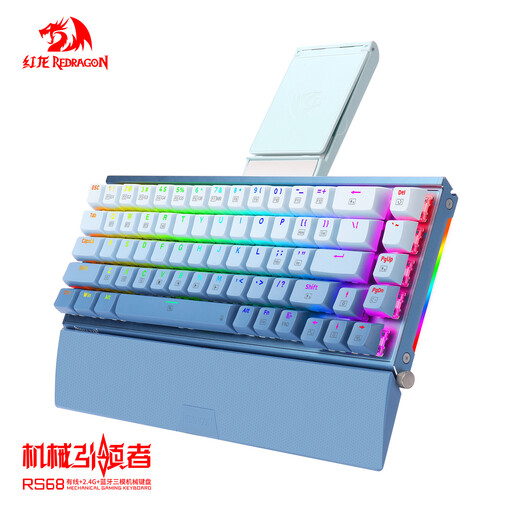
RS68 The Third Mock Examination mechanical keyboard, blue
A good fit if you’re looking for a mechanical keyboard with both wired and wireless connection options.
The product description lists USB-C, Bluetooth and 2.4 GHz, an aluminium case, a hot-swappable PCB and a detachable wrist rest.
Joybuy
Gaming keyboard FAQs
Do I need Rapid Trigger for colony-management games?
Not necessarily. RTINGS mainly links adjustable magnetic switches with fast-paced competitive games; comfort and easy-to-reach keys are also relevant if you play less competitively.
How can you set up your own shortcuts without disrupting in-game commands?
First, check the game’s key-binding settings. The official Factorio Wiki explains how to change key combinations there; check the settings for other games separately before setting up keyboard macros.
What can you do if you feel uncomfortable during a long session?
Change your posture and activity, and take breaks. A low-profile keyboard or wrist rest is not a treatment or a guarantee against discomfort; Arboportaal’s guidance is about working with display screens and is not specific advice for gaming at home.
What are the cooling-off period and warranty rules in the Netherlands?
For online purchases from a business, you usually have a 14-day cooling-off period, as the Dutch government explains. The Netherlands has no fixed statutory guarantee period; your statutory rights if a product is faulty are separate from a manufacturer's warranty.


