
Home worker looking for a quieter setup
Plays city-building games in the same place they work or take calls, so keyboard noise is a key consideration. SteelSeries, Corsair and Razer describe specific models as having switches they consider quiet.


Start by considering noise and layout: a membrane keyboard described as quiet may suit a shared workspace, while a full-size keyboard keeps the number pad and a TKL layout frees up more desk space. Then decide whether you really need customisable keys or multiple connection options; features for fast-paced competitive games aren’t automatically useful for city-building games.
Plays city-building games in the same place they work or take calls, so keyboard noise is a key consideration. SteelSeries, Corsair and Razer describe specific models as having switches they consider quiet.
Wants to keep the number pad for everyday work or their preferred in-game controls, so compares full-size layouts and customisable keys.
Wants more room beside the keyboard and may be willing to do without a number pad to get it. A TKL layout and the type of connection you need are important considerations.
Start with the things you’ll notice every day: keyboard noise, available space and whether you need a number pad. Then compare key customisation and connection options.
| What to consider | What to look for | Who it matters to |
|---|---|---|
| Keyboard noise | Compare the switch type and feel. Don’t treat a description such as ‘quiet’ as a like-for-like noise measurement. | If I play somewhere people also work or take calls, I want to factor in keyboard noise. Around 36% of consumers in this group put quiet operation at the top of their list. |
| Size and number pad | Decide whether you use the number pad and check the layout of the exact version. | If I need a number pad for work or my own controls, I don’t want to give it up for a smaller keyboard. That’s why around 29% of consumers prioritise a full-size layout. |
| Key customisation | Check which keys you can customise and what software you’ll need. | If I want to assign specific actions to keys of my choice, I need to know what the model and game support. Around 21% of consumers rank key customisation above the other priorities listed. |
| Space and connectivity | Check whether the version is wired or wireless and whether you can do without a number pad. | If mouse space or the option to switch connections matters to me, I compare the exact version. Around 14% of consumers prioritise a compact or flexible setup. |
The Corsair K55 CORE and K55 CORE TKL have different layouts. The TKL version doesn’t have a number pad, so the similar model names don’t mean the layouts are the same.
Before buying, check the full model name, layout and product description.
If you need a number pad, choosing the wrong version could mean finding another keyboard or arranging a return.
Corsair and SteelSeries describe the switches in specific models as quiet, but those product descriptions aren’t comparable, independent noise test results for the models.
Use the description to compare switch types, not as proof that a model will be the quietest on your desk.
The Logitech G515 LIGHTSPEED TKL and the wired G515 TKL are separate versions. The multiple connection options mentioned apply to the LIGHTSPEED version.
Compare the full product name with the connection type listed for the version you’re choosing.
ACM ConsuWijzer distinguishes between a seller’s or manufacturer’s warranty and your statutory rights. A shorter manufacturer’s warranty period doesn’t remove your statutory rights.
If a product breaks sooner than you could reasonably expect during normal use, contact the seller and discuss an appropriate solution.
The Apex 3 TKL is a compact option if you’re looking for a TKL layout and switches described by the manufacturer as quiet.
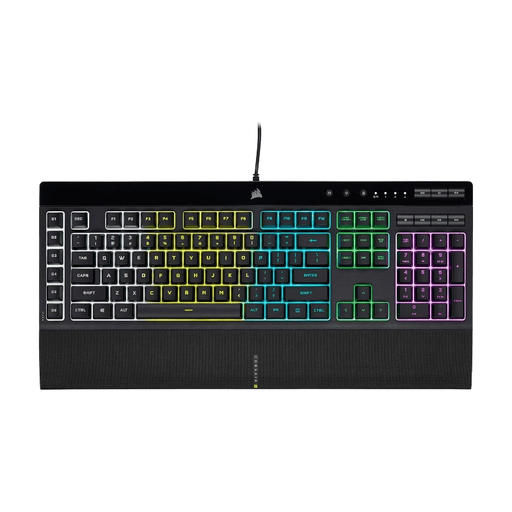
The full-size K55 CORE is a membrane model for anyone who wants to keep a number pad.
The Ornata V3 X is a low-profile membrane model for anyone who prefers membrane switches to mechanical ones.
The V6 Max is worth considering if you’re looking for a full-size mechanical keyboard with customisable keys.
The G515 range includes low-profile TKL versions, both wired and wireless.
This selection includes wired and wireless models, with both TKL layouts and keyboards with a number pad. Check the layout and connections included with each version.
 No image available
An option to compare if you want a TKL layout and can do without a number pad.
Wired USB connection; membrane keys; anti-ghosting for up to 10 simultaneous key presses; media keys. The product name lists PC/PS5 and QWERTY.
 No image available
A TKL option to compare if you can do without a number pad and want membrane keys described as quiet.
Wired USB connection; the product information lists membrane switches, 12-key rollover, key remapping and media keys. The TKL layout has no number pad.
 No image available
An option to compare if you want to keep a number pad in a more compact layout and customise keys.
The product information lists a 96% layout with a number pad, hot-swappable switches, programmable G keys, and wireless and wired connection options.
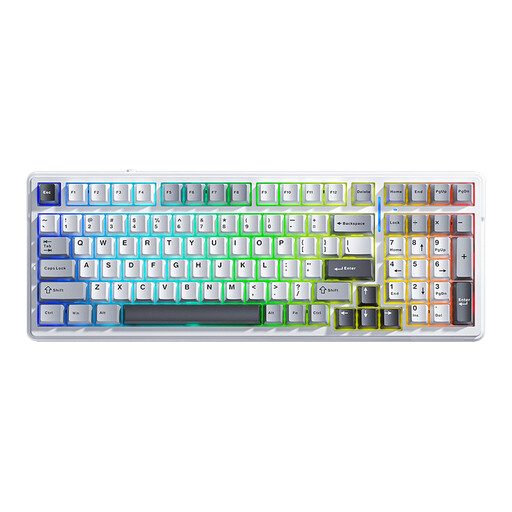 No image available
An option to compare if you want to switch between multiple connections; the product description describes the keystrokes as soft and quiet.
The product information lists Bluetooth, 2.4 GHz and wired USB-C, a gasket design and 99 keys. The noise description is a product claim, not an independent measurement.
 No image available
An option to compare if you want a full-size keyboard with a number pad and programmable macro keys.
The product information lists membrane keys described as quiet, six macro keys, media controls, anti-ghosting, a wired USB connection and a detachable wrist rest.
No, it’s not a general requirement for this type of gaming. RTINGS.com mainly links the benefits of adjustable magnetic switches to fast-paced competitive games, so start with the layout and controls you need.
First, check whether the exact version supports key remapping. Keychron lists configuration via Keychron Launcher for the V6 Max; Logitech describes customisation of the wired G515 TKL using G HUB. Also check which commands the game itself supports.
For an online purchase in the Netherlands, ACM ConsuWijzer says you generally have 14 days from the day after delivery to change your mind, without giving a reason. Exceptions and the rules on trying out and returning products still apply.
No. ACM ConsuWijzer distinguishes between a manufacturer’s or seller’s warranty and your statutory rights. If a product breaks sooner than you could reasonably expect during normal use, the seller is responsible for providing an appropriate solution free of charge; there isn’t one fixed statutory warranty period in the Netherlands that applies to every keyboard.