
Vandaag of morgen in huis

Kwaliteit gegarandeerd

Welkomstaanbiedingen ontgrendelen: GRATIS bezorging | Tot 80% korting | Gratis 30 dagen JoyPlus-proefperiode
Download de app
A good gaming keyboard can be the difference between victory and defeat, but the market is flooded with options. Manufacturers promise everything from millisecond-faster response times to unprecedented durability. How do you know what really matters and what's just marketing hype? Whether you're upgrading your gaming laptop or building the core of your new PC gaming setup, it's easy to fall into a few common traps.
As a Joybuy Product Recommendation Officer, I'm here to help you cut through the noise. We'll focus on the specifications that truly matter, ensuring you choose a keyboard that fits your needs without paying for features you won't use.
Before we get to the recommendations, it's important to recognise the most common purchasing mistakes.
To avoid the pitfalls above, focus on these three objective features.
The switch is the mechanism under each key. The choice is personal, but the technology behind it is objective.
The size of your keyboard determines its functionality and the space it takes up on your desk.
Below are some products that score well based on their specifications, matched to different user profiles.
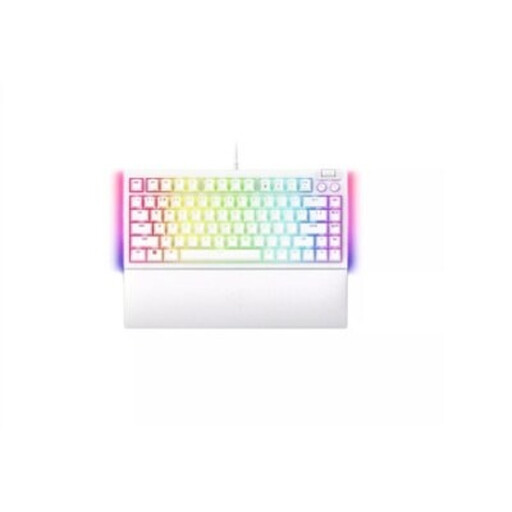
Why This Fits Their Persona: This keyboard is ideal for those who want to build an aesthetically pleasing yet functional white gaming setup. The 75% layout strikes an excellent balance between a compact form factor and retaining essential keys.
It bypasses the 'wrong switch choice' pitfall. Because it's a hot-swappable keyboard, you can easily replace the included switches with others (3- or 5-pin) if they don't suit your preference, without needing to buy a whole new board.
The combination of a compact 75% form factor, hot-swappable functionality, and the renowned Razer Chroma RGB lighting makes it a highly customisable and stylish part of your PC gaming accessories.
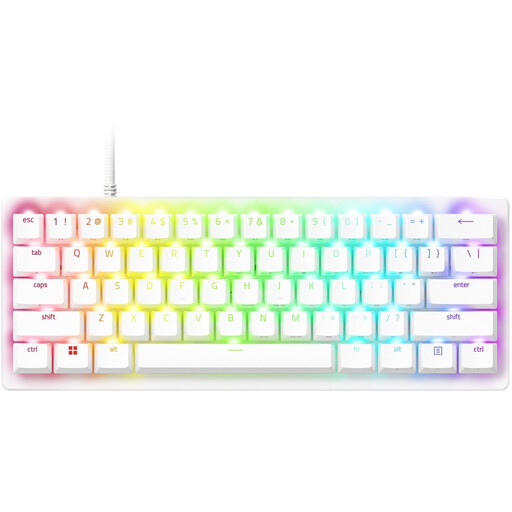
Why This Fits Their Persona: For gamers where every millisecond counts. This 60% compact gaming keyboard maximises desk space for wide mouse sweeps and is designed for pure speed.
This Razer keyboard bypasses the 'gaming marketing trap' by offering a tangible performance feature. According to Razer, its analog optical switches provide adjustable actuation, meaning you can customise how deeply a key must be pressed to register.
Its key advantages are the adjustable optical switches for extremely fast inputs and the ultra-compact 60% form factor, ideal for a competitive playstyle and easy portability.
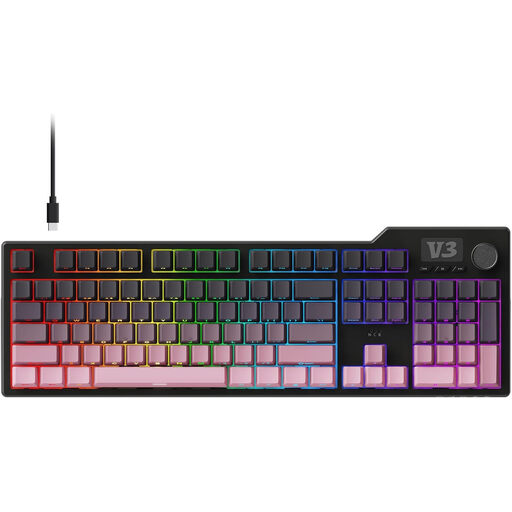
Why This Fits Their Persona: Perfect for those who want a single keyboard for both productivity and gaming. The full layout, complete with a number pad and multimedia controls, makes it a workhorse for any task.
This model avoids the 'impractical layout' pitfall. Instead of sacrificing functionality for a minimalist look, it offers a complete 104-key layout. You don't have to compromise on your daily tasks.
The 'gasket mount' construction, where the plate holding the switches 'floats' within the case, provides a quieter and softer typing experience. It's also a hot-swappable keyboard, which adds extra flexibility.
We have compiled a complete, up-to-date list of products that meet these strict selection criteria and comply with current regulations.
For most people buying their first mechanical keyboard, it isn't a strict necessity. But if you enjoy experimenting with your typing experience or plan to customise your setup in the future, it's an invaluable feature. It allows you to replace switches you don't like or use different types for different keys without having to purchase an entirely new keyboard.
Regular maintenance extends its lifespan. Always unplug the keyboard before you begin. Use a small brush or compressed air to remove dust and crumbs from between the keys. For a deep clean, you can use a keycap puller to remove the keycaps. The keycaps themselves can be cleaned with a slightly damp cloth. Be cautious with cleaning agents, especially on keyboards with a special coating or transparent materials.
Usually, yes. Manufacturers often provide their own software to manage lighting effects, macros, and other settings. However, some keyboards also offer the ability to adjust basic lighting effects directly via key combinations. This is useful if you prefer not to install extra software or if you use the keyboard on multiple computers.
