
Vandaag of morgen in huis

Kwaliteit gegarandeerd

Welkomstaanbiedingen ontgrendelen: GRATIS bezorging | Tot 80% korting | Gratis 30 dagen JoyPlus-proefperiode
Download de app
Buying a gaming keyboard seems simple until you have to choose between mechanical switches, a compact size, wireless connectivity and different layouts. Marketing terms such as “fast response” or “waterproof” also do not always tell you what you actually need in practice.
The biggest buying mistakes usually come down to three misunderstandings:
The layout determines how much desk space you save and which keys are immediately available.
Also pay attention to QWERTY US. A US layout uses an ANSI layout and has different symbols and a different Enter key from a Dutch ISO layout. This is relevant for punctuation, programming and touch typing. Also check whether the product page states “US International” or just “US”.
A mechanical gaming keyboard uses individual switches beneath the keycaps. Linear switches feel smooth and consistent, tactile switches provide a noticeable bump, and clicky switches are generally louder. A membrane model may be quieter and more affordable, but usually offers fewer options for replacing switches.
A hot-swappable keyboard has sockets that allow compatible 3- or 5-pin switches to be replaced without soldering. However, check that the new switches are electrically and physically compatible. For example, the AJAZZ AK820 models state support for 3- and 5-pin switches.
With a Hall Effect gaming keyboard, the key position is measured magnetically. Models with a rapid trigger can, according to the product description, adjust the actuation and reset point through software. Redragon states that the M68 offers an adjustable actuation range of 0.2 to 4.0 mm and supports Rapid Trigger. Treat this as a technical feature, not a guarantee of better gaming performance. According to Redragon’s own product information, the model is aimed at fast-paced FPS games.
A USB connection is straightforward and does not require a battery or wireless receiver. A wireless gaming keyboard may work via Bluetooth, 2.4 GHz or both. Bluetooth is useful for laptops, tablets and multiple devices; 2.4 GHz is particularly practical for a fixed desktop setup. Check whether the receiver is included and how the keyboard is charged.
For a keyboard for PC and Mac, you should look beyond the operating system. Also check whether the software for lighting, macros or key customisation works on macOS. Some models list Windows and Mac as compatible, but may offer more extensive configuration on Windows.
Terms such as “waterproof” require extra attention. The MageGee TS91 states that it has an IPX4-certified circuit board, but the product information also warns that the connection is not waterproof. Do not take this as permission to submerge the keyboard. If you spill something, disconnect the device immediately and allow it to dry completely.
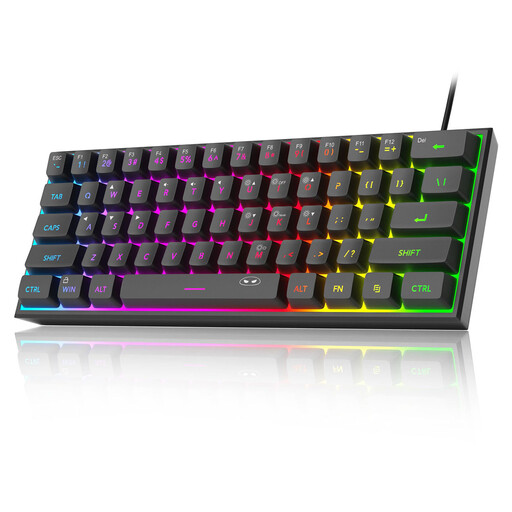
Why it suits this profile: This compact model is designed for users with limited desk space who want a simple USB connection. The product information states that it has a 60% layout with 61 keys, RGB lighting and compatibility with Windows and Mac.
The product information explicitly states that it uses membrane technology with a mechanical feel. You therefore know that you are not buying a mechanical model by mistake.
61 keys, USB connection and adjustable RGB lighting. The case measures approximately 29.2 × 10.1 × 3.8 cm.
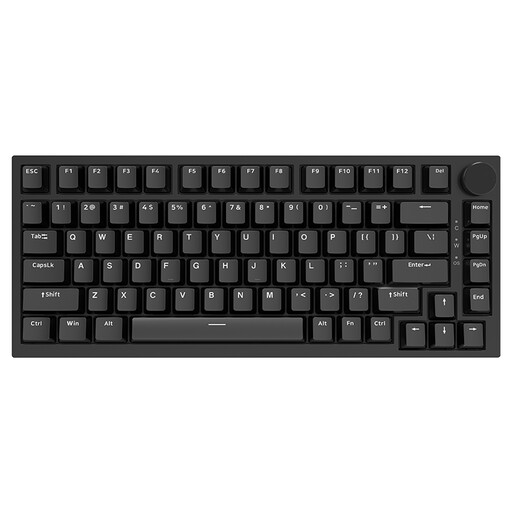
Why it suits this profile: The 75% layout combines a compact size with arrow keys, function keys and a volume knob. This makes the model suitable for gaming, typing and programming.
The layout means you do not lose too many functions in everyday use. Thanks to hot-swap support, you can replace compatible switches later.
PBT keycaps, gasket construction, volume knob, USB-C and support for 3- and 5-pin switches.
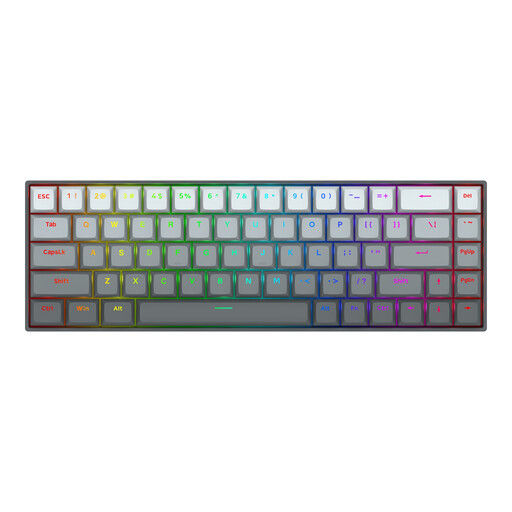
Why it suits this profile: Players who want to adjust key actuation get a 68-key model with Hall Effect switches and Rapid Trigger settings, according to the product description.
The technical features are clearly specified: adjustable actuation from 0.2 to 4.0 mm and a stated polling rate of 8000 Hz. However, check the software and system requirements.
Linear magnetic switches, aluminium top plate, 68 keys, RGB and detachable USB-C cable.
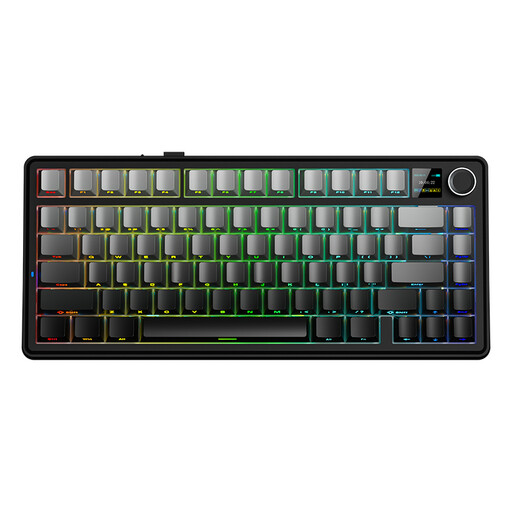
Why it suits this profile: This model is suited to users who want to switch between a PC, laptop and other devices. The product name states QWERTY US and three connection modes: USB, Bluetooth and 2.4 GHz.
You are not limited to a single connection method. For a stable connection, you can use USB; for a tidy workspace, Bluetooth or 2.4 GHz are available.
75% size, mechanical design, RGB lighting and tri-mode connectivity. Check the included receiver and software support before buying.
We have put together a complete, up-to-date list of products that fully meet these strict selection criteria and the applicable European safety regulations.
It can be, but pay attention to the type of switch and the noise level. Linear switches are often smooth and consistent; clicky switches can be noticeably loud in a shared working environment. A gasket construction and dampening layers can affect typing noise, but they do not make a keyboard silent.
A 60% model can be useful for gaming and small desks. However, you will usually be missing a separate numeric keypad, function row and sometimes arrow keys. For extensive Excel work, programming or quick navigation, a 75% or TKL model is often more practical.
Power consumption mainly depends on the battery, connection method and lighting. RGB typically uses more energy than switched-off lighting. So check the stated battery capacity and runtime, and confirm whether the keyboard can be charged via USB while in use.
