
Vandaag of morgen in huis

Kwaliteit gegarandeerd

Welkomstaanbiedingen ontgrendelen: GRATIS bezorging | Tot 80% korting | Gratis 30 dagen JoyPlus-proefperiode
Download de app
Buying a gaming keyboard sounds simple until you have to choose between mechanical, membrane, wireless, 60%, TKL or full-size. Marketing copy often focuses on RGB lighting, a high polling rate or a long lifespan. In practice, it is the layout, connection and type of switch that determine whether a keyboard works well for your needs.
Joybuy Product Recommendation Officer helps you check the key differences before you place your order. This helps you avoid ending up with a compact model that has too few keys, a wireless keyboard that is incompatible with your devices or a mechanical model that is too loud for a shared space.
A 60% keyboard usually has 61 keys and leaves out the numeric keypad, function row and separate arrow keys, among others. These functions are often accessed using Fn combinations. This saves space for your mouse, but it takes some getting used to.
A 65% keyboard usually adds arrow keys. A 75% keyboard often also includes a function row in a compact case. If you enter a lot of numbers, for example for studying, administration or work, it may be better to choose a keyboard with a numeric keypad. Always check the exact key layout, as percentages are not identical across all brands.
Not every keyboard with a firm keystroke is mechanical. According to the product description, the MageGee TS91 uses a membrane construction with “mechanical feeling”. This is different from a mechanical gaming keyboard with individual switches.
With a genuine mechanical model, you can often choose between linear, tactile or clicky switches. Linear switches generally feel smooth and consistent. Clicky switches produce a clearly audible click. For a shared workspace or evening use, a quiet keyboard with scissor or silent linear switches may be more practical.
A high polling rate means that the keyboard can send data to the computer more frequently. This is not automatically noticeable in every game. On a model with Hall Effect switches, adjustable actuation and rapid trigger can be relevant for players who want to set precisely when a key registers.
Pay attention to the source of such claims. According to Redragon’s own information, the M68 supports an 8000 Hz polling rate, adjustable actuation from 0,2 to 4,0 mm and rapid trigger. These are product specifications, not a guarantee of better gaming results. Also check whether the required software works with your operating system.
Choose based on how you use your keyboard every day:
Also check whether you need a US QWERTY keyboard, US International or a Dutch layout. The position of Enter, Shift and punctuation marks, among other keys, may differ. The wrong layout is a practical annoyance that RGB lighting cannot solve.
A membrane keyboard is often low-profile, simple and relatively quiet. Mechanical switches offer more choice in feel and may be hot-swappable. With a hot-swappable keyboard, you can replace compatible switches without soldering. Check whether the board supports 3-pin or 5-pin switches.
Optical switches and Hall Effect switches work differently from traditional mechanical switches. On Hall Effect models, the key position is measured magnetically. According to manufacturer information from Redragon and AULA, this can be combined with adjustable actuation and rapid trigger. Use this information as a technical comparison, not as a fixed promise about performance.
A wired keyboard does not require a battery and can be used directly via USB. This is convenient for a fixed PC setup. A wireless keyboard may work via Bluetooth, a USB receiver or both. Check how many devices can be paired at the same time and how you switch between devices.
“Waterproof” and “spill-resistant” do not mean the same thing. The MageGee TS91 lists an IPX4-certified PCB, while the interface is not waterproof according to the safety information. If you spill liquid, disconnect the cable immediately, allow the keyboard to dry and do not submerge it. A spill-resistant Logitech K120 or Trust Ody II is also not designed to be rinsed with liquid.
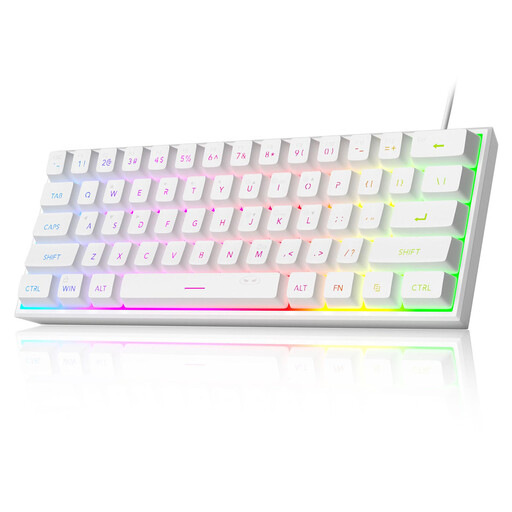
Why it suits this profile: This compact wired model has 61 keys, a US QWERTY layout and RGB lighting. It is well suited to a first gaming setup where desk space is limited.
The product information makes it clear that this is a membrane keyboard with a mechanical feel, not a fully mechanical model. It also distinguishes spill resistance from waterproofing.
61 keys, USB plug-and-play, adjustable RGB modes and an IPX4 rating listed for the PCB.
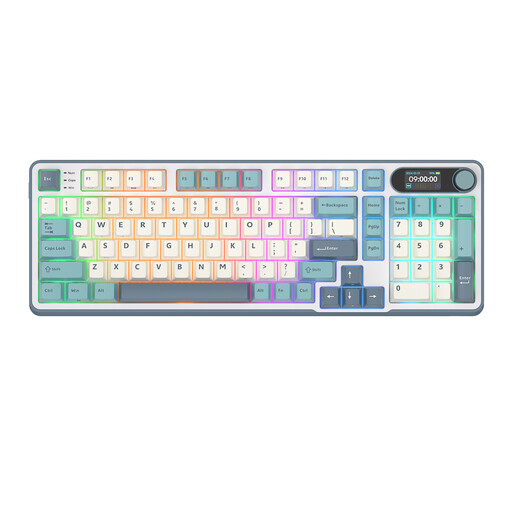
Why it suits this profile: The 98% layout retains almost all the functions of a full-size model, including a numeric keypad and an additional control knob. The tri-mode connection is well suited to use with multiple devices.
Choosing a more compact board does not automatically mean giving up the numeric keypad. However, check the software and layout support in advance.
98 keys, hot-swappable design, RGB lighting, Bluetooth, 2,4 GHz and USB-C.
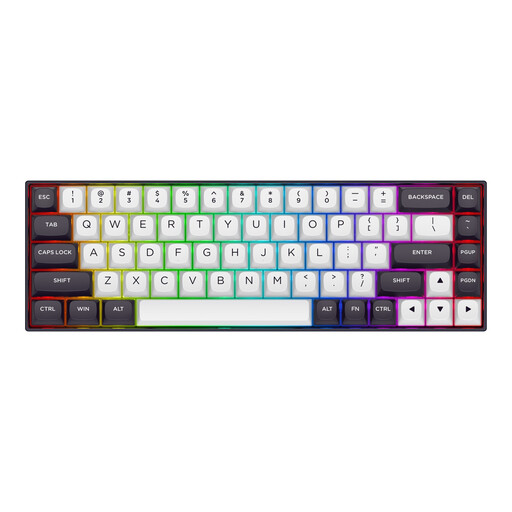
Why it suits this profile: According to the manufacturer, this 65% model with 68 keys is aimed at competitive PC gaming. Hall Effect switches, adjustable actuation and rapid trigger are relevant for users who genuinely want to configure these features.
The technical claims are linked to specific values: 0,2–4,0 mm actuation and a stated polling rate of 8000 Hz. Before buying, check that the software settings are compatible with your system.
65% layout, magnetic linear switches, rapid trigger, RGB and detachable USB-C cable.
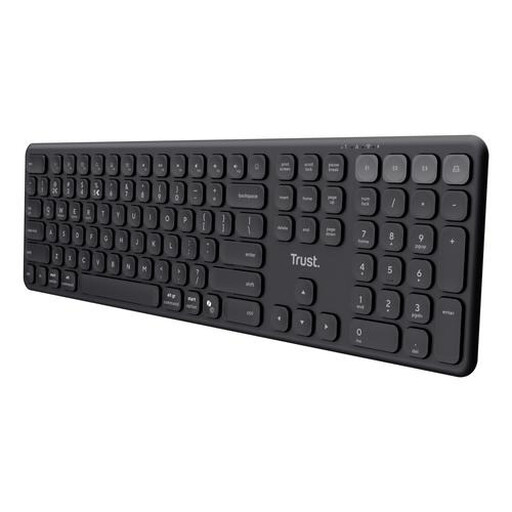
Why it suits this profile: The full-size US QWERTY layout, quiet scissor keys and support for four devices are well suited to working with a laptop, tablet and smartphone.
The product description clearly states that this is not a mechanical gaming keyboard and does not have lighting or programmable keys. This means you know exactly what you are buying.
Four connection channels, USB-C rechargeable battery, numeric keypad and quiet keys.
We have put together a complete, up-to-date list of products that fully meet these strict selection criteria and the applicable European safety regulations.
Not necessarily. A mechanical model offers a choice of different switches and may be hot-swappable. A membrane keyboard is often quieter and may be sufficient for casual gaming and office work. Consider the feel, noise level, layout and features you will actually use.
That depends on the connection and the model. A wireless keyboard using a USB receiver may be suitable for a fixed PC setup, while Bluetooth is especially practical for multiple devices. For maximum simplicity and consistent power, a wired keyboard remains a clear choice.
Its lifespan depends on usage, construction, switches and maintenance. Manufacturers sometimes specify a particular number of keystrokes, but this is a stated product specification, not a guarantee for every user. Keep the board free from dust, avoid liquids and do not pull the USB cable unnecessarily tight. With hot-swappable models, you can replace compatible switches later, which can make maintenance easier.
