
Vandaag of morgen in huis

Kwaliteit gegarandeerd

Welkomstaanbiedingen ontgrendelen: GRATIS bezorging | Tot 80% korting | Gratis 30 dagen JoyPlus-proefperiode
Download de app
Buying a gaming keyboard seems straightforward until you have to choose between mechanical, membrane, wireless, 60%, 65% or 75%. Marketing often focuses on RGB lighting, extremely short response times and high polling rates. Yet it is mainly the layout, switch type and connection that determine whether a keyboard works well for your needs.
Also watch out for these common pitfalls:
The size determines how much room you have left for your mouse and which keys are available.
A compact gaming keyboard is therefore not necessarily more convenient. If you often work with numbers, a full-size model may be the better choice. If you mainly play shooters, you may appreciate the extra mouse space offered by a 60%, 65% or TKL model.
A mechanical gaming keyboard uses individual switches beneath the keycaps. Linear switches usually provide a consistent keystroke without a tactile click. Clicky switches, on the other hand, produce a distinct click and can be disruptive in a shared space.
Pay attention to the difference between:
A hot-swappable keyboard may be appealing if you want to replace the switches later without soldering. However, check whether 3-pin or 5-pin switches are supported. The AJAZZ AK820’s product information states that both types are supported.
A wired keyboard connects via USB and does not need a battery. For a fixed desktop setup, this is simple and predictable. A wireless keyboard offers greater flexibility, but check the connection method, battery life and charging requirements.
The following points are also useful to consider:
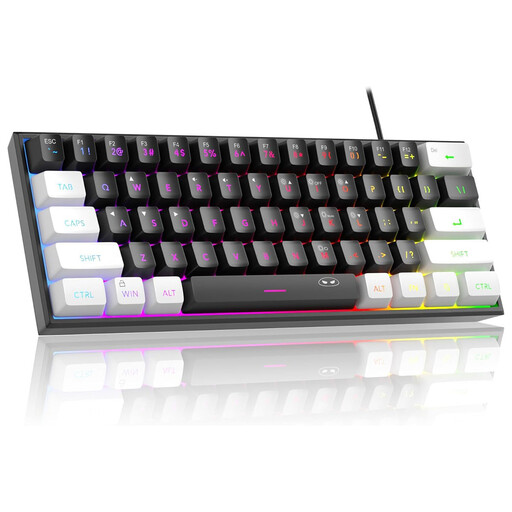
Why it suits this profile: This wired 60% model is aimed at users looking for a small keyboard with RGB lighting for gaming, home use and office work. The product information describes a membrane design with a mechanical feel.
The specifications make it clear that this is a membrane keyboard. Do not expect individual mechanical switches or a hot-swappable construction.
61 keys, a wired USB connection, RGB lighting and a compact design. The manufacturer states that the circuit board has IPX4 protection; the connection itself is not waterproof.

Why it suits this profile: For anyone who wants to combine a mechanical gaming keyboard with a compact layout, PBT keycaps and direct volume control.
The 75% layout retains more functions than a 60% model. The product specifications also mention a wired Type-C connection and a hot-swappable 3/5-pin PCB.
82 keys, a CNC volume knob, PBT keycaps, gasket construction and, according to the manufacturer, multiple sound-dampening layers.
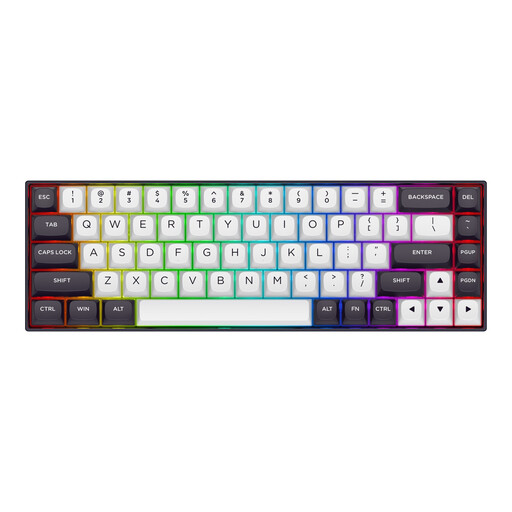
Why it suits this profile: According to the product information, this 65% model is designed for competitive PC games such as Valorant, CS2 and Apex Legends, with Hall Effect technology.
The product description explicitly mentions Hall Effect magnetic switches, an adjustable actuation point from 0,2 to 4,0 mm and Rapid Trigger. Before buying, check whether you want to use these features in the software.
68 keys, an aluminium top plate, RGB lighting, a detachable Type-C cable and, according to the manufacturer, an 8000 Hz polling rate.
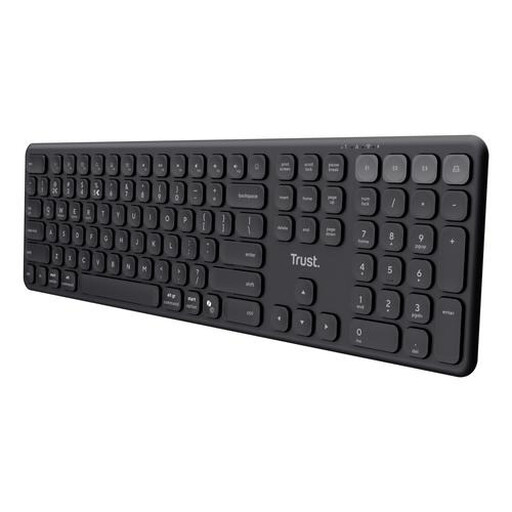
Why it suits this profile: The full-size layout with numeric keypad and quiet scissor keys is well suited to work, spreadsheets and switching between a laptop, tablet and smartphone.
The product information clearly states that this is neither a mechanical keyboard nor an RGB model. You therefore do not pay for features you will not use.
Connection via USB receiver and three Bluetooth channels, a rechargeable battery and a range of up to 8 metres according to Trust.
Choose a wired keyboard if you use a fixed desktop PC, do not want to charge a battery and do not mind cable management. A wireless keyboard is more convenient when using multiple devices or keeping your desk tidy. With wireless models, check whether they support Bluetooth, a USB receiver or both.
For streamers, a volume knob or dedicated media key can be useful. For office professionals, noise levels are often more important than RGB. For esports players, layout, stability and the ability to adjust the actuation point are more relevant than appearance alone.
We have put together a complete, up-to-date list of products that fully meet these strict selection criteria and the applicable European safety regulations.
Not necessarily. The noise level depends on the switch type, keycaps, case and any sound dampening. Linear switches are generally quieter than clicky switches, but a membrane keyboard or scissor model may be better suited to a quiet working environment.
It can be, but you will need to get used to using Fn combinations for functions that do not have a dedicated key. For lots of typing, programming or spreadsheets, a 65%, 75% or TKL keyboard may be more practical. Also check that the QWERTY US layout suits the way you use it.
Lifespan varies depending on the switches, case, usage and maintenance. Manufacturers sometimes quote a specific number of keystrokes, but this is a product specification rather than a guarantee for every user. Keep the keyboard dry, do not pull the USB cable forcefully from the connection and unplug it before cleaning.
