What should you look for?
Start with the shortcuts you actually use. Then decide which keys you want within easy reach, and only then compare noise levels and extra gaming features.
| What to consider |
What should you check? |
Which consumers? |
| Replay controls |
Check your replay software’s shortcuts and whether the keys you need are within easy reach. |
I want to play, rewind or mark clips quickly while watching a replay. Around 36% of consumers prioritise replay controls. |
| Typing noise |
Compare the exact switch variant and, if possible, how it sounds through your own microphone. |
I use a headset microphone and want to avoid mistaking a noise claim for a result in my own setup. Around 29% of consumers prioritise quiet use with a headset. |
| Size and keys |
Check whether it has arrow keys, a function row and the navigation keys you need, or whether they’re accessed through an Fn layer. |
I want to save desk space but keep the keys I use often for navigating replays. Around 21% of consumers prioritise desk space. |
| Adjustable actuation |
Check whether you’ll use this feature while gaming and whether the exact model supports it. |
I play fast-paced competitive games and want to customise my key settings; I don’t need this just to watch replays. Around 14% of consumers prioritise adjustable gaming input. |
Gaming keyboards on Joybuy
This selection of Joybuy products includes TKL and more compact layouts with media controls; some models also list sound-dampening features. Check the layout, connection and available features for each version.
 No image available
GXTrust Thado TKL wired gaming keyboard
The TKL layout and media keys may suit you if you can do without a number pad and want to control media from your keyboard.
Wired USB connection; media keys for volume and playback. The product name lists QWERTY.
Joybuy
 No image available
Corsair K55 CORE TKL, US QWERTY
This TKL model may suit you if you’re comparing a compact layout, media controls and membrane switches for use with a headset.
The product description lists quiet membrane switches and four dedicated media keys. Check how it sounds with your own microphone setup, too.
Joybuy
 No image available
Corsair K70 CORE TKL, BE AZERTY, MLX Red
The TKL layout and media dial may suit you if you want media controls on your keyboard and are looking for a BE AZERTY layout.
The product description lists USB-C, a dial with programmable media controls and sound-dampening foam layers.
Joybuy
 No image available
Ajazz AK820 Pro 75%, US QWERTY, grey
The 75% layout with arrow keys and function keys may suit you if you want a more compact keyboard but still want to keep those keys.
The product name lists tri-mode connectivity, gasket mount, TFT display, hot-swappable switches and Flying Fish Switch. The description mentions a dial for volume and media, plus sound-dampening foam layers.
Joybuy
 No image available
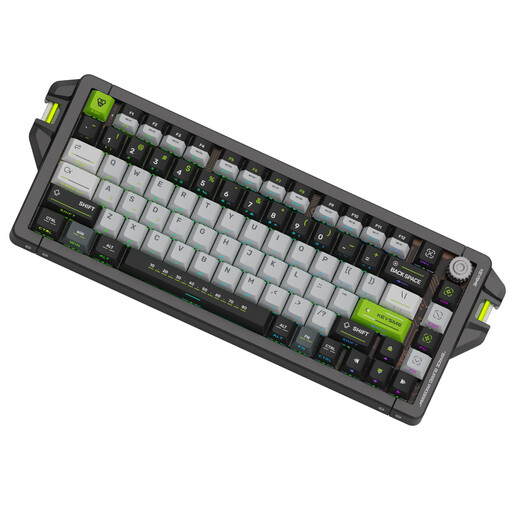
KEYSME AHD-HCKR-C 75%, US QWERTY, Magnetic Jade Switch Pro
This model may suit you if you play competitively as well as analysing replays and want adjustable key actuation.
The product name lists a 0,1–4,0 mm trigger range, an 8 kHz polling rate and PBT dye-sub keycaps. The description mentions an 82-key layout and dials; these gaming settings aren’t necessary for watching replays.
Joybuy
Frequently asked questions
Do I need special keys to watch a competitive replay in Steam?
Not necessarily. Steam lets you adjust settings such as shortcuts and audio recording options. First decide which actions you want to perform using the keyboard, then check whether the layout keeps those keys within easy reach.
How can I stop replay controls from interfering with my gaming shortcuts?
Check your replay software’s shortcut settings and change them where possible. Steam offers shortcut settings; once you’ve made your changes, test both the replay controls and the game.
Do ‘silent switches’ mean my headset microphone won’t pick up the keys?
No. A manufacturer’s description of silent switches or sound-dampening features isn’t a measure of how your microphone setup will perform. Compare the exact version and, if possible, test how it sounds with your own microphone.
What can I do if my keyboard develops a fault?
When you buy as a consumer in the Netherlands, you’re entitled to a product that meets the required standards. According to Business.gov.nl, the Dutch government, the statutory guarantee doesn’t have a fixed term of exactly two years; what you can expect depends on factors including the product. An additional manufacturer’s warranty doesn’t replace your statutory rights.
Can I return a keyboard bought online to check the layout?
For most online consumer purchases in the Netherlands, you generally have a statutory 14-day cooling-off period starting the day after you receive the product, according to Business.gov.nl, the Dutch government. Exceptions may apply, so check the information about return costs in advance and handle the product with care.


