
Vandaag of morgen in huis

Kwaliteit gegarandeerd

Welkomstaanbiedingen ontgrendelen: GRATIS bezorging | Tot 80% korting | Gratis 30 dagen JoyPlus-proefperiode
Download de app
A gaming keyboard needs to do more than look good. You want reliable keys, a layout that suits your desk and a connection that won’t cause hassle while gaming or working. Yet product pages are often packed with terms such as RGB, Rapid Trigger and mechanical feel, without making it clear what they actually mean in practice.
As a Joybuy Product Recommendation Officer, I therefore focus mainly on verifiable specifications. Below, you’ll discover what to look for, which common pitfalls are often overlooked and which type of gaming keyboard suits different users.
An RGB keyboard with 16.8 million colours and multiple lighting effects can make your desk look more appealing. However, the lighting says nothing about key feel, response speed or key durability. Think of RGB as an additional feature, not a reason to choose a particular model.
Also check whether the lighting can be configured per key, works via keyboard shortcuts or requires software. This determines how much control you actually have.
Some affordable keyboards use membrane technology with a mechanical feel. This can be pleasant for typing, but it is different from a mechanical gaming keyboard with individual switches. With a mechanical model, you can compare the switch type, such as linear, tactile or clicky.
A red linear switch type, such as the one used in the RK ROYAL KLUDGE RK61, is generally designed to provide a smooth keystroke without a distinct tactile bump. According to MageGee’s product information, the TS91, by contrast, uses a membrane construction with mechanical feel. So read the technical description carefully.
A 60% keyboard saves a great deal of space, but usually has no dedicated arrow keys, function row or number pad. These functions are often available through Fn combinations. This works well for many gamers, but can be less practical for spreadsheets, keyboard shortcuts and everyday office work.
A 75% keyboard usually retains the arrow keys and a function row. A TKL gaming keyboard leaves out the number pad but retains most of the other keys. So choose based on how you plan to use it, not just on its appearance.
The layout has a direct impact on your available workspace and typing style:
With a keyboard featuring a US QWERTY layout, look out for the different positioning of symbols and the smaller Enter key. A US International layout can work perfectly well on Windows and Mac, but check your operating system’s language settings. An AZERTY model, such as the Turtle Beach Vulcan listed, is better suited to users who specifically type with AZERTY.
The following features are relevant when choosing a mechanical gaming keyboard:
With Hall Effect models, you should check which functions are actually supported by the software and connected device. The AULA WIN60HE and Corsair K70 PRO TKL are listed in the product information as featuring Hall Effect technology, adjustable actuation and Rapid Trigger. These functions are particularly interesting for competitive PC gaming, but they do not automatically make a keyboard suitable for every user.
A wired keyboard does not have a battery and can be used immediately via USB. A wireless gaming keyboard keeps your desk tidy and can be convenient for use with multiple devices, but you need to consider battery capacity, charging method and connection type.
A tri-mode keyboard usually combines USB, Bluetooth and 2.4 GHz wireless. Bluetooth is useful for laptops, tablets and phones; for gaming, 2.4 GHz is often the more practical wireless connection. Also check whether Windows, macOS, iPadOS, consoles or Android are officially listed as supported.
A hot-swappable keyboard allows you to replace compatible switches without soldering. Check whether the board supports 3-pin, 5-pin or both types. Hot-swap does not mean that every switch will automatically fit.
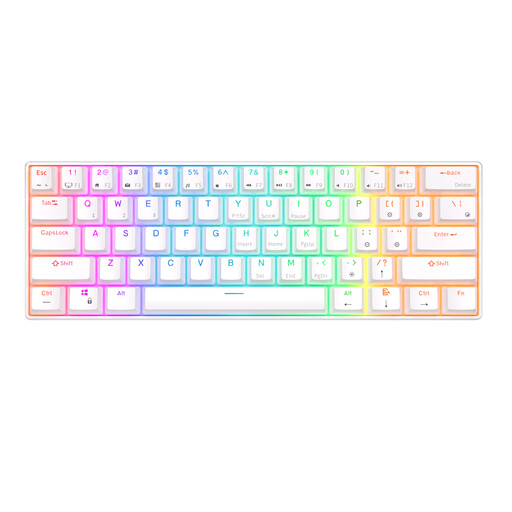
Why it suits this profile: The 61-key layout takes up very little space and combines Bluetooth with a detachable USB cable. According to the product information, the model works with Windows, iOS and Android.
The product listing explicitly mentions a mechanical switch type, hot-swap functionality and a 60% layout. However, check that the lack of arrow keys suits the way you plan to use it.
61 keys, RGB lighting, Bluetooth for up to three devices and a built-in 1450 mAh battery, according to the product information.
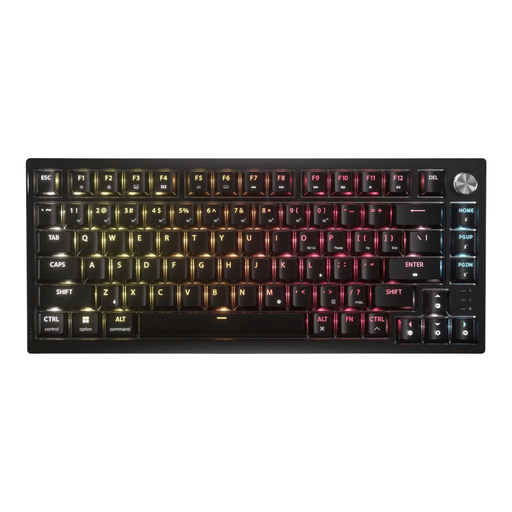
Why it suits this profile: This 75% model is designed for users who want a compact keyboard without giving up the function keys and arrow keys. The US ANSI version uses PBT double-shot keycaps, according to Corsair’s product information.
The specifications list three connection options and a hot-swappable PCB. This means you are less dependent on a single connection or fixed switch type.
2.4 GHz, Bluetooth and USB; per-key RGB; rotary dial; Windows and macOS support; and a stated battery life of up to 266 hours with RGB enabled.
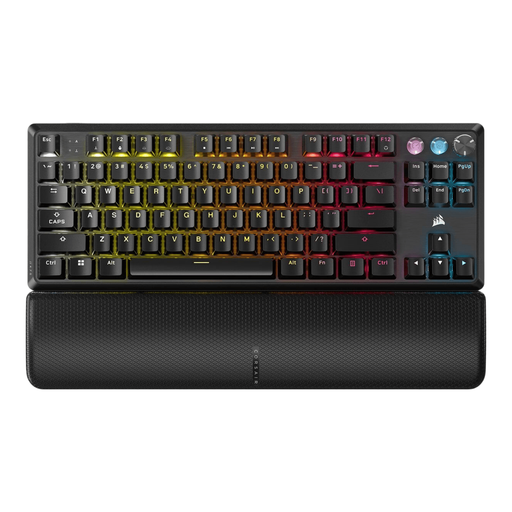
Why it suits this profile: According to Corsair’s product information, this wired TKL model is aimed at users who want to combine adjustable actuation, Rapid Trigger and a polling rate of up to 8000 Hz with a conventional keyboard layout.
The Hall Effect features are specified in concrete terms: actuation from 0.1 to 4.0 mm in 0.1 mm increments and a separate Game Mode. Check beforehand that your games and software support these functions.
TKL format, magnetic switches, Rapid Trigger, per-key RGB, a volume dial and a detachable wrist rest, according to the stated product specifications.
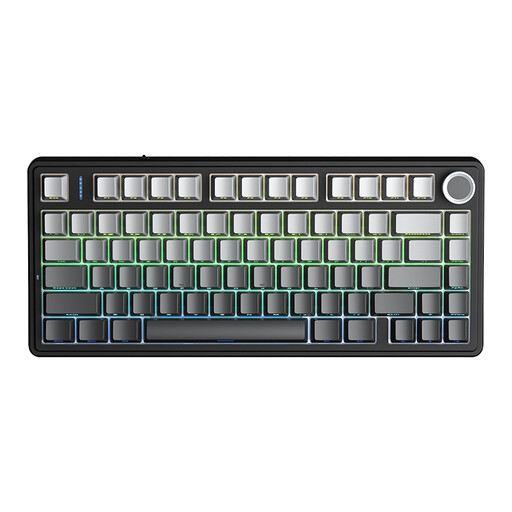
Why it suits this profile: The 75% layout keeps the arrow keys and function keys within easy reach. The tri-mode connection is suitable for switching between a PC, laptop and mobile devices.
The product information lists USB, Bluetooth and 2.4 GHz, as well as hot-swap support for 3- or 5-pin switches. This clearly sets out the key connection and customisation options.
81 keys, 4000mAh battery, RGB lighting, programmable rotary dial and multiple connection modes, according to the product listing.
Use this quick checklist:
We’ve put together a complete, up-to-date list of products that fully meet these strict selection criteria and the applicable European safety regulations.
Yes, but pay attention to the switch type and noise level. Linear or silent switches generally produce less noticeable clicking than clicky switches. A low-profile design or wrist rest can also be comfortable during longer typing sessions.
Its lifespan depends on the switch type, usage, maintenance and exposure to dust or liquids. Manufacturers sometimes state a number of keystrokes, but this is a product specification measured under certain conditions and is not a guarantee for every user. Cleaning the keyboard regularly and keeping liquids away helps prevent unnecessary wear.
Power consumption is usually limited, but RGB lighting uses more energy than a switched-off backlight. With a wireless model, battery capacity, brightness and connection type determine how often it needs charging. A keyboard with a USB connection remains usable when the battery is empty, provided that wired mode is supported.
