
Vandaag of morgen in huis

Kwaliteit gegarandeerd

Welkomstaanbiedingen ontgrendelen: GRATIS bezorging | Tot 80% korting | Gratis 30 dagen JoyPlus-proefperiode
Download de app
Buying a gaming keyboard seems straightforward, until you discover that a compact model has no arrow keys, a wireless keyboard responds differently than you expected or “mechanical feel” doesn’t mean it has mechanical switches at all. So, whether you’re a gamer, working from home or programming, your choice isn’t just about RGB lighting.
The main pitfalls are:
The size determines how much desk space you have left and which keys are immediately available.
Also check whether you’re buying a US QWERTY keyboard or a QWERTZ layout. On a US QWERTY model, for example, the Z and Y keys are in different positions from those on a QWERTZ keyboard. You may notice this when typing in Dutch, programming or using keyboard shortcuts.
A mechanical gaming keyboard uses individual switches beneath the keys. Linear switches generally feel smooth and consistent, while tactile or clicky switches can provide more feedback or sound. The exact characteristics vary by switch.
A hot-swappable keyboard lets you replace compatible switches without soldering. Check whether the board supports 3-pin or 5-pin switches, and use a suitable switch puller. Magnetic Hall Effect switches, such as those found in some esports models, work differently from traditional mechanical switches. Features such as Rapid Trigger depend on the product’s hardware and software settings.
The construction is worth considering, too. A gasket mount keyboard uses flexible mounting points between the plate and case. According to the product description, this can contribute to a softer typing feel and less resonance, but the overall experience also depends on the plate material, foam, keycaps and switches.
A wireless gaming keyboard can connect via Bluetooth, a 2.4 GHz receiver or USB. A tri-mode keyboard usually supports all three. USB is handy for a permanent gaming setup and means you don’t have to charge a battery. Bluetooth is useful for a laptop, tablet or phone, but check compatibility and the keyboard layout first.
Also look out for:
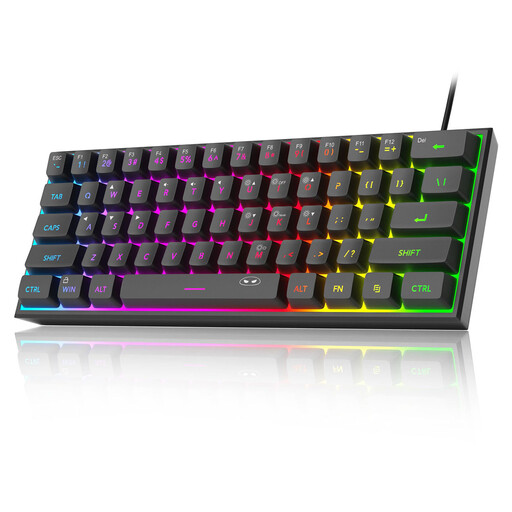
Why it suits this profile: This wired 60% model takes up little space and, according to the product information, offers plug-and-play compatibility with PCs, Macs and selected consoles. Its US QWERTY layout suits anyone who has specifically chosen this layout.
The wired connection means there’s no battery to manage. Just note that, according to the product description, it has membrane keys with a mechanical feel rather than a traditional mechanical keyboard.
61 keys, RGB lighting and a compact footprint of approximately 29,2 × 10,1 cm. The manufacturer lists an IPX4-rated PCB; the USB connection itself is not waterproof.
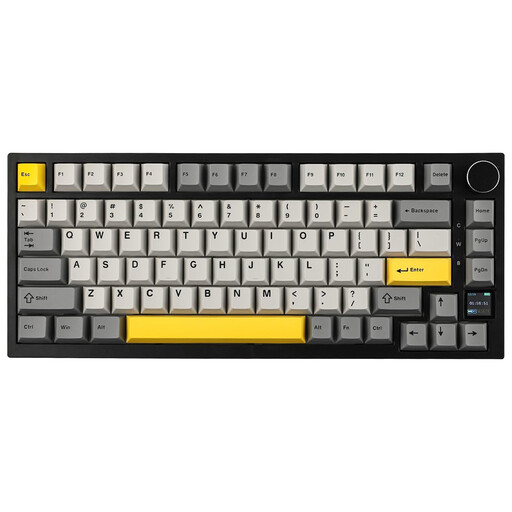
Why it suits this profile: This model combines a 75% layout with mechanical switches, wireless modes, USB-C, RGB and a TFT screen. It’s a good fit if you’re looking for one keyboard for gaming, office work and multiple devices.
The product information explicitly lists Bluetooth, 2.4 GHz and USB-C, so it’s clear which connection options are available. Do check which features work via software on your operating system.
Hot-swappable switches, a gasket mount, PBT keycaps, a metal control dial and a stated battery capacity of 4000 mAh. The manufacturer lists compatibility with Windows and macOS.
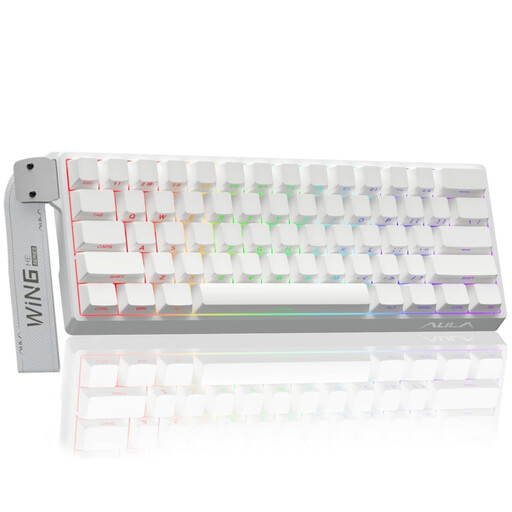
Why it suits this profile: This compact wired model is designed for players looking for features such as Hall Effect magnetic switches, Rapid Trigger and adjustable actuation. The product details list an 8K polling rate and adjustable actuation down to 0,01 mm.
The specific switch technology is clearly stated in the product name and description. It isn’t a wireless model, so you know from the outset that USB connectivity and a fixed setup are part of the choice.
60% size, RGB lighting and Hall Effect magnetic switches. The settings are particularly useful for gamers who want to adjust actuation points and register key presses quickly.
It can be, but you’ll need to get used to using Fn combinations for the arrow keys, function keys and navigation. A 60% model saves space for typing and gaming. Programmers and anyone who often uses the F keys or arrow keys may find a 75% or 80% model more practical.
No. The noise level depends on the switches, keycaps, stabilisers and case. Linear switches aren’t automatically quiet, but clicky switches generally make more clicking noise. Foam and a gasket mount can affect resonance, but they won’t make a keyboard completely silent.
As well as the purchase price, you’ll need to factor in charging and possibly software or a replacement receiver. A tri-mode keyboard offers more flexibility, while a wired model doesn’t need a built-in battery. For wireless models, check the battery capacity, stated battery life and charging method.
We’ve put together a complete, up-to-date list of products that meet these strict selection criteria and the current European safety requirements.
