Who is this guide for?

Gaming in a shared space

You play with a headset, but want to minimise the noise your keystrokes make for housemates or pick up on your microphone. Compare the exact switch variant: SteelSeries, Corsair and Logitech describe specific models as quiet or dampened, but these descriptions aren’t directly comparable sound measurements.

Gaming with lots of quick actions

You want to control spells, other commands or the volume directly, and are weighing up dedicated macro and media keys against the extra space a larger keyboard takes up. Corsair and Razer describe models with dedicated macro keys; check which version you’re choosing.

Gaming at a small desk

You want to leave room for mouse movements, so you’re considering a TKL layout without a number pad. This is a good fit if you don’t need the number pad for other tasks.

What should you consider when choosing?

Keys described as quiet

A good fit if: keystrokes in a shared room or picked up by a microphone are your main concern. SteelSeries describes the Apex 3 TKL as whisper-quiet, while Corsair describes the K55 RGB PRO as quiet.

The trade-off: these manufacturers’ terms aren’t based on a shared sound test. The compact Apex 3 TKL also has no number pad.

Compact mechanical keyboard

A good fit if: mechanical keys and extra room for your mouse matter to you. Logitech describes the wired G515 TKL as having a sound-dampening design.

The trade-off: sound dampening doesn’t guarantee silence. Also check the switch variant and whether you can manage without a number pad.

Keyboard with dedicated action keys

A good fit if: you want direct control of macros and media. The Razer BlackWidow V4 is available with six macro keys.

The trade-off: a larger keyboard needs more desk space. The sound of the BlackWidow V4 also varies by switch variant.

What to consider What should you check? Who is this important for?
Key noise Check the exact switch variant and, if sound is a deciding factor, look for a sound test of that version. If I play with a headset in a shared space, I want to minimise keystrokes that my housemates or microphone can hear. Around 33% of consumers give key noise top priority.
Actions and volume Check how many dedicated macro and media keys there are, and how to set up macros. I want to control spells or the volume directly without searching through menus during a game. Around 27% of consumers give direct control top priority.
Desk space Measure the space available and decide whether you need a number pad. If I need room for mouse movements, a compact keyboard may suit me, as long as I don’t miss the number pad. Around 20% of consumers give desk space top priority.
Connection and layout Check whether the version is wired or wireless, and which physical keyboard layout you’ll receive. I want the connection to suit my setup and the keys to be where I expect them. Around 20% of consumers give connection and layout top priority.

Common buying mistakes

  • Assuming ‘quiet’ means a measured comparison

    Manufacturers use terms such as quiet or dampened to describe different products, but these terms aren’t based on a shared testing method. You can’t use them to create a reliable ranking of the noise levels of different models.

    Check the exact switch version and, if quiet operation is essential, look for a sound test of that variant.

  • Choosing a compact layout without checking which keys are missing

    A TKL keyboard has no number pad. This saves space, but can be inconvenient if you also use the number pad for tasks outside gaming.

    Before choosing a layout, make a note of the keys you need to access quickly while gaming and for other tasks.

    If you find you need a number pad later, a separate numeric keypad could become an extra part of your setup.

  • Assuming similarly named variants are identical

    Switches, connections and physical layouts can vary between versions, even within the same model range.

    On the product page, check the full model and variant name, the switch, the layout and the connection.

Brands to consider

SteelSeries

The Apex 3 TKL is a compact option with keys that SteelSeries describes as whisper-quiet.

  • SteelSeries lists Whisper Quiet switches, a TKL layout and IP32 for the Apex 3 TKL.
  • TKL has no number pad. IP32 doesn’t mean there’s no risk from spills, and the sound description isn’t an independent comparison.

Corsair

The K55 RGB PRO combines rubber-dome keys with dedicated macro and media controls.

  • Corsair lists six macro keys and says saved macros can be used without iCUE software running.
  • The K55 RGB PRO is larger than a TKL keyboard. ‘Quiet’ is Corsair’s description, not a comparative sound measurement.

Logitech G

The G515 TKL range is worth considering if you’re looking for a low-profile mechanical keyboard in a compact layout.

  • Logitech lists a sound-dampening design and tactile or linear switches. According to Logitech, the LIGHTSPEED version offers three connection options.
  • The wired G515 TKL and wireless G515 LIGHTSPEED TKL are different products. Sound dampening doesn’t mean measured silence.

Razer

The BlackWidow V4 range may suit you if dedicated macro keys are important.

  • Razer lists six macro keys and distinguishes Green switches, which have a clicky feel, from Yellow switches, which are described as quiet.
  • The sound depends on the switch variant supplied; making a general sound claim about every version would be misleading.

Trust

The GXT 833 Thado is a compact TKL option if you want to keep space free next to your mouse.

  • Trust lists an 80% layout, media keys and anti-ghosting for up to 10 simultaneous key presses.
  • These specifications don’t indicate the noise level. The Thado is described as having membrane switches.

Joybuy products

This selection includes compact TKL and 75% keyboards that leave extra room next to your mouse, as well as models with direct media or macro controls. Versions vary in their mechanical or membrane keys, connection and physical layout.

Trust GXT 833 Thado wired gaming keyboard, TKL

Trust GXT 833 Thado TKL

The compact layout may suit you if you want to leave space next to your keyboard and use media controls directly.

Wired USB keyboard with membrane switches, media keys and game mode. The product description lists anti-ghosting for up to 10 simultaneous key presses.

The TKL layout has no separate number pad.

Joybuy

AJAZZ AK820 MAX 75% wireless mechanical gaming keyboard with Flying Fish switches

AJAZZ AK820 MAX 75%

The 75% layout may suit you if you want to save space while still having a volume knob and a compact mechanical design.

The product name lists tri-mode connectivity, Flying Fish switches, hot-swappable switches, RGB lighting, an 8000 mAh battery and a US QWERTY layout.

The product description lists arrow keys, a function row and a design with foam layers. Check which connection option suits your setup.

Joybuy

Corsair K70 CORE TKL mechanical gaming keyboard, BE AZERTY with MLX Red switches

Corsair K70 CORE TKL BE AZERTY MLX Red

This compact mechanical version may suit you if you want space next to your mouse and direct media controls.

The product name lists TKL, BE AZERTY and MLX Red switches. The product description lists media controls via a dial and button, as well as a detachable USB-C cable.

Check that the BE AZERTY layout and MLX Red switches suit your preferences.

Joybuy
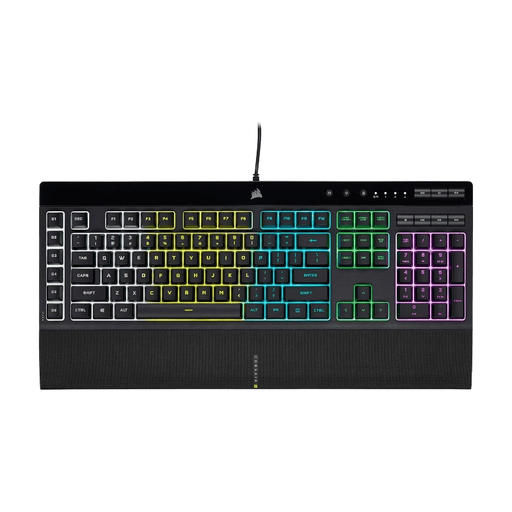
Corsair K55 RGB PRO gaming keyboard with US QWERTY layout

Corsair K55 RGB PRO US QWERTY

This model may suit you if you want dedicated macro and media keys and have room for a larger keyboard.

The product description lists membrane keys, six macro keys, media controls and anti-ghosting. Corsair describes the keys as quiet; this isn’t a comparative sound measurement.

The product name lists US QWERTY. Check that this physical layout suits you.

Joybuy

Razer BlackWidow V4 X mechanical gaming keyboard with Yellow switches and US QWERTY layout

Razer BlackWidow V4 X Yellow Switch US QWERTY

This version may suit you if you want mechanical keys, macro controls and physical media buttons.

The product name lists Yellow switches and US QWERTY. The product description lists six macro keys, a multi-function dial and media keys.

The Yellow switches are described as quiet; this isn’t a comparative sound measurement. The full-size design takes up more desk space than a compact keyboard.

Joybuy

Frequently asked questions

Does gaming with a headset make keyboard noise unimportant?

No, not if housemates can hear your keystrokes or your microphone picks them up. SteelSeries and Corsair describe specific keys as quiet, while Logitech mentions sound dampening, but these manufacturers’ terms aren’t directly comparable sound measurements. Check the exact variant if sound matters to you.

Can you use macros without the configuration software open?

Corsair says that saved macros on the K55 RGB PRO can be used in hardware mode when iCUE isn’t running, as long as there’s space in the onboard memory. This information doesn’t automatically apply to other models.

What should you consider when connecting and cleaning your keyboard?

First, check the connection for the specific version: Logitech distinguishes between the wired G515 TKL and the G515 LIGHTSPEED TKL, which offers wireless and wired connection options. Disconnect the keyboard before cleaning it and follow the manufacturer’s care instructions.

What are your rights when buying online in the Netherlands?

According to the Government of the Netherlands, when you buy online from a business, you usually have 14 days to change your mind, although exceptions apply. If a product is faulty, your statutory rights depend on the circumstances. Check who the seller is and the returns information provided with your purchase; any extra warranty offered doesn’t replace your statutory rights.
