
Vandaag of morgen in huis

Kwaliteit gegarandeerd

Welkomstaanbiedingen ontgrendelen: GRATIS bezorging | Tot 80% korting | Gratis 30 dagen JoyPlus-proefperiode
Download de app
A new gaming keyboard can make or break your gaming experience. But the market is flooded with marketing jargon, flashy lights, and models that promise more than they deliver. Many gamers fall into the same traps: they overpay for a standard office keyboard with some RGB keyboard lighting, or choose a model that shows signs of failure after just a few months of heavy use.
Before you make a decision, it's important to recognise the most common pitfalls:
mechanical keyboard is a popular choice, but not all mechanical switches are the same. A noisy "clicky" switch can be disruptive to housemates, while a linear switch might not provide the tactile feedback you're looking for when typing.To avoid a bad purchase, focus on the specs that truly matter. These are the three most important factors that determine the performance and lifespan of your gaming keyboard.
The switches under the keys determine how every keystroke feels, sounds, and responds.
Corsair does offer high-quality membrane options that can be a good starting point.Razer, this results in a faster response time and a longer lifespan.The size of your keyboard affects ergonomics and the amount of space you have left for your mouse.
TKL keyboard omits the number pad. This creates significantly more room for your mouse, which is popular with FPS gamers.How you connect and customise the keyboard is just as important as the hardware itself.
wireless gaming keyboard offers a clutter-free desk, but pay attention to the connection technology. Modern 2.4GHz RF connections provide latency comparable to a wired connection. Bluetooth is convenient for multi-device use but can have slightly more delay.hot swappable keyboard allows you to change the mechanical switches without soldering. This is ideal for enthusiasts who want to personalise the feel of their keyboard or easily replace worn-out switches.Based on these criteria, we have selected a few models that suit different user profiles.
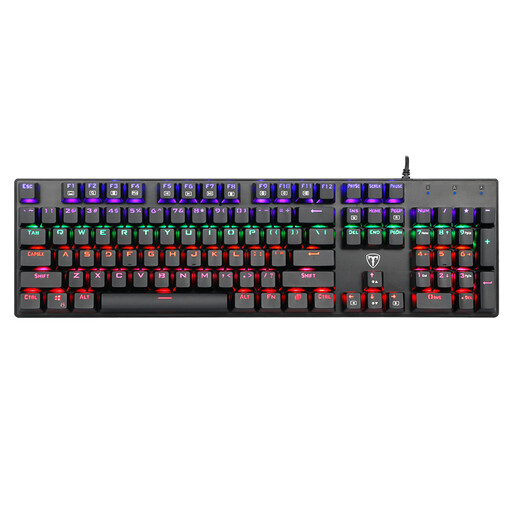
Why This Fits Their Persona: An excellent choice for those looking to switch to a mechanical keyboard without a major investment. It offers the tactile and audible feedback of blue switches, which is a world of difference from a standard membrane board.
This model bypasses the "gaming membrane trap" by offering genuine mechanical switches at a competitive price. You get the responsiveness and feel of a true mechanical keyboard.
Full-size layout with a number pad, 100% anti-ghosting for accurate input during gaming, and a spill-resistant design for added durability.
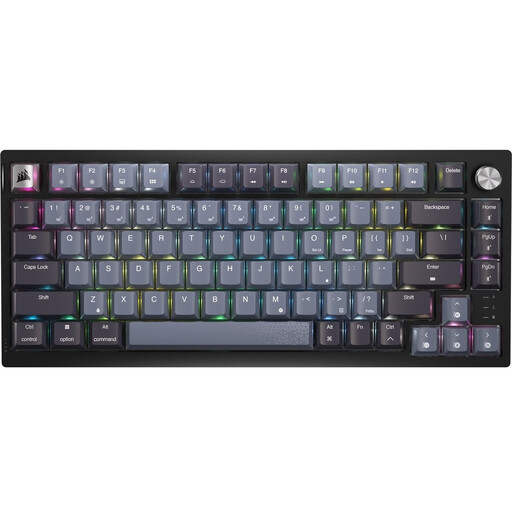
Why This Fits Their Persona: Designed for gamers who demand performance. The combination of a compact 75% form factor, a fast wireless connection, and smooth linear switches makes this an ideal weapon for competitive games.
This Corsair keyboard focuses on performance rather than just aesthetics. The sub-1ms wireless RF technology and pre-lubed linear switches are geared for pure speed and reliability.
Compact 75% form factor for maximum mouse space. Smooth, pre-lubed CORSAIR MLX Red linear switches and durable PBT dye-sub keycaps that won't shine or wear out.

Why This Fits Their Persona: For the user who wants complete control over the feel and functionality of their keyboard. The hot-swap feature, gasket-mount construction, and programmable knob make this a hobbyist's dream.
This is not an off-the-shelf product. It offers advanced features like a hot swappable keyboard PCB and a gasket-mount structure, features typically found only in more expensive, custom-built keyboards.
Full customisation thanks to hot-swap switches. Tri-mode connectivity (wired, 2.4Ghz, Bluetooth) and a programmable knob for media or other functions.
We have compiled a complete, up-to-date list of products that fully meet these strict selection criteria and local regulations.
Mechanical switches use a physical spring mechanism, providing distinct feedback and durability. Membrane switches use a rubber dome; they are quieter and cheaper but less precise. Optical switches use a beam of light for actuation, which manufacturers claim results in a faster response and less wear.
Very important for gaming. NKRO ensures that every keystroke is registered, no matter how many keys you press simultaneously. This prevents "ghosting," where keystrokes are lost during fast and complex in-game actions. Most gaming keyboards offer NKRO or at least 6-key rollover.
Absolutely. The durability, typing comfort, and extra features (like media keys or programmable macros) of a gaming keyboard also make it an excellent choice for programmers, writers, and other power users. A model with tactile or linear switches is often more comfortable for long typing sessions than a noisy clicky model.
