Joybuy Insights

Gaming Keyboard Buying Guide: Recommendations for Speed and Precision

In the world of PC gaming, every millisecond counts. A missed keystroke or a split-second of delay can be the difference between victory and defeat. The search for the right gaming keyboard can be overwhelming, with a plethora of switches, form factors, and features. This guide is designed to bring clarity. We'll explain the key specifications and present a selection of popular models, helping you make an informed choice that suits your playstyle and setup.

Choosing a Gaming Keyboard: What to Look For?

Before we dive into the products, it's helpful to understand three core aspects that define a keyboard's performance and feel.

1. The Switch: The Heart of Your Keyboard

The switches beneath the keycaps determine how a keystroke feels and registers. The most common types are:

  • Mechanical switches: Beloved by gamers for their durability and distinct feedback. They come in three main flavours: linear (smooth and quiet, for rapid actions), tactile (a noticeable 'bump' on actuation, for precision), and clicky (a tactile bump with an audible click). A mechanical keyboard offers a consistent and reliable experience.
  • Optical switches: These use a beam of light to register a keystroke. According to manufacturers like Razer, this results in a faster response time as less physical contact is required. They are also often very durable.

2. The Form Factor: From Full-Size to Compact

The size of your keyboard affects ergonomics and the amount of space on your desk.

  • Full-size (100%): Includes all keys, including the numeric keypad. Ideal if you also use your PC frequently for work or productivity.
  • Tenkeyless (TKL) or 75%: These omit the numeric keypad, creating more space for your mouse. A 75% layout is even more compact, pushing the arrow keys and function keys closer together.
  • Compact (60% or 65%): A compact gaming keyboard features only the essential keys. Function keys and arrow keys are often accessible via an 'Fn' key. Perfect for minimalist setups and gamers who need maximum mouse space.

3. Connectivity and Extras: Wired, Wireless, and RGB

  • Connectivity: Wired keyboards offer the most stable connection without input lag. However, a modern wireless gaming keyboard with 2.4GHz technology is now virtually just as fast and offers more freedom. Bluetooth is convenient for use with multiple devices.
  • RGB Lighting: An RGB keyboard allows you to customise the lighting on a per-key basis. This isn't just for aesthetics; you can also highlight specific keys for games.
  • Layout: Most keyboards in English-speaking regions use the QWERTY keyboard layout, often in the US-International variant.

Gaming Keyboard Recommendations

Below is a selection of models that stand out for their specific features and popularity among gamers.
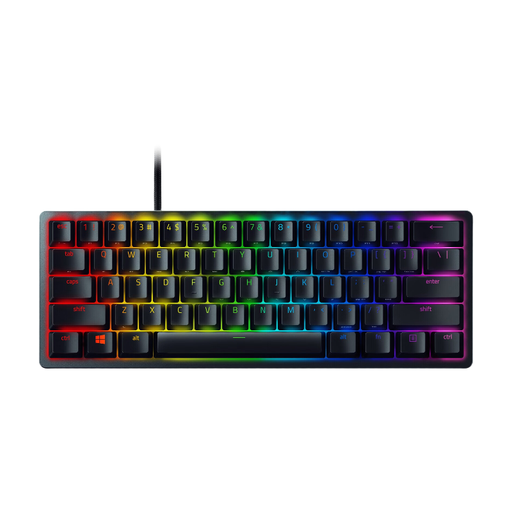
Razer Huntsman Mini: Compact and Blazing-Fast

Razer Huntsman Mini Keyboard

Why It Stands Out The Razer Huntsman Mini is the definition of a compact gaming keyboard. With its 60% form factor, it saves a tremendous amount of desk space. Its key feature is Razer's optical switches, which the brand claims respond faster than traditional mechanical variants.

Pros

  • Razer Clicky Optical Switches: Provide a light, fast, and audible keystroke with an actuation point of just 1.5 mm.
  • 60% Form Factor: Ideal for minimalist setups and competitive gamers who need ample room for their mouse.
  • Durable PBT Keycaps: The keycap material is wear-resistant and has a premium feel.
  • Detachable USB-C Cable: Makes the keyboard easy to take with you.

Who It's For This Razer keyboard is an excellent choice for serious FPS players and esports enthusiasts who prioritise speed, responsiveness, and maximum freedom of movement for their mouse.
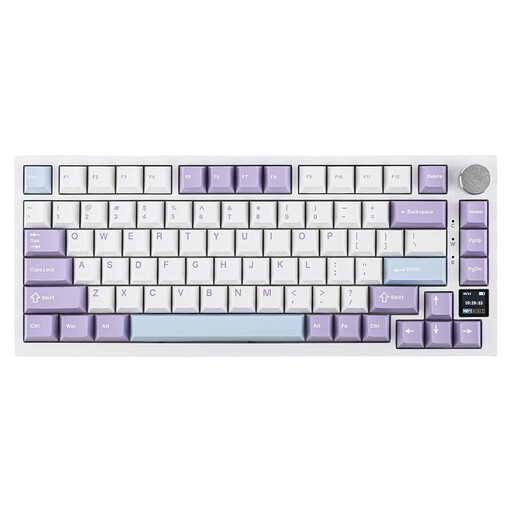
Ajazz AK820 Pro: Versatility with a Personal Touch

Ajazz AK820 Pro 75% Mechanical Tri-Mode Keyboard

Why It Stands Out The Ajazz AK820 Pro sets itself apart with a built-in TFT colour screen. This screen can display battery status, time, connection mode, or even custom GIF animations. Combined with its tri-mode connectivity, this is a highly flexible mechanical keyboard.

Pros

  • Tri-Mode Connectivity: Seamlessly switch between wired (USB-C), 2.4GHz wireless, and Bluetooth 5.1.
  • Interactive TFT Screen: Provides instant visual feedback and personalisation options.
  • Gasket-Mounted Structure: Delivers a cushioned and soft typing feel, which the manufacturer claims reduces finger fatigue and produces a pleasant sound.
  • Hot-Swappable: You can easily change the switches without soldering to customise the typing experience.

Who It's For The Ajazz AK820 Pro is perfect for the tech enthusiast and multitasker looking for a keyboard that excels at both gaming and productivity. Its customisability and connectivity options make it a versatile choice for users who switch between a PC, laptop, or tablet.
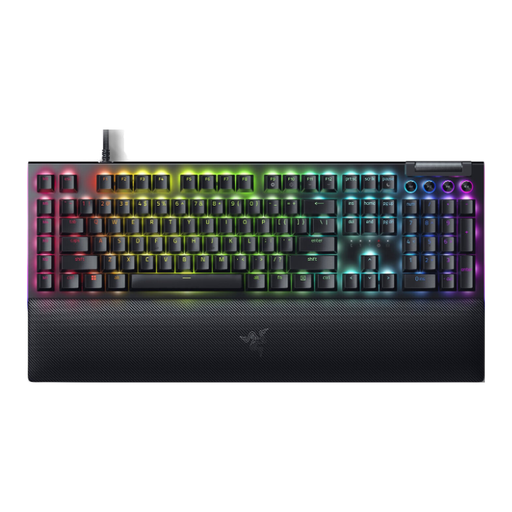
Razer BlackWidow V4: The Complete Experience

Razer BlackWidow V4 - Mechanical Gaming Keyboard

Why It Stands Out The Razer BlackWidow V4 is a full-size gaming keyboard that makes no compromises. It offers a complete suite of features, including dedicated macro keys, a multi-function roller, and a comfortable wrist rest, making it a true command centre for your gaming setup.

Pros

  • Razer Yellow Mechanical Switches: These linear and silent switches are designed for fast, repeated keystrokes without much noise.
  • Dedicated Macro Keys: Six programmable keys on the side for complex commands and shortcuts.
  • Magnetic Wrist Rest: The plush, leatherette wrist rest magnetically attaches and provides comfort during long gaming sessions.
  • Full Razer Chroma RGB Integration: Sync the lighting with your games and other Razer peripherals for an immersive experience.

Who It's For This Razer keyboard is ideal for gamers who want an all-in-one solution. Streamers, MMO/RTS players, and anyone who values the extra functionality of macro keys and a numeric keypad will find the BlackWidow V4 a powerful addition to their setup.

Haven't Found What You're Looking For?

The world of gaming keyboards is vast and diverse. If the models above aren't exactly what you had in mind, or if you simply want to explore more options, there's plenty more to discover. Check out our broader assortment for other form factors, switch types, and brands.

Explore More QWERTY Keyboards

Frequently Asked Questions About Gaming Keyboards

What is the advantage of a mechanical keyboard?

A mechanical keyboard generally offers better durability, a more consistent typing experience, and distinct feedback with every keystroke. Because each key has its own switch, every press feels exactly the same, which aids muscle memory and precision during gaming.

Which gaming keyboard size is right for me?

This depends on your playstyle and desk space. A full-size keyboard is useful if you also type a lot or need a numeric keypad. A TKL (80%) or 75% model offers a good compromise between functionality and space. A compact (60%) keyboard is the choice for maximum mouse room and a minimalist look.

Is a wireless gaming keyboard good enough for competitive gaming?

Yes, modern wireless technology has improved significantly. A wireless gaming keyboard that uses a 2.4GHz USB dongle has latency that is indistinguishable from a wired connection for most people. This makes them an excellent option, even for competitive gamers who value a clutter-free desk.


Written by the Joybuy Product Recommendation Officer