Who is this for?

PC gamer who uses team chat

If you want to speak or mute quickly during a practice session without taking your eyes off the game, a customisable shortcut in a desktop app can be useful. Discord Support explains how to set up custom keybinds in the desktop app.

Gamer sitting away from the screen

If you play from the sofa or somewhere without a desk setup, you’ll need to think about the connection, charging and a stable surface for your keyboard and mouse.

Console gamer who wants to chat

If you want to enter text or chat on PS5 or Xbox, check both the connection and whether the specific game or app supports it. PlayStation warns that not every device is compatible, while Xbox Support points out that support varies between games and apps.

What should you look for?

PC with team chat through a desktop app

A good fit if: you want to use a dedicated key for push-to-talk, muting or another command.

Consider: a standard shortcut may be enough; check that it doesn’t conflict with an in-game action. Discord Support describes the keybinds mentioned for its desktop app.

PC on a big screen, with a seat some distance away

A good fit if: running a cable to your seat would be awkward, or you use your mouse and keyboard on a different surface.

Consider: compare the connection modes, receiver and charging options, and think about where both devices can sit securely. A separate keyboard doesn’t automatically come with a lapboard.

PS5 or Xbox on a big screen

A good fit if: you mainly want to enter text or control the console using a keyboard.

Consider: connecting a keyboard doesn’t guarantee that your game or chat feature supports keyboard controls. PlayStation and Xbox Support each set out their own compatibility requirements.

What to consider What to check before buying Who should pay particular attention?
Compatibility Check the device connected to your screen and whether the specific game or app supports the keyboard. I want to know before buying whether my console, game and chat feature work together; around 33% of consumers put compatibility first when choosing what to buy.
Team chat controls Decide whether you use text chat, push-to-talk or voice activation, and check the shortcuts in the desktop app you use. I want to speak or mute using a key that’s easy to reach; around 25% of consumers prioritise communication controls.
Connection and setup Check the connection modes, included receiver, available ports, charging and the surface you’ll use for your keyboard and mouse. I want to use my keyboard and mouse securely from my seat; around 25% of consumers make a separate gaming spot their top priority.
Key feel and layout Check the switch type and layout of the exact model; don’t treat claims about sound as measurements taken in your room. I want a comfortable typing experience without the sound or layout being a nuisance in a shared space; around 17% of consumers prioritise quiet, comfortable typing.

Common mistakes

  • Assuming that connecting a keyboard means the game or chat will support it

    A console may recognise a keyboard for text input without a particular game supporting the keyboard controls or chat feature you want. PlayStation also warns that not every device is compatible.

    Before buying, check your console, game and intended chat feature separately.

  • Confusing a USB receiver with Bluetooth

    According to its manual, the Trust GXT 868 uses its own 2.4GHz USB receiver, not Bluetooth.

    Compare the connection modes of the exact model with the ports available and where you plan to sit.

  • Assuming a different switch type is the same model

    K65 PLUS listings describe different switch types. The model code can therefore matter when you’re comparing specifications.

    Check the full model code, switch type and keyboard layout in the listing before relying on a product feature.

Relevant brands to consider

Logitech G

The G915 X LIGHTSPEED TKL is a compact option if you want to choose between wireless USB, Bluetooth and wired connections.

  • The Dutch product specifications list media controls.
  • This model doesn’t have a number pad. Check the keyboard layout and device compatibility; this specification doesn’t prove that every console game supports its keys.

Corsair

The K65 PLUS WIRELESS has a 75% layout, leaving space beside your mouse. The K63 with lapboard is a separate combination for PC gaming from the sofa.

  • For the K65 version mentioned, Corsair lists arrow keys and an adjustable dial.
  • Don’t assume a lapboard is included with a K65 or a standalone K63 keyboard.

Razer

The wired BlackWidow V4 X has dedicated macro and media controls, keeping commands within easy reach.

  • Razer lists six programmable macro keys and Green and Yellow switch options.
  • Whether a macro is useful for chat depends on the app or game; the product specifications aren’t an independent measure of typing response or sound.

Trust

The GXT 868 Torix is a full-size model with a number pad, offering a choice between wireless use with a USB receiver and a wired connection.

  • The manual lists an included receiver and the option to play while charging.
  • It doesn’t use Bluetooth. The connection steps described are for a computer and don’t prove compatibility with a console.

SteelSeries

The wired Apex Pro TKL (2023) is a compact option to compare if you’re looking for adjustable actuation.

  • SteelSeries lists adjustable actuation and two actions on one key.
  • The product specifications mentioned apply to the US version. Manufacturer claims about speed don’t prove that these features improve team communication.

Joybuy product picks

This selection of Joybuy products includes compact, wireless and wired keyboards for gaming on a big screen. For each model, check that its connection and the game or chat feature you want to use are compatible with your device.

GXTrust Thado wired TKL gaming keyboard, PC/PS5, QWERTY, black

GXTrust Thado TKL, wired

A compact wired option if you want room to move your mouse and have a USB port near your gaming spot.

The product description lists a 1.8 m USB cable, media keys and anti-ghosting for up to 10 simultaneous keys. The title mentions PC/PS5; check support for your game and chat feature.

Joybuy

AULA F75 Pro 75% gaming keyboard with Bluetooth, 2.4G and wired connection

AULA F75 Pro, 75%, tri-mode

A compact option to compare if you want to leave space beside your mouse and choose from several connection types.

The product name lists Bluetooth, 2.4G and a wired USB connection, a US layout and hot-swappable keys. The description mentions customisable key functions and software macros.

Joybuy
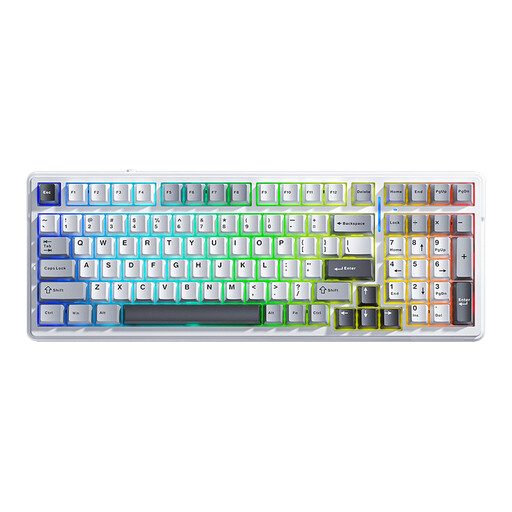
AULA F99 wireless mechanical keyboard with 99 keys and tri-mode connectivity

AULA F99, 99 keys, tri-mode

An option to compare if you want to keep a number pad and have the choice of a wireless or wired connection.

The product name lists Bluetooth, 2.4G, USB-C, 99 keys and hot-swappable keys. The description also mentions a volume knob and TFT screen.

Joybuy

AULA F75 75% gaming keyboard with three connection modes, RGB and US QWERTY layout

AULA F75, 75%, tri-mode

A compact option if you want to save space for your mouse and choose between wireless and wired use.

The product name lists Bluetooth, 2.4G and a wired mode, a US QWERTY layout and PBT keycaps.

Joybuy

Ticktype DP104 full-size keyboard with 108 keys, tri-mode connectivity and quiet tactile switches

Ticktype DP104, full-size, tri-mode

A full-size option to compare if you want to keep a number pad and connect wirelessly or via USB-C.

The product name lists 108 keys, 2.4G, Bluetooth, USB-C, an 8000mAh battery and quiet tactile switches. The sound description is a product feature, not an independent measurement taken in your room.

Joybuy

Frequently asked questions

Do I need macro keys for team chat?

No. You can use a customisable keybind for push-to-talk in the Discord desktop app. Dedicated macro keys are an additional control option; check that the app and game you use accept the key you choose. A keyboard doesn’t replace a microphone.

How do I connect a keyboard when my big screen is connected to a console?

PS5 explains how to connect a USB or Bluetooth keyboard for text input and warns that not every device is compatible. Xbox Support describes using a keyboard for navigation and basic text input; support in games and apps varies. So check the specific game and chat feature too.

What should I check on a wireless model if I play from the sofa?

Check whether the model uses Bluetooth, its own USB receiver or both, and how it charges. According to the Trust manual, the GXT 868 uses its own 2.4GHz USB receiver, not Bluetooth, and can charge while connected by cable.

Which product marking is relevant for electrical devices in the Netherlands?

According to the Dutch Authority for Digital Infrastructure, electrical, electronic and radio equipment placed on the European market must comply with the applicable European directives and carry a CE mark. This is a requirement for placing a product on the market; on its own, it doesn’t confirm that a specific online listing has been checked.

What can I do if my keyboard doesn’t work properly after purchase?

With normal use, a product in the Netherlands must meet what you could reasonably expect from it. According to ACM ConsuWijzer, the seller is responsible for providing an appropriate solution if the product is faulty. For online purchases, you’ll generally also have a cooling-off period of up to 14 days after delivery, subject to legal exceptions. This cooling-off period is separate from your rights if a product is faulty.
