If you play ranked games with voice chat, choose a headset with a microphone that works on your platform and that you can test before a match. For longer sessions, a comfortable fit matters too. A wired headset means no charging, while a wireless one gives you more freedom to move but requires you to check the receiver, platform version and battery life. A surround sound label alone doesn’t prove that you’ll hear cues better in your strategy game.
Who is this buying guide for?
Ranked team player using voice chat
You coordinate with your team during matches and want to know in advance whether the microphone, mute controls and voice settings work on your gaming platform. Age of Empires Support explains voice chat in multiplayer lobbies, while Steam Support offers a microphone test.
Player who enjoys long ranked sessions
You wear your headset for long periods, so fit, pressure and a sensible listening volume are worth considering. Comfort is personal, but the Consumers’ Association often recommends over-ear models for long listening sessions.
Player who switches between devices
You want to know whether the right cable or receiver will work with your PC or console. A wireless headset also needs charging, so check the exact platform version.
What should you look for when buying?
First choose the connection that suits your gaming setup, then check that the microphone, fit and audio settings meet your needs.
| What to consider |
What should you check? |
Who is this important for? |
| Team chat |
Check the microphone connection and mute controls. Test the input and push-to-talk setting in your game or chat app. |
If I want to communicate clearly during team matches and be able to mute quickly, microphone controls are top of my list. Around 29% of consumers give team chat their highest priority. |
| Comfort |
Look at how adjustable it is and the type of ear cushions; try it on yourself if possible. |
When I play for hours at a time, I want a headset that feels comfortable without uncomfortable pressure. For around 23% of consumers, long-wearing comfort is the main reason to buy. |
| In-game audio cues |
Check which audio settings work on your platform, then listen to how the game and voice chat balance with each other. |
If I want to hear important cues in my strategy game without turning the volume up unnecessarily, I compare the settings in that game. Around 18% of consumers say in-game audio cues are their top priority. |
| Connection and freedom to move |
Make a note of your device’s ports and check the exact headset version, cable or receiver. |
If you play on a particular device or want to move around without a cable, you need to know whether the connection you choose works for both game audio and the microphone. Around 18% of consumers prioritise connectivity or freedom to move. |
| Features you’ll use |
Compare the connections and features you need; don’t pay extra for things you won’t use. |
If I mainly play in one place, I don’t want to choose features that won’t improve how I use the headset. For around 12% of consumers, getting good value without unused extras is the top priority. |
Buying pitfalls
-
Assuming a surround sound label guarantees an advantage in every strategy game
According to Razer, the Razer BlackShark V2 X’s advertised 7.1 feature is limited to Windows 11. That doesn’t prove it will give you an advantage in your game.
Check the platform and software requirements, then try it with your game to see whether voice chat and important audio cues are clear.
-
Assuming every version works with your platform
The Turtle Beach Stealth 600 Gen 3 comes in different platform versions, and compatibility depends on the version you choose.
Before buying, check the full version name, the receiver included and your device.
-
Confusing the manufacturer’s warranty with your statutory rights
According to the Dutch Government, a manufacturer’s warranty is in addition to your statutory rights. If a product is faulty, the retailer is your point of contact.
Check what any additional warranty covers and keep your proof of purchase so you can contact the retailer.
Brands to consider
HyperX
The wired Cloud III is worth comparing if you’re looking for a headset with several connection options.
- HyperX lists 3.5 mm, USB-C and USB-A connections for this model, along with a microphone mute indicator.
- These specifications don’t tell you how comfortable the headset will be or how clearly your voice will come through in every environment.
SteelSeries
The Arctis Nova 5 is a wireless option to consider if you’re weighing up a receiver and Bluetooth.
- SteelSeries lists switching between 2.4 GHz and Bluetooth, a USB-C receiver, EQ profiles and a stated battery life of 60 hours.
- Check that the platform version is suitable for your device. The stated battery life is information from the manufacturer, not a measurement based on your settings.
Razer
The wired BlackShark V2 X is a 3.5 mm option to compare if you’re looking for a straightforward connection.
- Razer lists a cardioid microphone and closed-back ear cups for this model.
- According to Razer, the advertised 7.1 feature is limited to Windows 11, so don’t assume it’s available on a console.
Turtle Beach
The Stealth 600 Gen 3 comes in wireless versions for different platforms, including an Xbox version.
- Turtle Beach lists 2.4 GHz, Bluetooth, a flip-to-mute microphone and a stated battery life of 80 hours.
- Check that the exact version is compatible; the stated battery life isn’t a measure of how long it will last with your usage.
Logitech G
The PRO X 2 LIGHTSPEED is a wireless option to compare if Bluetooth, a 3.5 mm connection and different ear cushion options are relevant to you.
- Logitech lists a stated battery life of up to 50 hours and leatherette or velour ear cushions.
- Claims about competitive advantage and sound quality come from the manufacturer; they aren’t based on an independent comparison for strategy games.
Gaming headsets at Joybuy
These Joybuy products offer options for wireless gaming, voice chat and use with Xbox or other devices.
 Image unavailable
Turtle Beach Stealth 600 Gen 3 Xbox, purple
Worth considering if you play on Xbox and want to be able to mute the microphone during team matches.
The product listing mentions a flip-to-mute microphone and Bluetooth for switching between devices. Wireless use requires charging, so check that this version is suitable for your devices.
View at Joybuy
 Image unavailable
Turtle Beach Stealth 500 Xbox, black
Worth considering if you’re looking for an Xbox headset that you can also use with other devices.
The product listing mentions a flip-to-mute microphone and connections to other devices via a USB receiver or Bluetooth. Wireless use requires charging, so check that the connections are suitable for your devices.
View at Joybuy
 Image unavailable
Razer Kraken V3 X, black
Worth considering if you play on PC or PS4 and use voice chat.
The product listing mentions a cardioid microphone and volume control.
View at Joybuy
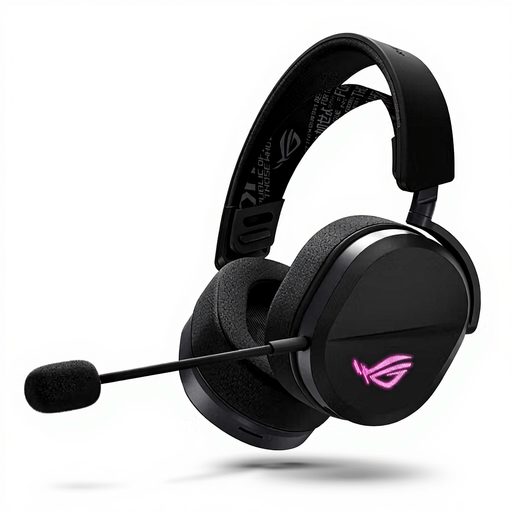 Image unavailable
ASUS ROG Pelta, black
Worth considering if you’re weighing up a wired or wireless connection and use a boom microphone for team chat.
The product listing mentions USB-C, a 2.4 GHz receiver and Bluetooth. Wireless use requires charging, so check which connection works with your device.
View at Joybuy
 Image unavailable
HyperX Cloud III S, black and red
Worth considering if you’re looking for a wireless headset for gaming sessions with voice chat.
The product listing mentions a detachable boom microphone with a mute indicator, plus memory foam in the headband and ear cushions. Wireless use requires charging.
View at Joybuy
Frequently asked questions
How can I check my microphone is set up properly before a ranked match?
If you use Steam voice chat, open the microphone test under Friends & Chat, then Voice, and check the voice mode and any push-to-talk key. Check your game settings too: in Age of Empires II, the voice chat options are under Audio.
Can I use Bluetooth and wireless game audio at the same time on the Arctis Nova 5?
Don’t assume you can: SteelSeries describes a button for switching between 2.4 GHz and Bluetooth. Check which connection you’re using for the audio you want to hear.
How can I avoid listening at too high a volume during long sessions?
Keep the volume low and take listening breaks. The World Health Organization gives the example of a maximum of 40 hours per week at an average of 80 dB, and four hours at 90 dB. These are exposure examples, not measured volume levels for the headsets mentioned.
What are my rights when buying online in the Netherlands?
For a distance purchase from a business, you’ll generally have a 14-day cooling-off period, although you should check whether an exception applies. You’re also entitled to a product that is fit for purpose. According to the Dutch Government, there is no fixed statutory warranty period in the Netherlands, and the retailer is your point of contact if a product is faulty.


