Start with a headset that works with your PC or console and feels comfortable during long gaming sessions. With a wired headset, you don’t have to manage a battery. A wireless one gives you more freedom to move, but requires a compatible connection and charging. Think of spatial audio as an extra feature: whether it works depends on the headset, game and platform.
Who is this guide for?
Fantasy gamer who plays long evening sessions
You want to follow dialogue and ambient sounds clearly, and need a fit that stays comfortable during longer gaming sessions. Megekko Academy and RTINGS.com highlight sound quality and comfort as important factors when choosing.
Gamer who switches between devices
You might play on both PC and console, and want to know in advance which connections and features work with each device. Megekko Academy and HyperX stress the importance of connection type and device compatibility.
Wireless gamer who uses voice chat
You want to play without an audio cable and control the volume or microphone during conversations. Connection type, battery life and controls are all worth considering.
What should you look for?
Megekko Academy and RTINGS.com highlight sound, comfort, microphone quality and platform connectivity as key considerations. Choose the features that suit the way you play.
| What to consider |
What to look for |
Who will find this especially important? |
| Dialogue and game world |
Compare the standard sound reproduction and check whether EQ or spatial audio works with your game and platform. |
If I want to follow voices and ambient sounds in a story, I look beyond a surround-sound label; around 28% of consumers put sound quality first. |
| Comfort during long sessions |
Look at adjustability, ear cushions and weight; weight alone doesn’t determine whether a headset is comfortable. |
When I play for a long time, I want a fit that stays comfortable, rather than letting a low stated weight alone make the decision; around 22% of consumers put comfort first. |
| Connection and platform |
Check the ports, the exact model variant and which features are available through each connection. |
If I switch between PC and console, I want to know which connection and features work with each device; around 22% of consumers prioritise platform compatibility. |
| Wireless gaming |
Check that your device supports the receiver, and consider how the stated battery life suits the way you use the headset. |
If I don’t want an audio cable while playing, I check the connection first and factor in charging; around 17% of consumers put wireless freedom of movement first. |
| Voice chat in the dark |
Check whether you can control the volume and microphone on the headset, and whether the microphone works with your connection. |
When I play with others, I want to control the volume or microphone without searching through menus; around 11% of consumers put voice chat controls first. |
Common mistakes when choosing
-
Assuming a surround-sound label guarantees better sound
Virtual surround sound is processed by software. Whether you can use it, and how it sounds, also depends on the game and platform.
First check the standard sound reproduction and platform support. Then see whether the audio mode you want is available with your setup.
-
Assuming every wireless headset works with every console
Support can vary by headset, device and connection method. Bluetooth and a USB receiver aren’t automatically interchangeable.
Check the exact model, receiver and support for your console before you choose.
Brands to compare
HyperX
The wired Cloud III could suit you if your device supports one of its listed connections.
- HyperX lists memory foam, controls on the ear cup and a microphone with a mute indicator.
- It’s a wired headset. Check which features work with your connection and platform.
SteelSeries
The Arctis Nova 5 Wireless is an option if you want to play wirelessly and set audio presets.
- SteelSeries lists a USB-C dongle, switching between 2.4 GHz and Bluetooth, and a stated battery life of 60 hours.
- Check the model and platform compatibility; the stated battery life and presets don’t guarantee a particular usage time or gaming experience.
Logitech G
The G435 is a lightweight wireless option for the PC and PlayStation connections listed by Logitech.
- Logitech lists a weight of 165 grams, LIGHTSPEED for PC, Mac, PS4 and PS5, and 18 hours of use.
- For other devices, check the connection method. The stated compatibility applies to the G435, not every Logitech G headset.
Razer
The wired BlackShark V2 X is worth considering if 3.5 mm, a microphone and passive noise-isolating ear cups suit your setup.
- Razer lists a weight of 240 grams for the standard version.
- Razer says the 7.1 surround-sound feature is available on Windows 11 only. Check the version, especially if you’re looking at separately licensed console variants.
PlayStation
The PULSE Elite is an option if you want to use the PlayStation Link connection on PS5.
- PlayStation lists volume controls, microphone muting, up to 30 hours of battery life and 3D Audio for supported PS5 games.
- The listed PS5 features don’t prove compatibility with Xbox. PlayStation lists PlayStation Link compatibility for PC and Mac.
Gaming headsets at Joybuy
These models include wired and wireless options for fantasy adventures, with platform connectivity, comfort and in-game controls all taken into account.
 No image available
JBL Quantum 300
A wired option if you’re looking for a 3.5 mm connection and want to mute the microphone by flipping it up.
The product information lists a USB audio adapter and adjustable EQ. According to the product description, QuantumSURROUND is available on PC only.
View at Joybuy
 No image available
Turtle Beach Stealth 500 Xbox
A wireless option to compare if you’re looking for a headset with a flip-up microphone that mutes when raised.
The product information lists a 2.4 GHz USB receiver for Xbox, PC and Switch in docked mode, and Bluetooth for mobile devices. EQ settings are available through the Swarm II app.
View at Joybuy
 No image available
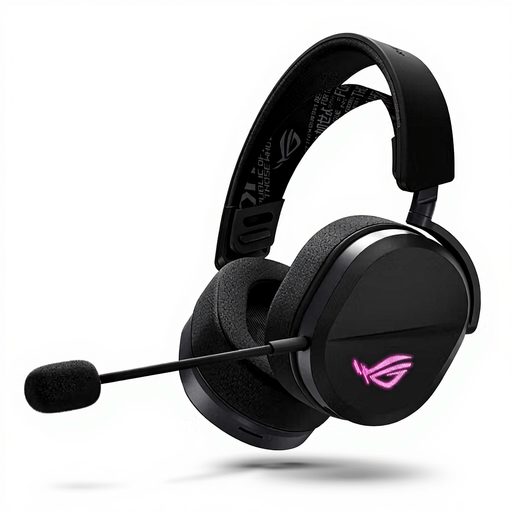
ASUS ROG Pelta
An option to compare if you want both wired and wireless connections, as well as volume and microphone mute controls.
The product information lists USB-C, a 2.4 GHz receiver and Bluetooth. The stated weight is 309 g; wireless gaming requires charging.
View at Joybuy
 No image available
HyperX Cloud III S Wireless
A wireless option if you want to control the volume and microphone on the headset while playing.
The product information lists 2.4 GHz and Bluetooth, a detachable microphone with a mute indicator, and memory foam ear cushions. DTS Spatial Audio is listed for PC.
View at Joybuy
 No image available
HyperX Cloud III
A wired option if you want to compare the different listed connections and avoid having to manage a battery.
The product information lists 3.5 mm, USB-A and USB-C, a detachable microphone with a mute indicator, and memory foam in the headband and ear cushions. DTS Spatial Audio is listed for PC.
View at Joybuy
Frequently asked questions
Do I need 7.1 surround sound for a fantasy game?
No, 7.1 surround sound isn’t essential. Stereo can work well too; check whether the virtual or spatial audio you want works with your headset, game and platform.
How do I connect a headset when playing in the dark?
Choose a connection supported by your device and check which controls are on the headset. HyperX lists 3.5 mm, USB-A and USB-C for the wired Cloud III. For a wireless model, also check that the receiver or pairing method works with your device.
What should I consider when gaming with a headset for a long time?
Consider your listening volume and how long you’re exposed to sound. The World Health Organization warns that unsafe listening while playing video games can increase the risk of permanent hearing loss or tinnitus.
What are the cancellation period and warranty when buying online in the Netherlands?
When you buy online from a business, you’re generally entitled to a 14-day cancellation period; check which terms apply to your purchase. You’re also entitled to a product that is fit for purpose. The Dutch government explains that there’s no fixed statutory warranty period for all products in the Netherlands, and that you should contact the seller if a product is faulty.


