What should you look for when choosing?
Start with the microphone controls and connection to your device. Then decide whether a cable works on your desk or whether you’d rather use a receiver and battery.
| What to consider |
What should you check? |
Who is this important for? |
| Team chat and muting |
Check whether the microphone is adjustable, the mute button is easy to reach and your chat app is using the right microphone. |
When I’m giving call-outs during practice rounds, I want to be able to position the microphone properly and mute it quickly. Around 33% of consumers prioritise team chat. |
| Cable space |
Think about where a headset cable could run along your desk, or where you could plug in a USB receiver. |
When I have limited room for my mouse, I weigh up a cable against space for a receiver and charging. Around 27% of consumers prioritise cable space. |
| Comfort |
Compare the stated weight and ear cushion material, and try the fit for yourself if possible. |
For longer practice sessions, I want to know how the headset fits and what material will be against my head. Around 20% of consumers make comfort their top priority. |
| Connection and model variant |
Make a note of your device’s ports and check the full model variant and platform support. |
If I want to practise on my PC or console, that specific headset variant needs to connect to my device. Around 20% of consumers focus on compatibility. |
Joybuy products for team chat
These Joybuy products are gaming headsets for team chat, including wired and wireless models. Check the microphone controls, connection and compatibility with your platform for each model.
 Image unavailable
JBL Quantum 300 wired gaming headset with flip-up microphone, black
The flip-up boom microphone is designed for team chat and can be raised to mute it.
Wired, with a 3.5 mm connection; the product information lists compatibility with PCs, consoles and other devices. The description also mentions a lightweight design and memory foam ear cushions.
View at Joybuy
 Image unavailable
Turtle Beach Atlas 200 PC wired gaming headset, black
A wired option for team chat, with a microphone that flips up to mute.
The product information lists a 3.5 mm connection, a USB adapter in the box and on-earcup volume controls. The headset has memory foam ear cushions.
View at Joybuy
 Image unavailable
Turtle Beach Stealth 600 Gen 3 Xbox, wireless, purple
This wireless headset has a flip-up microphone that mutes when raised, making it a good option if you don’t want a headset cable across your desk.
The title lists Xbox, PlayStation, PC, Steam Deck and mobile. The product information mentions a QuickSwitch button; the built-in battery needs charging.
View at Joybuy
 Image unavailable
Turtle Beach Stealth 500 Xbox, wireless, black
The microphone flips up to mute; wireless use keeps a headset cable off your desk.
The product information lists 2.4 GHz, Bluetooth, a QuickSwitch button and a USB receiver. It charges via USB-C, so the headset needs charging.
View at Joybuy
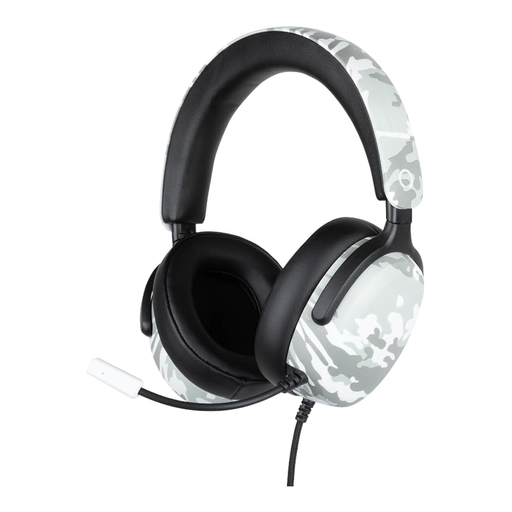 Image unavailable
Konix Nexus wired over-ear gaming headset, 40 mm, 1.5 m, camouflage
The flexible microphone can be positioned close to your mouth for team chat.
The title lists 40mm drivers and a 1.5 m cable. The product information lists a 3.5 mm connection, on-earcup volume controls and compatibility with PS5, Switch 2 and Xbox Series X|S.
View at Joybuy
Frequently asked questions
How should you set up the microphone before practising with your team?
Connect the headset, select the microphone you want to use in your chat app and make a test recording. Also check that the physical mute button is off; HP lists an LED indicator on the Cloud III.
Does every Arctis Nova 5 work wirelessly with Xbox?
Don’t assume the variants are interchangeable: SteelSeries specifically lists the Nova 5X for Xbox. Check the full model name before buying.
Do you need to buy extended cover if your headset breaks?
Paid extended cover is not the same as your legal rights. According to the Dutch government, you’re entitled to a product that works properly in the Netherlands, and the retailer is your point of contact if something goes wrong; there is no fixed statutory warranty period. Compare the cover and exclusions of an extended warranty with your existing rights.
Do you have a cooling-off period when buying online in the Netherlands?
For many distance purchases from a business, there is a 14-day cooling-off period, but exceptions apply. The Dutch government advises checking the terms that apply to your specific purchase.
How can you use a headset during long sessions without turning the volume up unnecessarily?
The World Health Organization recommends keeping the volume low and taking regular listening breaks: both the sound level and the length of exposure matter. This advice does not prove that a specific headset is safe at every volume.


