
Player who enjoys long squad sessions
Wants the headband and ear cushions to stay comfortable throughout a session, with a connection that suits their gaming setup. Fit is a personal thing.


First, choose a headset that works with your PC or console and is suitable for team chat. Then prioritise a comfortable fit and easy-to-use microphone mute controls. A wired headset means you don’t have to charge the headset itself, while a wireless one gives you more freedom to move but means checking the connection, battery life and platform version. Keep the volume moderate and take listening breaks: the World Health Organization points out that both sound level and listening time matter.
Wants the headband and ear cushions to stay comfortable throughout a session, with a connection that suits their gaming setup. Fit is a personal thing.
Needs a good-quality microphone, quick mute controls and team chat that’s clear over the game audio.
Might switch between a PC and console, or want to listen to audio from their phone too. Check the connection and exact platform version before you buy.
Start with the connection and platform support, then compare fit, microphone controls and battery life for a wireless model.
| What to consider | What should you check? | Who is this important for? |
|---|---|---|
| Fit for long sessions | Check the adjustability, space around your ears and the material of the ear cushions. | If I play for hours, I want a headset that doesn’t pinch or feel hot. Around 24% of consumers put wearing comfort first. |
| Team chat and muting | Check the microphone and mute controls, and whether they work with your chat app or console party chat. | When I make lots of call-outs, I want to be easy to understand and able to mute my microphone quickly. Around 24% of consumers give team chat top priority. |
| Adjusting game audio | Check whether volume balance and any EQ settings are available on your platform; don’t set the volume higher than you need to. | If I want to hear important sounds in a match without chat drowning them out, I pay attention to the audio balance. Around 19% of consumers put game audio first. |
| Connection and platform | Check the exact model version, connection, any receiver and whether both game audio and the microphone work. | When I switch between console and PC, I want to know for sure that the headset works with my devices. Around 19% of consumers give compatibility top priority. |
| Wireless use | Compare the stated battery life in the mode you use and check how the headset charges. | Playing without a cable is handy, but I also want to know when it’ll need charging. Around 14% of consumers put wireless freedom and battery life first. |
A Bluetooth connection to a phone doesn’t automatically mean that game audio and the microphone will work in the same way on a console.
Check the exact version and the connection specified by the console and manufacturer for that headset.
HyperX lists separate maximum battery life figures for 2.4 GHz and Bluetooth for the Cloud III S Wireless; these apply to different modes of use.
Compare the stated battery life for the mode you’ll actually use to play.
In the Netherlands, the statutory warranty period isn’t set at a fixed length. The Dutch government advises contacting the retailer if a product is faulty.
Keep your proof of purchase and discuss any fault with the retailer.
HyperX offers both a wired Cloud III and a wireless Cloud III S Wireless here; they are different models.
The Arctis Nova 7X Wireless Gen 2 is worth considering if you want to switch between devices such as an Xbox and PC, or listen to audio from your phone at the same time.
The BlackShark V3 Pro for PlayStation is a separate PlayStation version for players looking for features such as a detachable microphone and adjustable active noise cancellation.
The PRO X 2 LIGHTSPEED is a wireless option for which Logitech G lists a choice of ear cushion materials.
This Joybuy selection includes wired and wireless gaming headsets for team chat during long sessions.
 Image unavailable
A wired option for playing on PS5 or PS4 using a compatible 3.5 mm connection, with the option to mute the microphone.
The product information lists a detachable microphone, mute controls on the ear cup and soft ear cushions. The connection described for PS5 and PS4 is via the controller, using the included 3.5 mm cable.
 Image unavailable
A wired option for team communication via a compatible 3.5 mm connection.
The product information lists a flip-up directional microphone, a lightweight headband and memory foam ear cushions. According to the information, QuantumSURROUND and QuantumENGINE software features are only available on PC.
 Image unavailable
A wireless option for team players who want to be able to mute the microphone by flipping it up.
The product information lists 2.4 GHz and Bluetooth, game and chat volume controls, and support for Xbox, PlayStation, PC, Steam Deck and mobile devices.
 Image unavailable
A wireless option for Xbox players who want to mute team chat by flipping up the microphone.
The product information lists a USB receiver, Bluetooth and EQ settings. The platforms listed are Xbox Series X|S, Xbox One, PC, Switch 2 and mobile devices.
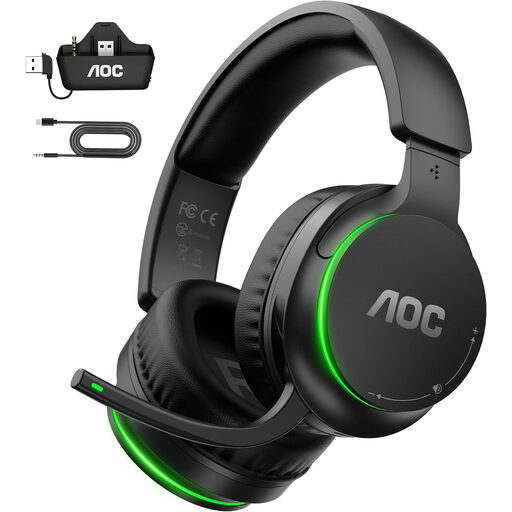 Image unavailable
A wireless option for team chat during longer sessions, with a flip-up microphone that you can mute.
The product information lists a 2.4 GHz transmitter for Xbox and a USB connection for the other platforms mentioned. It also lists volume controls and memory foam ear cushions.
Don’t assume so: Bluetooth on a headset doesn’t prove that it connects directly to your Xbox. Xbox Support says that Xbox One doesn’t have Bluetooth functionality, so check how each model connects to the console and whether the microphone works too.
According to SteelSeries, connect the included 2.4 GHz receiver to the Xbox using the USB-A cable, then set the switch on the receiver to Xbox. These setup instructions apply to this specific model.
Keep the volume as low as is comfortable and take regular listening breaks. The World Health Organization explains that both sound level and length of exposure matter.
For an online purchase, you usually have 14 days from delivery to change your mind, according to ACM ConsuWijzer. Check the applicable exceptions and returns policy before use; this doesn’t tell you the return status of a specific opened headset.
Report a fault to the retailer. According to the Dutch government, there’s no fixed statutory warranty period in the Netherlands; what you can expect from the product depends, among other things, on the type of product and the sales information. A manufacturer’s warranty is different.