What should you look for?
Wired
A good fit if: you mainly listen at one desk and don’t want to recharge your headset. Check your playback device’s connection first.
Trade-off: the cable limits your freedom to move around.
Wireless
A good fit if: you want to get up while reviewing replays and your device supports the headset’s connection.
Trade-off: you’ll need to recharge the headset. Bluetooth can connect a second device, but check whether your model mixes audio or only lets you switch between sources.
When reviewing competitive replays at home, your choice mainly depends on what you want to hear, how long you listen for, and how your PC or other devices connect.
| What to consider |
What to look for when buying |
Who should pay particular attention? |
| Audio cues |
Compare a familiar replay using a neutral setting and, if you like, a game preset. Check which software features work with your device. |
If I want to distinguish speech from events in a replay, I don’t want to assume that a preset will improve my analysis. Around 31% of consumers say replay audio is their main purchase concern. |
| Comfort and volume |
Look at pressure on your head and ears, ear cushion material and easy-to-reach volume controls. Don’t turn the volume up to compensate for unclear details. |
For long sessions, I want a comfortable headset that doesn’t need to be turned up repeatedly to hear details. Around 25% of consumers prioritise comfort and listening time. |
| Connection and compatibility |
Check the ports on your PC and other devices. If you’re going wireless, find out whether the model mixes sources or only switches between connections. |
If I want to use PC audio alongside a second device, I want to know in advance which connection my setup supports. Around 19% of consumers cite device connectivity as their main purchase concern. |
| Team chats during reviews |
Check whether the microphone is adjustable or detachable and whether the mute control is easy to use. Try recording in your own room. |
When I discuss replay moments live, I want to be able to control my microphone easily. Around 13% of consumers prioritise team communication. |
| Purchase and aftercare |
Check the connection and included accessories, the seller and the terms of any additional cover. |
When choosing a headset that works with my devices, I also want to know what aftercare applies. Around 12% of consumers say purchase and aftercare are their main concern. |
Headsets at Joybuy
This selection includes wired and wireless gaming headsets for replay audio at a desk, including models also designed for team communication.
 No image available
Razer Barracuda X Wireless Headset (White)
A good choice if you want to listen to replay audio wirelessly and need a detachable microphone for team chats. Remember that you’ll need to recharge it when using it wirelessly.
View at Joybuy
 No image available
HyperX Cloud III S Gaming Headset (Black/Red)
A good choice if you want to listen to replay audio wirelessly on a PC and discuss reviews using a detachable microphone. Remember that you’ll need to recharge it when using it wirelessly.
View at Joybuy
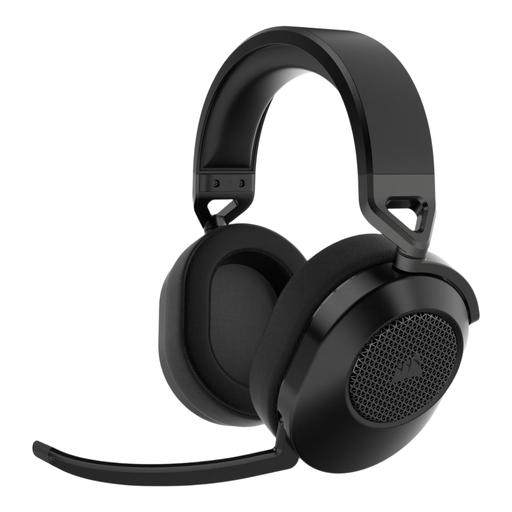 No image available
Corsair HS65 Wireless Gaming Headset (Carbon)
A good choice if you want to listen to replay audio wirelessly on a PC and need a microphone with a mute control for team chats. Remember to factor in recharging when choosing a wireless headset.
View at Joybuy
 No image available
Razer BlackShark V2 X 7.1 Wired Gaming Headset (Multi-Platform Esports, Black)
A good choice if you want to use a wired 3.5 mm headset at a desk and discuss reviews with your team. The cable limits your freedom to move around, and Razer lists the 7.1 feature for Windows 11 only.
View at Joybuy
 No image available
HyperX Cloud III Gaming Headset (PC, PS5, Xbox Series X|S, Black)
A good choice if you want a wired headset for your desk and a detachable microphone for discussing reviews. Check which connection works with your playback device before buying.
View at Joybuy
Frequently asked questions
Should virtual surround sound be on when I’m assessing replays?
Not necessarily. Where possible, compare the same passage with and without the profile at the same volume. SteelSeries describes presets that bring certain sounds to the fore; Razer lists the BlackShark V2 X’s 7.1 feature for Windows 11 only. That doesn’t prove the setting works better for every replay.
How do I connect a wireless headset if I also want to hear audio from my phone?
Check the manual for the exact model. Trust describes the GXT 491 Fayzo as connecting via a USB receiver and Bluetooth, with an audio-mixing control. SteelSeries describes the Arctis Nova 5 Wireless as letting you switch between 2.4 GHz and Bluetooth.
How can I use a headset during long review sessions without continually turning up the volume?
Keep the volume low and take listening breaks. The World Health Organization gives a limit of up to 40 hours a week at an average of 80 dB as an example, with a shorter safe listening time at higher levels. This is listening advice, not a measured volume level for a specific headset.
What are my rights in the Netherlands when buying online and receiving a faulty product?
For online purchases from a business, consumers generally have 14 days to change their mind; check the exceptions and terms that apply to your order. If a product is faulty, the seller must also provide a solution. According to the Government of the Netherlands, there is no fixed statutory two-year warranty period in the Netherlands. Manufacturer and additional warranties are on top of your statutory rights.


