Who is this buying guide for?

Players who rely on sound to pinpoint opponents

You want to pick up subtle cues in tactical matches. Check the connection and your in-game settings, then listen for yourself to see how the cues come through on your platform. RTINGS.com highlights accurate reproduction of in-game audio cues as something to consider when choosing a gaming headset.

Team players who make lots of call-outs

You want your teammates to hear you clearly and to be able to mute the microphone quickly in the dark. A test recording and trying out the controls will help you decide whether they work for you.

Players with long gaming sessions

Think about fit and accessible controls; with a wireless headset, you’ll also need to charge it. Manufacturer descriptions provide information about materials and batteries, but they can’t replace trying the fit for yourself.

What should you look for?

What to consider What should you check? Who is this important for?
Positional in-game audio cues Assess the sound reproduction and relevant in-game settings on your platform; don’t take surround-sound or EQ labels as proof of better positioning. If I want to locate opponents using subtle cues, I want to assess the sound in my own game. Around 33% of consumers put positional in-game audio cues first.
Platform and connection Check that the connection or wireless receiver you choose works with your PC or console, including both audio and microphone. I want to know in advance whether the headset, microphone and features I need will work with my device. Platform compatibility is the top priority for around 27% of consumers.
Team communication and muting Make a test recording and check whether you can mute the microphone and tell its status without looking at the controls. If I make lots of call-outs, I want to be easy to understand and able to mute quickly in the dark. This is the top priority for around 20% of consumers.
Comfort and controls Assess the fit during a session similar to how you normally play; check whether the buttons are within easy reach, and remember to charge wireless models. If I play for a long time, I want a headset that feels comfortable and is easy to use. Around 20% of consumers give this the highest priority.

Common pitfalls

  • Taking a surround-sound label or large driver as proof of better positioning

    A technical or marketing label alone doesn’t tell you how useful in-game audio cues will be on your platform and with your settings.

    Check that the features work with your device and compare the relevant in-game settings.

  • Assuming every version in a product range has the same features

    Wireless versions for different platforms and features such as simultaneous playback or switching between sources can vary.

    Before buying, check the full model name, platform version, receiver and the features you need.

  • Confusing microphone noise reduction with noise isolation around your ears

    A feature that filters the sound sent from your microphone doesn’t prove that you’ll hear less background noise yourself.

    Assess the microphone and fit separately, and make a test recording.

Relevant brands

HyperX

The Cloud III is a wired model to consider if you want to check the connection options available for your device.

  • HyperX lists 3.5mm, USB-C and USB-A connections, physical volume controls, a detachable microphone and memory foam ear cushions for the Cloud III.
  • You’ll need to assess the fit and how clearly you can be heard for yourself; also check that the features you want work with your connection.

SteelSeries

The Arctis Nova 7 Gen 2 is worth considering if you want to game wirelessly while also hearing audio from your phone.

  • For the Gen 2, SteelSeries lists simultaneous 2.4GHz and Bluetooth audio, EQ controls and a claimed battery life of more than 50 hours.
  • The battery life is the manufacturer’s claim. Don’t assume these features also apply to the original Nova 7 or another version without checking.

Turtle Beach

The Stealth 600 Gen 3 is a wireless option where choosing the right PC, PlayStation or Xbox version matters.

  • Turtle Beach lists a flip-to-mute microphone, QuickSwitch for switching between wireless sources and a claimed battery life of 80 hours.
  • QuickSwitch means switching between sources, not playing audio from both at once. Check the platform version and the features you need.

Logitech G

The PRO X 2 LIGHTSPEED is worth a look if you’re weighing up wireless, Bluetooth and a 3.5mm connection.

  • Logitech lists interchangeable ear cushion types and a maximum battery life of 50 hours.
  • The manufacturer’s claim that the drivers make footsteps sound clear isn’t independently proven for your game.

Razer

Razer positions the BlackShark V2 Pro for competitive team play.

  • Razer lists microphone and isolation features for this product range.
  • Check the model year and console version separately; features on one version don’t automatically apply to another.

Headsets on Joybuy

This Joybuy selection includes both wired headsets and wireless models for different consoles. Check that the connection and version of each model are right for your device.

SteelSeries Arctis Nova Pro Wireless for PlayStation, black

SteelSeries Arctis Nova Pro Wireless for PlayStation, black

Suited to anyone who wants to game wirelessly while also hearing audio from their phone; check that the PlayStation version works with your equipment.

Remember to factor in the receiver and charging the battery.

Joybuy

JBL Quantum 300 wired over-ear gaming headset with flip-up microphone, black

JBL Quantum 300, wired, with flip-up microphone

Suited to anyone who wants to play using a wired connection and flip the microphone up to mute it.

The product name specifies an over-ear design and a wired connection. Check which connections work with your device.

Joybuy

Logitech G G432 7.1 Surround Sound wired gaming headset

Logitech G G432 7.1 Surround Sound, wired

Suited to anyone looking for a wired headset with microphone muting; the surround-sound label alone doesn’t prove better positioning.

Check which features are available on your platform and whether you need software for the settings you want to use.

Joybuy

HyperX Cloud III gaming headset, black

HyperX Cloud III, black

Suited to anyone looking for a wired headset who wants to check the microphone status using a physical mute button and indicator.

Check which features work with your connection and platform, and assess the fit for yourself.

Joybuy
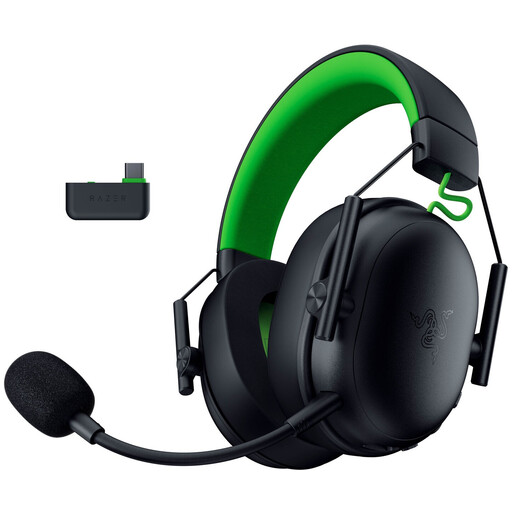
Razer BlackShark V3 X HyperSpeed for Xbox, black

Razer BlackShark V3 X HyperSpeed for Xbox, black

Suited to anyone looking for an Xbox version who wants to use the microphone and volume controls on the headset.

Remember to charge it; the product information states that 2.4GHz and Bluetooth audio cannot be played at the same time.

Joybuy

Frequently asked questions

Should you enable surround sound in a tactical game?

Not automatically. Use your game and platform to assess whether the setting helps with positional cues; a surround-sound label doesn’t prove that it will. Also check that the feature is available with your connection.

How should you set up a headset for team chat in a dark room?

Select the intended audio output and microphone on your device, make a test recording, and practise muting and adjusting the volume by touch. HyperX lists on-earcup controls and an LED that indicates mute status for the Cloud III; check for yourself whether the indicator is clear enough for you.

How should you manage volume during long matches?

Don’t turn the volume up just to pick out quiet in-game cues, and take breaks. VeiligheidNL warns of hearing damage from high volumes; its figures on Dutch young people aged 10 to 15 who play games do not describe buyer share or provide a universally safe setting for a volume control.

What warranty and cancellation rights apply to online purchases in the Netherlands?

For online consumer purchases, you generally have a statutory cancellation period of up to and including 14 days after delivery, subject to legal exceptions. You also have a statutory guarantee if the product does not do what you could reasonably expect during normal use; there is no fixed, general warranty period for this in the Netherlands. Check who the seller is and which returns policy applies.

Are there any special EU requirements for a new wireless headset?

EU rules on radio equipment are relevant to wireless models. The European Commission states that common USB-C charging requirements have applied to headsets within the scope of those rules since 28 December 2024. This doesn’t mean a wired headset needs a charging port; check the requirements for the specific version.
