Who is this relevant to?

Players who rely on directional audio

You want to distinguish different sounds in tactical matches and assess positional audio in the games you play. Tweakers discusses positional audio in specific tested models; those findings don’t necessarily apply to other versions.

Players switching consoles from the sofa

You play on more than one system or sit some distance from the screen. So check that the connection, receiver or wireless pairing of the exact headset is compatible with your devices. PlayStation and Xbox describe different pairing methods.

Players with long team sessions

You want to remain easy to understand without the fit, warmth or need to charge interrupting your session. Tweakers discusses fit and microphones in separately tested models; fit will always depend on the wearer.

What should you look for when choosing?

Wired via 3.5 mm

A good fit if: you’re within reach of a suitable port and want to use a headset with different systems. HyperX also lists USB-A and USB-C for the wired Cloud III; check which connection on your device supports the features you want.

Keep in mind: a cable limits your freedom to move, and having several plugs doesn’t mean every software feature works on every platform.

Wireless for PlayStation

A good fit if: you play on PS5 and want to listen and talk without a cable between your seat and console. For the PULSE Elite, PlayStation describes the included PlayStation Link USB adapter as the connection to the PS5.

Keep in mind: you’ll need to charge the headset and check which adapter comes with the exact version. Bluetooth for a phone doesn’t, by itself, prove that it connects directly to a PS5.

Wireless for Xbox

A good fit if: you play on Xbox Series X|S or Xbox One. Xbox describes the Xbox Wireless Headset as pairing directly with these consoles.

Keep in mind: according to the Xbox FAQ, this headset doesn’t have a wired 3.5 mm connection. Don’t assume it supports PlayStation either.

Wireless for multiple systems

A good fit if: you switch between consoles and PC. In 2024, Tweakers tested the Arctis Nova 7X Wireless with a dongle for consoles and PC, alongside a simultaneous Bluetooth connection to a phone.

Keep in mind: features of the 7X don’t necessarily apply to the 7P or a Gen 2 version. Tweakers also noted that the tested 7X doesn’t sit particularly securely on the head.

What to consider What should you look for? Who is this important to?
Directional audio Assess the positional audio of the exact model in your own game and check which audio settings your platform offers. If I want to pick out subtle cues in ranked matches, I look beyond a surround-sound label. Around 33% of consumers give directional audio top priority.
Connection and range Check the connection for your console or PC and whether a required USB receiver is included. When I want to hear game audio and chat from where I sit, the connection needs to suit my device and the distance to the port. Around 27% of consumers prioritise connection and platform compatibility.
Team chat Look for a microphone review of the exact version and check the controls for muting and chat balance. If I want to communicate clearly with my team during a match, I look for clear audio and practical microphone controls. Around 20% of consumers prioritise team chat.
Comfort and battery life Pay attention to the pressure from the headband and ear cushions; for wireless models, check the battery details of the exact version. For long sessions, I want a fit that stays comfortable and need to factor in charging. Around 20% of consumers make comfort and uninterrupted use their top priority.

Common buying mistakes

  • Assuming every wireless headset works with every console

    PlayStation describes pairing via a USB adapter, while Xbox describes a direct console connection for its own wireless headset. The connection you need depends on the console and model.

    Before choosing, check the full model name and the connection explicitly supported by your console.

    If the required adapter isn’t included with the version you choose, you may need a compatible adapter or a different headset.

  • Treating different versions as the same model

    The wired HyperX Cloud III has different connections from the tested Cloud III Wireless. The Arctis Nova 7X and Nova 7P Gen 2 are different versions too.

    Compare the full model name, version and platform support rather than looking only at the series name.

  • Confusing extra cover with your existing rights

    According to the Government of the Netherlands, your statutory guarantee exists alongside the manufacturer’s guarantee or any extra cover you buy; there is no fixed statutory guarantee period in the Netherlands.

    Before buying, compare what additional cover an extended guarantee offers and keep it separate from your existing statutory rights.

    An optional guarantee may come at an extra cost.

Relevant brands to consider

HyperX

The wired Cloud III is worth considering if you’re looking for different connection options. The Cloud III Wireless is a separate model; test findings for the wireless version don’t necessarily apply to the wired one.

  • HyperX lists 3.5 mm, USB-A and USB-C connections for the wired Cloud III. Check which connection on your system supports the features you want.
  • Tweakers assessed positional audio in the tested Cloud III Wireless for shooters, but this finding says nothing about the wired Cloud III.

SteelSeries

The Arctis Nova 7X Wireless has been discussed as an option for use with multiple systems. The Nova 7P Wireless Gen 2 is a different version, which SteelSeries targets at PlayStation and PC, among others.

  • Tweakers reported simultaneous Bluetooth connection to a phone and clear speech on the tested 7X.
  • Tweakers noted that the tested 7X doesn’t sit particularly securely on the head. The battery life of more than 50 hours quoted by SteelSeries is a manufacturer claim for the 7P Wireless Gen 2, not all Nova versions.

PlayStation

PULSE headsets are worth considering if you mainly play on PS5. The PULSE 3D and PULSE Elite differ in features and connections.

  • PlayStation describes equaliser settings for the PULSE 3D in the PS5 menu and an included PlayStation Link adapter for the PULSE Elite.
  • Check the exact version and required connection: features of one PULSE headset don’t necessarily apply to another.

Xbox

The Xbox Wireless Headset is an option if you want to connect wirelessly and directly to a supported Xbox console.

  • Xbox describes wireless pairing with Xbox Series X|S and Xbox One.
  • According to the official Xbox FAQ, this headset doesn’t have a wired 3.5 mm connection, so don’t assume you can connect it to a controller using an analogue cable.

JBL

The JBL Quantum 910X has been discussed as a wireless option for anyone considering features such as active noise cancellation alongside team chat.

  • Tweakers rated voices and footsteps as clear on the tested Quantum 910X.
  • Tweakers noted that the imitation leather on this version can make your ears feel warm. This finding doesn’t necessarily apply to other Quantum models.

Headsets for different connections

These Joybuy products include wireless headsets for multiple systems and wired options for suitable connections. Check that each model’s connection suits your console, PC and seating position.

Turtle Beach Stealth 600 Gen 3 wireless gaming headset for Xbox, black

Turtle Beach Stealth 600 Gen 3 wireless gaming headset for Xbox, black

A wireless option if you play on one of the systems listed for this version; check the connection for your device.

The product title lists Xbox Series X|S, Xbox One, PS5, PS4, PC, Switch 2, Steam Deck and mobile. Wireless use requires charging.

View at Joybuy

HyperX Cloud III S wireless gaming headset, black

HyperX Cloud III S wireless gaming headset, black

A wireless option if you want to switch between the systems listed for this version; check the features you want on each platform beforehand.

The product title lists PC, PS5, PS4, Switch and mobile, as well as a detachable boom microphone. It also states up to 200 hours via Bluetooth and up to 120 hours via 2.4 GHz; check which usage mode and conditions apply. Wireless use requires charging.

View at Joybuy
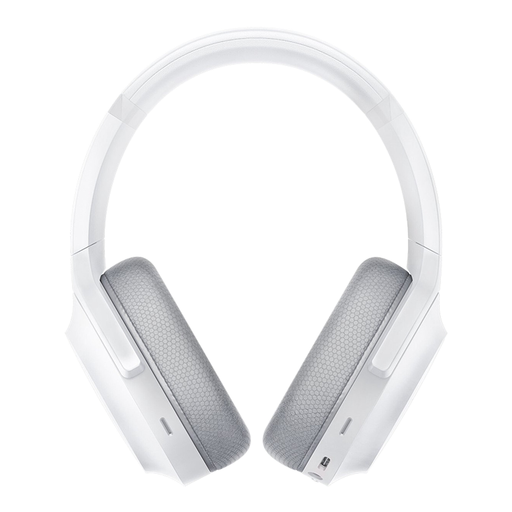
Razer Barracuda wireless gaming headset, Mercury White

Razer Barracuda wireless gaming headset, Mercury White

A wireless option if you want to play on one of the platforms listed for this version; check the connection and microphone controls for your setup.

The product title lists PC, PlayStation, Switch and Android. Wireless use requires charging.

View at Joybuy

Razer BlackShark V2 X 7.1 wired gaming headset, black

Razer BlackShark V2 X 7.1 wired gaming headset, black

A wired option if your device has a suitable connection and running a cable from your seat is practical.

The product title describes a gaming headset for multiple platforms. Wired use requires a suitable port.

View at Joybuy

HyperX Cloud III wired gaming headset for PC, PS5 and Xbox Series X|S, black

HyperX Cloud III wired gaming headset for PC, PS5 and Xbox Series X|S, black

A wired option if you play on one of the listed systems and are within reach of a suitable connection.

HyperX lists 3.5 mm, USB-A and USB-C connections for the wired Cloud III. Check which connection supports the features you want on each device. Wired use requires a suitable port.

View at Joybuy

Frequently asked questions

Does my headset need to connect to the television?

Not necessarily. Work out where your console or PC processes game audio and microphone input: a suitable wired headset can connect to an appropriate port, while PlayStation pairs wireless headsets with the console via a USB adapter and Xbox describes direct pairing for its own wireless headset. Check that your device and the exact headset are compatible.

How do I pair a compatible wireless PlayStation headset?

For the pairing method described, PlayStation recommends charging the headset, connecting the supplied USB adapter to the PS5 and switching on the headset. For a headset from another brand, follow the instructions for the exact version.

How can I reduce the risk to my hearing during long gaming sessions?

Keep the volume low and take regular breaks; according to the World Health Organization, listening risks depend on both sound level and duration of exposure. The WHO example of up to 40 hours per week at 80 dB is a guideline for listening exposure, not a product specification or a guaranteed safe volume for every headset.

Should I buy an extended guarantee if the seller mentions a manufacturer’s guarantee?

No, extra cover isn’t a legal requirement when buying. The Government of the Netherlands states that you have a statutory guarantee in the Netherlands, with no fixed statutory guarantee period; a manufacturer’s guarantee or extra cover you buy is in addition to this. Compare the additional cover you’ll actually receive.
