
Team player who uses voice chat a lot
You often share information during matches, so you’ll want a microphone that works well, easy-to-use mute controls and a connection that supports voice chat on your device.


Start with the connection to your gaming device and what matters most to you during a match: keeping track of in-game sounds, communicating clearly or staying comfortable. Wired gaming means no battery to charge, but you do have a cable to contend with. Wireless gives you more freedom to move, provided the receiver and exact model variant work with your platform.
You often share information during matches, so you’ll want a microphone that works well, easy-to-use mute controls and a connection that supports voice chat on your device.
You wear your headset for long stretches and want to consider the fit and ear cushions, rather than relying only on the audio terminology on the packaging.
You may use more than one device, so you’ll want to check the exact connections and model variant.
| What to consider | What should you check? | Who is this important for? |
|---|---|---|
| Picking up in-game cues | Check which audio features work with your platform, game and any software you use. Don’t rely on a surround sound label alone. | If I want to pick up important in-game sounds during arena matches, I check that the audio features work with my own set-up. Around 33% of consumers say game audio is their top buying priority. |
| Clear team chat | Check the microphone connection, its position and how to mute it. Make a test recording in your usual gaming spot after set-up. | If my teammates need to hear me clearly during a match, I focus on the microphone and mute controls. Around 27% of consumers put team chat first. |
| Comfort during long matches | Look at the adjustability and material of the ear cushions. The stated weight won’t tell you how a headset will feel when you wear it. | If I wear a headset for hours at a time, I want it to feel comfortable for me. Around 20% of consumers put comfort first when choosing. |
| Connection and compatibility | Compare the connections with your device and check the full model name, receiver, and support for voice chat and the features you want. | If I have a specific gaming device or use several devices, I want to be sure the connection and model variant are right for me. Around 20% of consumers make connection and compatibility their top priority. |
Virtual surround sound is processed by software. Its availability and performance can depend on the platform, software and game. Razer states that the 7.1 feature on the BlackShark V2 X is only available on Windows 11.
Check which audio features work on your platform, and don’t base your choice on the channel count alone.
For wireless Xbox use in the Arctis Nova 5 series, SteelSeries specifically names the Nova 5X.
Before buying, compare the full model name, connection and supported devices.
SteelSeries describes the Arctis Nova 5 as switching between 2.4 GHz and Bluetooth. This doesn’t mean that audio from both sources is mixed at the same time.
If you want to hear game audio and phone audio at the same time, check that the exact model explicitly supports this feature.
The Cloud III is a wired comparison model for a dedicated gaming set-up, with a detachable microphone.
The BlackShark V2 X is a wired option with an adjustable microphone and closed-back ear cups.
The Arctis Nova 5 Wireless is worth considering if you want to switch between a 2.4 GHz receiver connection and Bluetooth.
According to Logitech G, the PRO X 2 LIGHTSPEED offers a wireless option with Bluetooth and a wired 3.5 mm connection.
This selection includes a wireless headset for PlayStation and wired models. Check that the connection and model variant suit your device.
 No image available
A wireless option for a PlayStation set-up.
The product description mentions a wireless connection via a base station, a flexible microphone and controls for game and chat volume.
The description also mentions spatial audio and a physical mute button.
 No image available
A wired choice if you’d rather not charge your headset while you play.
The product description mentions a detachable microphone, a 3.5 mm connection and 50 mm drivers.
It also mentions volume and mute controls on the ear cup. The product name states that it is officially licensed for PS5.
 No image available
A wired option for team chat while playing Switch games.
The product description mentions 40 mm drivers, a 3.5 mm connection and a flip-up microphone that mutes when raised.
The product name states that it is compatible with Nintendo Switch, Switch Lite and Switch OLED.
 No image available
A wired headset with a flip-up microphone that mutes when raised.
The product description mentions 40 mm drivers, an adjustable headband and volume controls on the ear cup.
The product name states that it has a 3.5 mm connection and supports PC, PS5, Switch 2 and Xbox Series X|S.
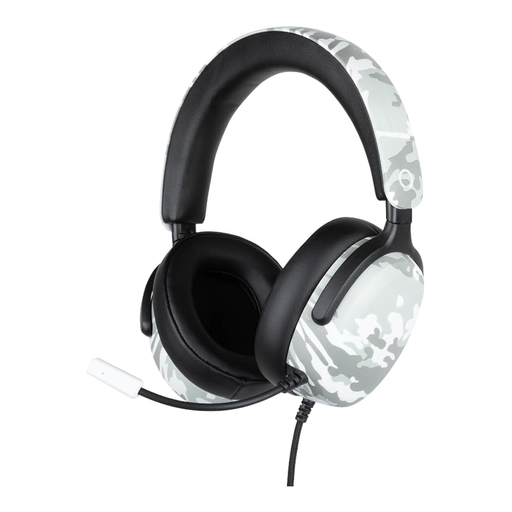 No image available
A wired option with a microphone for communicating during matches.
The product description mentions 40 mm drivers, a flexible microphone, over-ear cushions and an adjustable headband.
The product name states that it has a 3.5 mm connection, a 1.5 m cable and supports PS5, Switch 2 and Xbox Series X|S.
No, check the exact model variant. For wireless Xbox use in the Arctis Nova 5 series, SteelSeries specifically names the Nova 5X. Don’t assume the Nova 5 or Nova 5P offer the same support.
Keep an eye on both the volume and how long you listen for. The World Health Organization explains that safe listening time decreases as sound levels rise. Its example of 80 dB for up to 40 hours a week is health guidance, not a product specification or a legal volume limit for these headsets.
For online purchases, you generally have a statutory cooling-off period of up to 14 days after delivery; ACM ConsuWijzer explains the exceptions. You also have statutory rights against the seller if a product doesn’t meet what you could reasonably expect when used normally. These rights aren’t automatically limited to the length of the manufacturer’s warranty.
Wireless radio equipment placed on the EU market is covered by the EU framework for radio equipment, which includes requirements such as safety and electromagnetic compatibility. The European Commission explains this framework. According to Your Europe, the CE mark is the manufacturer’s declaration that the product complied with the applicable EU rules when it was placed on the market. It isn’t a separate certification for gaming audio.