Start with your PC or console’s audio output and the distance to where you sit. A large screen doesn’t automatically determine how your headset connects. A wired headset is suitable if you have a compatible connection and enough cable length; choose wireless only if the receiver or Bluetooth connection works with your device. Consider comfort separately: specifications and sound claims can’t tell you which headset will sound good to you.
Who is this guide for?
Player on the sofa
If you play on a PC or console some distance from the screen, check where the audio comes from and whether a cable or USB receiver will reach your seat. PlayStation Support explains the audio output settings on PS5; also check your headset’s connection and compatibility.
Dialogue-focused player
If voices and music are your priority, look for a comfortable stereo setup and listen to the sound on your own device. A virtual surround sound claim or driver size doesn’t, by itself, prove that dialogue will sound clearer to you.
Player who enjoys long sessions
If you wear your headset for long periods, consider pressure, weight and ear cushions, and try the fit for yourself. The materials and weights listed by HyperX and Razer are product specifications, not a guarantee of personal comfort.
What should you look for?
Wired via 3,5 mm or USB
A good fit if: your device has a compatible audio output and the cable reaches where you sit.
Bear in mind: the cable length and where your PC, console or controller is positioned. You won’t need to charge the headset with this option.
Wireless via USB receiver
A good fit if: you want to sit without a cable and the receiver works with your device and platform.
Bear in mind: charging, an available USB port and support for the exact headset variant.
Bluetooth
A good fit if: the device playing the game’s audio supports Bluetooth audio.
Bear in mind: Bluetooth on the headset doesn’t automatically mean your TV or console can act as the audio source. Switching between connections also isn’t the same as hearing two sources at once.
| What to consider |
What should you check? |
Who is this important to? |
| Connection and platform |
Check which output on your PC or console provides headset audio, and whether the exact model variant works with your platform. |
If I play from the sofa, I want to know that the cable or receiver will reach my audio device. Around 36% of consumers put connection and platform compatibility first. |
| Dialogue and music |
Listen to the sound from your own audio source; don’t treat sound profiles or surround claims as proof of improved speech clarity. |
If I mainly focus on dialogue and music, I want sound that I enjoy on my device. Around 29% of consumers put dialogue and music first. |
| Comfort |
Consider the fit, pressure, weight and ear cushions; product specifications can’t fully predict how a headset will feel on you. |
If I play for long periods, I want my headset to stay comfortable. Around 21% of consumers put comfort first. |
| Freedom to move |
Check which wireless connections your audio source supports and whether you want to switch between devices. |
If I want to play without a cable or switch between compatible devices, I check how the connection works. Around 14% of consumers put freedom to move and switching between devices first. |
Common buying mistakes
-
Assuming the headset must connect directly to the big screen
Your PC or console may be the source of the game audio. Connecting the picture to your TV doesn’t confirm that the TV also sends audio to your headset.
Before buying, note which device provides the sound and which headset output or supported USB connection you’ll use with it.
-
Choosing a SteelSeries Nova 5 without the right Xbox variant
SteelSeries specifically lists the Nova 5X as the Xbox version; the name Nova 5 alone doesn’t confirm compatibility.
If you use Xbox, check the full model name and the receiver included in the box.
-
Confusing switching between connections with listening to both at once
SteelSeries says that with Quick Switch on the Nova 5, only one of the two wireless connections can be active at a time.
Check whether you need two audio sources at once and whether the exact headset variant supports this.
-
Confusing an extended warranty with your statutory rights
ACM ConsuWijzer distinguishes between an optional extra warranty and your statutory rights if a product doesn’t meet what you were entitled to expect from it.
Before deciding, check what any extra cover adds and who is responsible for what.
Relevant brands
HyperX
The wired Cloud III is an option if a compatible connection is available where you sit.
- For the wired Cloud III, HyperX specifies 3,5mm, USB-C and USB-A connections, plus controls on the earcup.
- Check that the cable and connection you choose suit your setup. Don’t confuse this version with the Cloud III Wireless or Cloud III S Wireless.
Logitech G
The G435 is a lightweight wireless option for the PC and PlayStation setups listed by Logitech.
- Logitech lists LIGHTSPEED, Bluetooth and a stated battery life of up to 18 hours on a full charge.
- These features don’t confirm that your TV can act as the audio source or that the fit will be comfortable for you.
Razer
The Barracuda X is worth considering if you want to use a compatible wireless connection and Bluetooth with another device.
- Razer lists 2,4 GHz, Bluetooth, a detachable microphone and a stated weight of 250 g for the Barracuda X.
- Check the exact version and receiver. A manufacturer’s sound quality claim isn’t an independent listening test.
SteelSeries
The Arctis Nova 5 series is worth considering if you’re looking for wireless platform support and customisable profiles; SteelSeries lists the 5X as the Xbox version.
- SteelSeries states that the Nova 5 has up to 60 hours of battery life and describes its Quick Switch feature.
- According to SteelSeries Support, 2,4 GHz and Bluetooth can’t play audio at the same time on the Nova 5. Check the exact model variant.
Gaming headsets at Joybuy
This selection at Joybuy includes wired 3,5mm headsets and wireless models. For each headset, check that the connection and platform support suit your audio source and where you sit.
 No image available
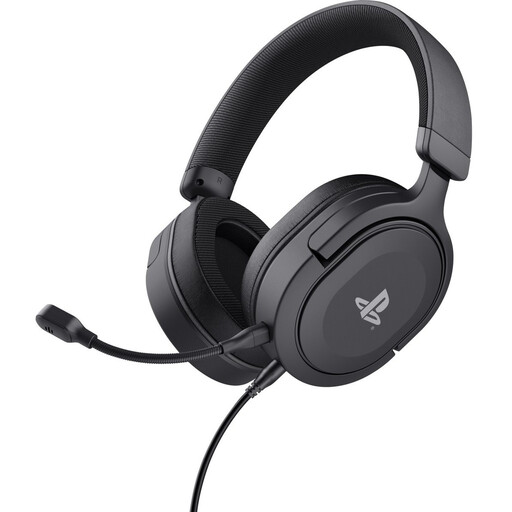
Trust GXT 498 Forta, wired PS5 headset
A good fit if you’re looking for a wired headset with a 3,5mm connection for a listed PS5 or PS4 setup; check where the audio is output from.
The cable is 1,2 m long. The description lists stereo sound, volume and microphone mute controls on the earcup, and a weight of 253 g.
View at Joybuy
 No image available
Turtle Beach Airlite Fit, wired for Switch, Black/White
A good fit if you’re looking for a wired headset for Nintendo Switch, Switch Lite or Switch OLED; check that the connection suits how you play.
The description lists a 3,5mm connection, on-headset volume control, a flip-to-mute microphone and mesh ear cushions.
View at Joybuy
 No image available
Turtle Beach Stealth 600 Gen 3 Xbox, Purple
A good fit if you’re looking for a wireless gaming headset; check that the exact version and connection are suitable for your platform.
The product name lists Xbox, PlayStation, PC, Steam Deck and mobile. The description lists a flip-to-mute microphone and memory foam ear cushions.
View at Joybuy
 No image available
Turtle Beach Stealth 500 Xbox, Black
A good fit if you want to connect to Xbox, PC or Nintendo Switch in docked mode via a USB receiver; check your device’s connection options.
The description lists QuickSwitch between 2,4 GHz and Bluetooth, with Bluetooth specified for mobile devices. It also mentions a flip-to-mute microphone and memory foam ear cushions.
View at Joybuy
 No image available
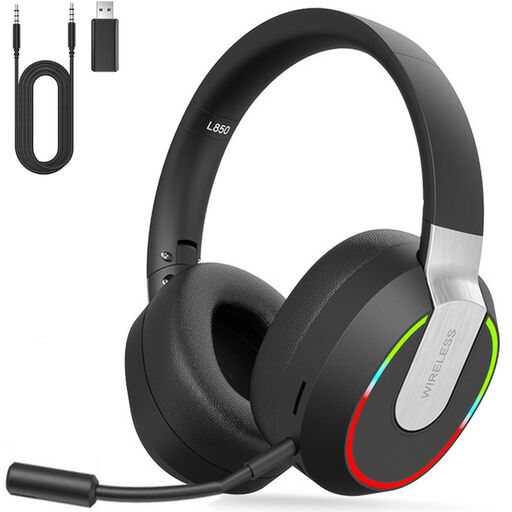
2,4GHz wireless gaming headset for PC, PS4, PS5, Mac and Switch
A good fit if you’re looking for a wireless connection via USB receiver for one of the listed platforms; check the exact connection and how it works with your device.
The description also lists Bluetooth, a wired 3,5mm mode, an adjustable headband and memory protein ear cushions.
View at Joybuy
Frequently asked questions
How do I check whether my PS5 is playing audio through the headset?
On PS5, go to Settings > Sound > Audio Output and select your preferred output device. Also check which audio is sent to the headphones; the headset manufacturer must confirm compatibility for headsets made by other brands.
Can I hear game audio and Bluetooth audio at the same time with the SteelSeries Nova 5?
No. According to SteelSeries, Quick Switch allows only one of the two connections to be active at a time. This limitation applies to the Nova 5; it isn’t a general rule for all wireless headsets.
How can I listen safely during long sessions?
The World Health Organization advises keeping the volume low, for example at no more than 60% of the maximum, and taking regular listening breaks. This is listening advice, not a legal product threshold.
What rights do I have in the Netherlands if an online headset doesn’t suit me or breaks?
According to ACM ConsuWijzer, online purchases generally come with a statutory 14-day cooling-off period after delivery, although you should check the exceptions in advance. You also have statutory rights if a product, when used normally, doesn’t meet what you were entitled to expect from it; the retailer is responsible for this.


