
Players who enjoy long sessions
If you read for long periods at a time, consider the fit, ear cushions, weight and how easy the volume controls are to reach. The stated weight alone won’t tell you whether a headset is comfortable.


Choose a headset that connects to your gaming device and feels comfortable to wear during long reading sessions. It’s also worth checking that the volume and microphone controls are easy to reach. A wired headset means you won’t need to charge a headset battery, while a wireless one gives you more freedom to move but requires a compatible connection and charging. If your game has voice acting, check how clear the dialogue sounds for yourself at a modest volume. Driver size and surround sound don’t prove that voices will sound better.
If you read for long periods at a time, consider the fit, ear cushions, weight and how easy the volume controls are to reach. The stated weight alone won’t tell you whether a headset is comfortable.
In visual novels with voiced scenes, it’s important to be able to follow voices clearly at a modest volume. Check the balance with the music for yourself; product specifications aren’t a test of speech clarity.
If you play on more than one device or want to move around without a cable, check the connection, wireless support and any charging requirements for each device.
Start with the connection and fit, then compare the controls and weigh up wired use against wireless.
| What to consider | What to look for | Who should pay particular attention? |
|---|---|---|
| Comfort during long sessions | Compare the weight, adjustability and ear cushions; try the headset on if possible. | If I read for long periods at a time, I want a fit that stays comfortable. Around 31% of consumers put comfort first. |
| Voiced dialogue | Listen to your own game at a modest volume and, if needed, check the balance between voices and music. | When I want to follow voices in a visual novel, I look for clear dialogue without having to turn the volume up unnecessarily. Around 25% of consumers prioritise dialogue audio. |
| Connection to your device | Check whether your device supports 3.5 mm, USB or the wireless connection you need. If it has separate audio and microphone ports, see whether you’ll need a splitter. | I want to know in advance whether the headset will work with my PC or console, including the microphone connection. Around 19% of consumers start by checking device compatibility. |
| Controls in the dark | Check where the volume and mute controls are, and exactly what they mute. | If I want to adjust the volume or mute the microphone while playing, I want to find the right control easily. Around 13% of consumers put easy-to-use controls first. |
| Freedom to move | Check which wireless connection works with your device and remember to factor in charging. | If you want to get up or switch devices without unplugging a cable, you’ll also need to consider the connection and charging requirements. Around 12% of consumers prioritise freedom to move. |
Specifications about drivers or positional audio don’t show how clearly you’ll hear voices in your visual novel.
First check whether the game has voice acting, then listen for yourself at a modest volume.
According to SteelSeries, the PC and console versions of the Arctis Nova 1 differ in whether a splitter is included.
Before buying, check the exact version, your device’s ports and what’s included in the box.
According to ACM ConsuWijzer, the seller remains responsible if a product doesn’t perform as you could reasonably expect under normal use.
Keep your proof of purchase and contact the seller if you need to make a claim under your statutory guarantee.
The wired G335 is an option if you’re looking for an adjustable headband, a 3.5 mm connection and on-earcup controls.
The wired Cloud III may suit you if you need different connection options for compatible devices.
The wired GXT 415 Zirox is a 3.5 mm option with a fold-away microphone.
The wired BlackShark V2 X is an option if you’re looking for a closed-back design.
The Arctis Nova 1 has a wired 3.5 mm connection, while the separate Arctis Nova 5 Wireless is designed for wireless use.
This selection includes wired headsets with a 3.5 mm connection and a wireless option, so you can choose a connection to suit your gaming device and how you play.
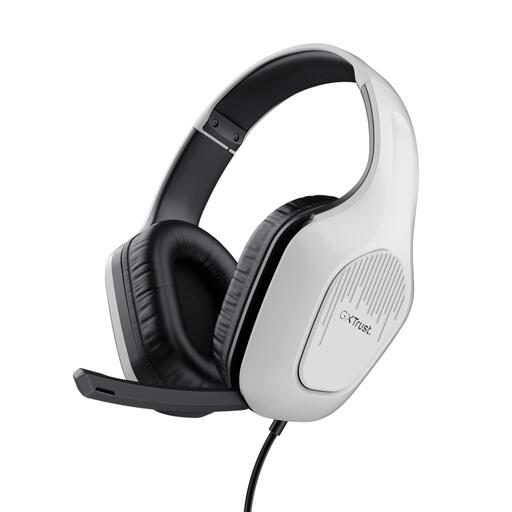 No image available
A wired option with on-headset controls, for easy access to the volume and microphone mute.
3.5 mm connection; stated weight 244 g; adjustable headband; 2 m cable; flip-up microphone.
Check that your gaming device has a compatible 3.5 mm connection.
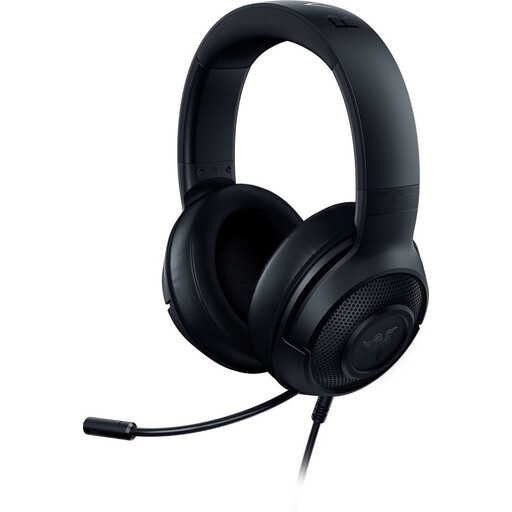 No image available
A wired option to compare if you’re looking for an adjustable headband and microphone mute.
3.5 mm connection; stated weight 230 g; adjustable headband.
The product description states that Windows 10 64-bit is required for the surround feature mentioned.
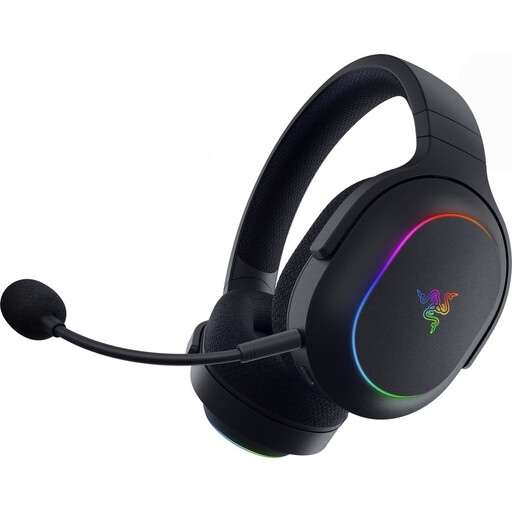 No image available
A wireless option if you want the freedom to move while playing and can use the connection with your device.
The product description lists 2.4 GHz and Bluetooth support; volume and mute buttons on the headset; stated weight 285 g.
The stated battery life is up to 70 hours with the lighting switched off; remember to factor in charging.
 No image available
A wired option if you’re looking for on-earcup controls and a 3.5 mm connection.
Stated weight 240 g; volume and microphone mute controls on the earcup; passive noise isolation according to the product description.
The cable limits your freedom to move, and a stated isolation feature isn’t an independent measurement.
 No image available
A wired option to consider if you need connections for several compatible devices.
The description lists 3.5 mm, USB-A and USB-C, memory foam ear cushions, and volume and microphone mute controls on the earcup.
Choose the connection that suits your gaming device.
Not necessarily. First, check which audio features your game uses and whether you need a microphone. Don’t let a claim about positional audio outweigh fit, connection and easy-to-reach volume controls.
Check whether your PC has one combined port or two separate 3.5 mm ports. SteelSeries states that the PC version of the Arctis Nova 1 includes a Y-splitter, while the console versions don’t. So check which version you’re looking at and select the correct audio input if needed.
Keep the volume modest and take regular breaks. The World Health Organization points out that sound level, listening time and frequency of exposure all matter. The volume setting alone doesn’t measure the sound level in your ears.
For online consumer purchases, there is generally a 14-day cooling-off period from the date of delivery, with some exceptions depending on the circumstances, according to ACM ConsuWijzer. If a product doesn’t perform as you could reasonably expect under normal use, the seller is responsible under the statutory guarantee; a manufacturer’s warranty doesn’t replace it.