Who is this for?

Players who enjoy long sessions

If you play for hours at a time, look at the adjustability, headband and ear cushions. HyperX describes the Cloud III as having memory foam in its headband and ear cushions; SteelSeries lists four adjustment points for the Arctis Nova 1. These details don’t automatically tell you how a headset will fit your head.

Fans of stories and music

If you mainly want to follow dialogue and music, try the sound with content you know well. When you play solo, team chat may matter less than the fit and how voices and music sound.

Players who switch between devices

If you switch between a PC, console or mobile device, check the connection or wireless connectivity for each headset variant. Compatibility listed for one model doesn’t automatically mean another variant will work with your device.

What should you look for when choosing?

What to consider What should you check? Who should prioritise this?
Comfort Compare the adjustability, headband and ear cushions. SteelSeries lists the Arctis Nova 1 as weighing 253 g and having four adjustment points, but that doesn’t tell you how the headset will fit you. If you play for a long time, you’ll want a headset that stays comfortable. Around 40% of consumers give comfort the highest priority.
Dialogue and music Listen to familiar voices and music if you can. Don’t choose features for competitive gaming based only on a label such as surround sound. If you mainly follow the story and soundtrack, what matters is how they sound to you. Around 30% of consumers prioritise dialogue and music.
Connection Check your device’s connections or wireless support, as well as the exact headset variant. HyperX says the Cloud III Wired has 3.5 mm, USB-C and USB-A connections; the Arctis Nova 1 uses 3.5 mm. If your first concern is whether a headset will work with your gaming device, compatibility is your top priority. Around 20% of consumers put this check first.
Freedom to move Consider whether you’ll want to leave your seat while playing. A cable can restrict your movement; a wireless headset needs charging, and you’ll need to check how it connects. If you want to move around while playing without a headset cable, that freedom matters more. Around 10% of consumers make freedom of movement their top priority.

Common buying mistakes

  • Assuming a low stated weight means a headset will be comfortable

    A headset’s weight or number of adjustment points won’t tell you exactly how it will feel on your head. The headband, ear cushions and your personal fit all play a part.

    Compare these features and, if possible, try the headset before you decide.

  • Choosing a wireless headset without checking how it connects

    Wireless doesn’t mean every model supports every connection method you might want. Logitech says the G733 uses LIGHTSPEED.

    Check that the connection used by the exact headset variant works with your gaming device.

  • Confusing the manufacturer’s warranty with your full legal rights

    A manufacturer’s warranty is separate from your legal rights. ACM ConsuWijzer explains that what you can reasonably expect from a product helps determine what should happen if it develops a fault.

    Keep your proof of purchase and contact the seller if there’s a fault. Don’t base your assessment solely on the manufacturer’s warranty.

Brands to consider

HyperX

The Cloud III Wired is a wired option to compare if you’re weighing up connection options and ear cushions.

  • HyperX lists memory foam and 3.5 mm, USB-C and USB-A connections for this model.
  • The headset is still wired, and the features listed aren’t an independent comfort test.

SteelSeries

The Arctis Nova 1 is a wired 3.5 mm option to compare if adjustability and weight matter to you.

  • SteelSeries lists the Nova 1 as weighing 253 g and having four adjustment points.
  • Check that the 3.5 mm connection is suitable for your device; weight alone doesn’t determine how it will fit.

Logitech G

The G733 is a wireless option for anyone who values freedom to move.

  • Logitech lists LIGHTSPEED and battery life of 29 hours without lighting or 20 hours with lighting.
  • These are the manufacturer’s figures. Check that LIGHTSPEED works with your device, and remember that the headset will need charging.

Razer

Razer positions the BlackShark V2 X, a wired 3.5 mm option, for competitive gaming.

  • Razer lists a cardioid microphone and passive noise isolation for this model.
  • For solo visual novels, microphone features don’t have to be your main reason for buying. Also consider the fit and the sound you’re looking for.

Gaming headsets at Joybuy

This Joybuy selection includes gaming headsets suited to needs such as long gaming sessions and wired gaming. Check each model’s connection, compatibility and variant before you choose.

Razer Kraken V3 X headset, black

Razer Kraken V3 X

An option to consider if you’re looking for a gaming headset for PC and long gaming sessions.

View at Joybuy
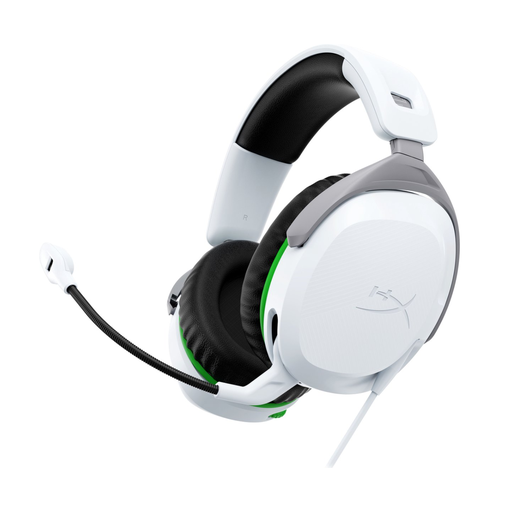
HyperX CloudX Stinger II, wired, white, for Xbox Series X|S and Xbox One

HyperX CloudX Stinger II, wired, white, Xbox Series X|S/Xbox One

A wired option to compare if you play on Xbox Series X|S or Xbox One.

The product name specifies a wired version for these Xbox models.

View at Joybuy

HyperX Cloud Stinger II, wired, white, for PS5 and PS4

HyperX Cloud Stinger II, wired, white, PS5/PS4

A wired option to consider if you play on PS5 or PS4.

The product name specifies a wired version for these PlayStation models.

View at Joybuy

Corsair HS55 Stereo gaming headset, white, 3.5 mm

Corsair HS55 Stereo, white, 3.5 mm

An option to compare if you’re looking for a stereo headset with a 3.5 mm connection.

The product name specifies stereo sound, a white colour and a 3.5 mm connection.

View at Joybuy

Logitech G G432 7.1 Surround Sound, wired gaming headset

Logitech G G432 7.1 Surround Sound, wired

A wired headset to consider if you want to compare the listed connections with your gaming device.

The product name specifies 7.1 Surround Sound and a wired version.

View at Joybuy

Frequently asked questions

Do I need a microphone or virtual surround sound for a visual novel?

Not necessarily if you play solo. First, consider whether dialogue and music are comfortable to listen to. A microphone is mainly for voice communication, while virtual surround sound may be useful if you want directional audio.

How can I avoid choosing the wrong connection or headset variant?

Compare your device’s connections and wireless support with the specifications for the exact headset variant. HyperX says the Cloud III Wired has 3.5 mm, USB-C and USB-A connections; the Arctis Nova 1 uses 3.5 mm, while the G733 uses LIGHTSPEED.

How can I listen more safely during long sessions?

Keep the volume down and factor your total listening time into your choice. The World Health Organization explains that safe listening time decreases as sound levels rise. Up to 40 hours a week at 80 dB is an example from its guidance, not a measured level for these headsets.

What are my rights when buying online in the Netherlands?

According to ACM ConsuWijzer, online purchases usually come with a 14-day cooling-off period after delivery, subject to legal exceptions. You also have statutory warranty rights: if a product breaks sooner than you could reasonably expect under normal use, the seller must offer an appropriate solution.
