
Team player in a shared room
You want to be easy to understand, mute your microphone quickly and avoid having to turn up the volume when there’s noise around you. VeiligheidNL recommends a well-fitting headset to help keep background noise out.


Start with a microphone you can easily mute during team practice, then check that the connection and features work with your device. A wired headset is practical if you play in one place and don’t want to recharge it; wireless gives you more freedom to move around, but you’ll need to consider the receiver, battery and platform version. VeiligheidNL says that a well-fitting headset can reduce background noise, making you less likely to turn up the volume.
You want to be easy to understand, mute your microphone quickly and avoid having to turn up the volume when there’s noise around you. VeiligheidNL recommends a well-fitting headset to help keep background noise out.
You’ll want a comfortable fit that lasts and a listening volume you can keep at a manageable level over repeated use.
You might use a PC and a console, for example, and want to check which audio and microphone features are available with each connection.
A good fit if: you practise in one place, don’t want to recharge your headset and the connection works with your PC or controller.
Keep in mind: the cable restricts your movement, and USB features won’t necessarily work over 3.5 mm or with a console.
A good fit if: you want to be able to get up during practice and the receiver or connection works with your gaming device.
Keep in mind: charging, the receiver and the platform version; also check the conditions under which the battery life was measured.
| What to consider | What should you check? | Who is this important for? |
|---|---|---|
| Speech and muting | Check the microphone position and physical mute control, then make a test recording in your chat app. | When practising with teammates, you’ll want to speak clearly and mute quickly when needed. Around 33% of consumers say clear speech and muting are their main reasons for buying. |
| Fit and listening volume | Look at the ear space, headband and whether the fit feels comfortable to you; also consider whether you can listen comfortably at a low volume. | For regular practice, you’ll want a comfortable headset that lets you keep the volume at a manageable level. Around 27% of consumers give comfort and listening volume top priority. |
| Connection and features | Check your device’s port or receiver, and the separate requirements for microphone and software features. | If you use your headset with different devices, you’ll want to know in advance whether both audio and the microphone work with your gaming device. Around 20% of consumers put device compatibility first. |
| Connection and use | Compare wired and wireless options. For a wireless model, check the receiver and the conditions attached to the battery-life estimate. | A wired headset may be appealing if you play in one place; if you want to get up, freedom to move may matter more to you than having to recharge. Around 20% of consumers say their main consideration is the connection type and cost of use. |
For the Logitech G432, Logitech says DTS Headphone:X 2.0 and EQ are only available on Windows with G HUB. So don’t assume these features will also be available on a console.
Check the requirements for your exact model and gaming platform. Assess speech and standard stereo separately from any software features.
The fit partly determines how much noise from the room you can hear; it doesn’t automatically tell you what your microphone picks up and sends to your teammates.
Assess the fit separately and make a test recording to check the microphone position and speech quality in your chat app.
Logitech’s stated battery life for the G733 is based on 50% volume with the lighting switched off. Your own use may involve different conditions.
Check the stated test conditions and think about how you’ll charge the headset before comparing wireless and wired options.
The wired Cloud III is worth considering if you want to compare connections for PC and console.
The wired G432 and wireless G733 demonstrate the different connection options available from the same brand.
The Arctis Nova 5 Wireless is worth considering if switching between a gaming connection and Bluetooth matters to you.
The wired Quantum 200 is a model to compare if you want a flip-up microphone.
The console versions of the BlackShark V2 X are worth considering if your controller has a 3.5 mm connection.
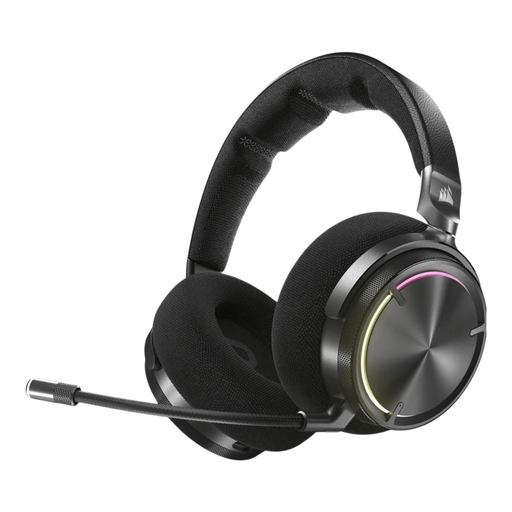
This selection of Joybuy products includes wired and wireless headsets for team communication. Check which connection and microphone features work with your device for each model.
 No image available
A good fit for team chat if you’re looking for a wireless headset with microphone controls.
The product description lists RF wireless, Bluetooth, and mute and volume controls. RF is listed for PC, PS4 and PS5; Bluetooth is listed for mobile devices.
 No image available
The flip-to-mute microphone is useful for team chat when you want to mute quickly.
The description lists 2.4 GHz RF, Bluetooth, a USB receiver and memory foam ear cushions. The stated microphone noise reduction via NVIDIA Broadcast requires a compatible NVIDIA GeForce RTX graphics card.
 No image available
This wired headset may suit you if you want a flip-up microphone for team chat.
The description lists a directional microphone, a 3.5 mm connection and a USB audio adapter. According to the description, QuantumSURROUND is only available on PC.
 No image available
The flip-to-mute microphone is useful for team chat when you sometimes need to mute quickly.
The product title lists wireless use and an Xbox version. The description mentions a 2.4 GHz USB receiver and Bluetooth for other listed devices; check that your device is supported.
 No image available
This wired headset may suit practice on a device with a 3.5 mm connection and a physical mute function.
The product title lists a flip-to-mute microphone and use with devices including Switch, PC and mobile devices. The description mentions mesh ear cushions; check your device’s connection.
Not necessarily. Logitech says DTS Headphone:X 2.0 and EQ for the G432 are only available on Windows with G HUB. Check the requirements for your exact model and gaming platform.
Connect the headset using a supported port or receiver, select your preferred input and output in your system or chat app, then make a test recording. Also check whether a physical mute control is switched on if the microphone isn’t picking up any sound.
A well-fitting over-ear headset can reduce background noise, making you less likely to turn up the volume. Keep the volume at a manageable level: a snug fit won’t automatically stop you from listening too loudly.
According to ACM ConsuWijzer, consumers generally have a statutory cooling-off period of up to 14 days after delivery for an online purchase, with some exceptions. A product must also meet what you could reasonably expect; if it has a fault covered by the statutory guarantee, the seller is responsible for putting things right. This doesn’t mean every headset comes with a fixed two-year guarantee period.