First, choose a headset connection that supports both game audio and microphone input on your console or PC. A wired headset can be a practical choice if you’re close to a suitable connection and don’t want to manage a headset battery. Wireless gives you more freedom to move, but requires a compatible connection and charging. Manufacturer information about a microphone doesn’t automatically tell you how clear your voice will sound in your room.
Who is this guide for?
Team player who often communicates
You want to give instructions and mute your microphone quickly. Check that the microphone works with your platform and that you can easily see or feel when it’s muted. HyperX and PlayStation describe the controls and mute indicators on their named models; this isn’t an independent test of microphone clarity.
Console gamer on the sofa
You play on a big screen and want a connection that suits where you sit. Compare a cable to the controller with a wireless connection supported by your console. Logitech G, Xbox and PlayStation describe different connection options for their products.
Player with multiple systems
You practise on more than one console or PC and want to know whether both chat and game audio work with each device. Check the exact model variant and the adapters included. For example, SteelSeries lists different connections for the Arctis Nova 7X Wireless and the separate 7X Gen 2.
What should you look for?
First, find out which connection supports both audio and chat on your system. Then compare the microphone controls and the practical distance to your controller or console.
Wired via a suitable connection
Choose this if: you sit close to a controller or another suitable device and don’t want to manage a headset battery.
Bear in mind: the cable limits how freely you can move; check that the microphone works through the connection you’re using.
Wireless for one console
Choose this if: you mainly play within one ecosystem and want a wireless connection supported by it.
Bear in mind: the connection may require a different pairing method or adapter for each console, and the headset needs charging.
Wireless for multiple devices
Choose this if: you switch between systems and the exact model variant supports connections to those devices.
Bear in mind: Bluetooth audio for a phone doesn’t automatically mean a console supports the microphone over Bluetooth.
| What to consider |
What should you check? |
Who should pay particular attention? |
| Microphone and mute |
Check microphone input, mute controls and any mute indicator on your platform. HyperX and PlayStation describe the controls on their named models. |
If I want to speak clearly during team practice and mute quickly, I put the microphone controls first. Around 29% of consumers prioritise clear speech and easy-to-reach controls. |
| Audio and chat compatibility |
Check that both game audio and the microphone work with your chosen connection, console and chat app. Nintendo states that Bluetooth microphone input isn’t supported on Switch or Switch 2. |
When I want to speak and listen on my own console or PC, I check both functions separately. Around 29% of consumers prioritise audio and chat compatibility. |
| Freedom to move |
Check where the cable or dongle connects and whether the setup is practical from where you sit. Xbox describes direct pairing with supported consoles; wired models need a cable route that works for you. |
When I play from the sofa, I don’t want to be limited by the distance to my controller or console. Around 24% of consumers name freedom to move as their top buying priority. |
| Fit for longer sessions |
Look for adjustability and ear cushions; material descriptions can’t predict how a headset will feel on your head. HyperX lists memory foam for the Cloud III. |
During longer practice sessions, I want a fit that stays comfortable for me. Around 18% of consumers rank wearing comfort above the other buying priorities listed. |
Common buying mistakes
-
Assuming surround sound features work the same on every device
According to Logitech, DTS Headphone:X 2.0 and EQ presets for the Logitech G432 are only available on Windows with G HUB. A 3.5mm connection to a console doesn’t confirm that these PC features are available on it.
Compare the features available with the connection and operating system you’ll actually use.
-
Confusing Bluetooth audio with a working team microphone
Nintendo states that microphone input through a direct Bluetooth audio connection isn’t supported on Switch or Switch 2. So Bluetooth audio alone doesn’t tell you whether your teammates will be able to hear you.
Check audio output and microphone input separately for your console and chat app.
-
Choosing a wireless headset without checking the connection
The described PULSE Elite connection to PS5 uses the included PlayStation Link USB adapter. According to Xbox, the Xbox Wireless Headset pairs directly with supported Xbox consoles and doesn’t have a 3.5mm connection.
Check the full model name, platform, required port and what’s included in the box.
-
Assuming paid extended cover is your only protection if something goes wrong
In the Netherlands, your statutory guarantee is separate from any extra cover you buy. ACM ConsuWijzer explains that the statutory guarantee period isn’t automatically two years; it depends on how long you can reasonably expect the product to last.
Compare any additional cover with your existing statutory rights before paying for it.
Brands to consider
HyperX
The Cloud III Wired is a wired option with several connections listed by HyperX for use with different devices.
- HyperX lists a 10mm microphone, mute controls and memory foam.
- This manufacturer information doesn’t independently measure microphone clarity or how the headset fits. Check the connection for each device.
Logitech G
The G432 is a wired headset for anyone considering a 3.5mm connection.
- Logitech also lists a USB DAC.
- According to Logitech, DTS Headphone:X 2.0 and EQ presets require Windows and G HUB. Don’t assume these PC features will be available when gaming on a console.
SteelSeries
The Arctis Nova 7X Wireless is worth considering if you’re looking for one wireless headset for several systems listed by the manufacturer.
- SteelSeries lists a USB-C dongle, an included USB-A connector and Bluetooth audio for a mobile device.
- The Arctis Nova 7X Wireless and 7X Gen 2 are separate models. Check which version you’re buying, and don’t assume features apply to both without checking.
Xbox
The Xbox Wireless Headset is designed to pair wirelessly and directly with supported Xbox consoles.
- Microsoft lists controls for balancing game audio and chat.
- This model doesn’t have a 3.5mm connection; according to Xbox, the chat balance dial doesn’t work over Bluetooth.
PlayStation
PULSE Elite is a wireless option aimed at PS5, with a PlayStation Link adapter and microphone controls.
- PlayStation describes pairing with PS5 using the included USB adapter, along with settings including mute controls.
- Check that the adapter fits the connection you want to use. The PS5 instructions don’t confirm compatibility with Xbox.
Gaming headsets at Joybuy
This selection includes wired and wireless gaming headsets for team chat on a console or another supported device. Check the specified version and connection for each product.
 Image unavailable
Trust GXT 498W Forta, wired, white
A wired option if you want to use the headset through a suitable controller connection and mute the microphone quickly.
The product description lists a detachable 3.5mm cable measuring 1.2m, a detachable microphone, and volume and mute controls. The title states that it is officially licensed for PS5 and has 50mm drivers.
View at Joybuy
 Image unavailable
Turtle Beach Stealth 600 Gen 3, Xbox, purple
A wireless headset to consider if you use the specified Xbox version and want to switch between game and Bluetooth audio.
The product description lists a 2.4GHz connection, QuickSwitch and a flip-to-mute microphone. The product title lists Xbox, PlayStation, PC, Steam Deck and mobile devices.
View at Joybuy
 Image unavailable
Turtle Beach Airlite Fit, wired, black/white
A wired option to consider if the 3.5mm connection suits your device and you want to be able to mute the microphone during team chat.
The product title lists a 3.5mm connection, a flip-to-mute microphone, and Nintendo Switch, Switch Lite and Switch OLED. Check the connection and chat function on your device.
View at Joybuy
 Image unavailable
HyperX Cloud III S, black/red
A wireless option to consider if you want to practise without a headset cable and the listed connections suit your devices.
The product description lists 2.4GHz and Bluetooth, a detachable microphone and an LED mute indicator. The systems listed include PC, PS5, PS4 and Nintendo Switch; check the chat function for each device.
View at Joybuy
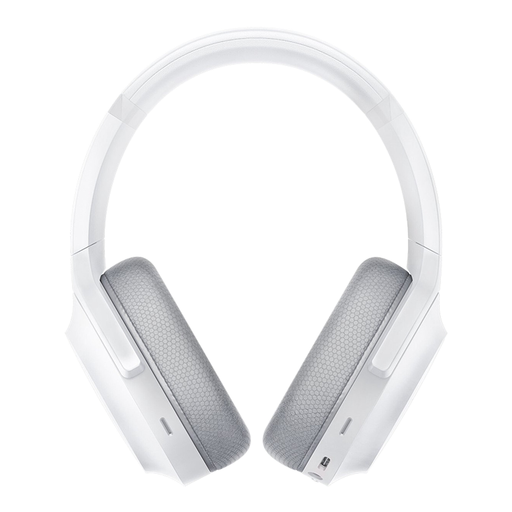 Image unavailable
Razer Barracuda, Mercury White
A wireless headset to consider if on-earcup microphone controls matter to you and the listed devices suit your needs.
The product description lists 2.4GHz and Bluetooth, built-in microphones and a mute control. The devices listed include PC, PlayStation, Switch and Android.
View at Joybuy
Frequently asked questions
Do I need to connect the headset to the big screen?
No, not necessarily. The connections described are for a console, controller or PC. First, work out which device handles your game audio and microphone, then check which connections it supports. A big screen on its own doesn’t confirm chat compatibility.
How do I set up a PULSE Elite for PS5 team chat?
According to PlayStation, connect the included PlayStation Link USB adapter to a USB Type-A port on the PS5 and switch on the headset. Then check the microphone and mute settings; if the mute light is on, the microphone is muted.
Does a Bluetooth headset microphone work directly with Nintendo Switch or Switch 2?
Not through a direct Bluetooth audio connection: Nintendo states that Bluetooth microphone input isn’t supported on Switch or Switch 2. For other connection types, check the specific headset, console and chat app.


