What should you look for?
First, check that the headset supports your gaming platform and preferred connection. Then consider how much isolation, comfort and freedom of movement you need.
| What to consider |
What to look for |
Who is this important for? |
| Hearing quiet in-game sounds |
Check how the ear cups fit and whether the model has ANC for the listener. According to VeiligheidNL, a good fit can help reduce background noise. |
If I want to hear quiet effects without constantly turning them up to drown out room noise, I look for a good fit. Around 36% of consumers put noise isolation first. |
| Connecting to your platform |
Check the exact model version and connection mode against the manufacturer’s compatibility information. SteelSeries specifically lists Xbox support for the Nova 5X; JBL says that the Quantum 810 Wireless’s 2.4 GHz connection doesn’t work on Xbox. |
I want to know in advance whether my headset will work with my console using the connection I want. Around 29% of consumers prioritise platform compatibility above all else. |
| Comfort during long sessions |
Consider the fit of the ear cups and headband. Materials and design features can’t predict whether a headset will feel comfortable to you. |
During a long gaming session, I want my headset to feel comfortable, not just look good on paper. Around 21% of consumers put comfort first. |
| Cables, charging and extra features |
Decide whether a cable suits your gaming setup. For a wireless model, check which dongle it needs and whether that version supports your console. |
If I play in one place, I want to know whether a cable will do before choosing wireless features. Around 14% of consumers start by choosing between a wired and wireless connection. |
Brands to consider
Compare the models and connection requirements listed for each brand. Features of one product line don’t automatically apply to every model from that brand.
HyperX
The wired Cloud III and wireless Cloud III S Wireless are different models with different connection options.
- HyperX lists 3.5 mm, USB-A and USB-C connections for the wired Cloud III, along with memory foam in its construction.
- Don’t confuse this model with the Cloud III S Wireless. A design feature doesn’t prove that the fit will be comfortable for everyone.
SteelSeries
Arctis Nova models may be worth considering if you want to compare wireless connections or support for a specific console.
- SteelSeries says the Nova 5 switches between 2.4 GHz and Bluetooth; Xbox support is specifically listed for the Nova 5X.
- SteelSeries says its dongles aren’t interchangeable, so check the version and the dongle it comes with.
JBL
The Quantum 810 Wireless is worth a look if ANC and a choice of connection options are important to you.
- JBL lists ANC, 2.4 GHz, Bluetooth and 3.5 mm connectivity for the Quantum 810 Wireless.
- According to JBL, this model doesn’t support 2.4 GHz on Xbox, and QuantumENGINE features are limited to PC.
Logitech G / Astro
The Astro A10 Gen 2 is a wired option with controls on the cable.
- Logitech G lists a flip-to-mute microphone and volume control on the cable.
- These controls don’t tell you anything about ANC or how the headset will fit you personally.
Gaming headsets at Joybuy
This selection includes wired and wireless gaming headsets, including models with ANC, for different connection and usage needs.
 No image available
SteelSeries Arctis Nova Pro Wireless, PlayStation, black
For wireless gaming with ANC: the product information lists ANC and a wireless connection via the base station.
The description mentions two swappable batteries and up to 22 hours of use per battery.
View at Joybuy
 No image available
Trust GXT 498W Forta, wired, PS5, white
A wired over-ear option for gaming on PS5 or PS4 without needing to recharge a wireless headset battery.
The product information lists a 3.5 mm connection for PS5 and PS4 controllers, 50 mm drivers and a weight of 253 g.
The description mentions soft ear cushions and a padded headband; you’ll need to decide for yourself whether the fit feels right.
View at Joybuy
 No image available
Turtle Beach Stealth 600 Gen 3 Xbox, purple
For wireless gaming on Xbox with ANC: the product information lists ANC and a 2.4 GHz connection for Xbox.
The description also mentions Bluetooth 5.2 and a flip-up microphone.
View at Joybuy
 No image available
Turtle Beach Stealth 500 Xbox, black
For wireless gaming on Xbox, the product information lists a 2.4 GHz connection via a USB dongle.
The description mentions Bluetooth and QuickSwitch for switching between 2.4 GHz and Bluetooth. According to the description, Bluetooth doesn’t connect directly to PS4 or PS5.
View at Joybuy
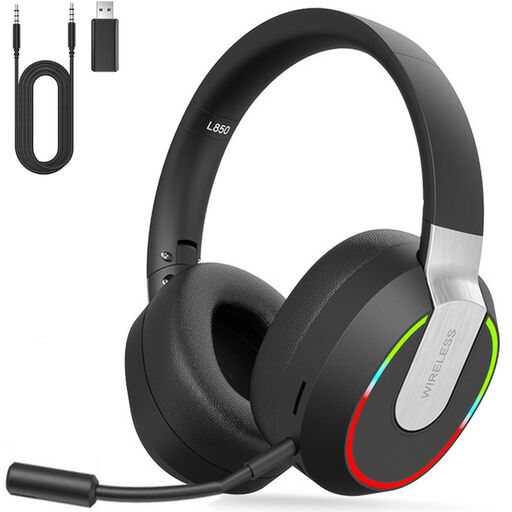 No image available
2.4 GHz wireless gaming headset for PC, PS4, PS5, Mac and Switch
The product description lists a 2.4 GHz connection for PS4 and PS5, as well as a wired Type-C mode.
According to the description, Bluetooth isn’t directly compatible with PS4 or PS5. Check which connection mode is right for your device.
View at Joybuy
Frequently asked questions
Will a headset make dark scenes easier to see in a bright room?
No, a headset won’t change reflections on your screen. Dell recommends adjusting ambient lighting, such as lamps or light from windows, to reduce screen reflections.
Can I use the JBL Quantum 810 Wireless wirelessly over 2.4 GHz on Xbox?
According to JBL, you can’t. The manual does list stereo sound on Xbox via the 3.5 mm audio cable.
How can I avoid turning up the volume to hear quiet effects?
Make sure the ear cups fit well and keep the volume at a comfortable level. VeiligheidNL says a good fit can help reduce background noise, making it less necessary to turn the volume up. However, this doesn’t guarantee that you’ll hear every sound in every game.
What if the headset feels uncomfortable or breaks soon after I buy it online?
For online purchases from a business in the Netherlands, you generally have a statutory cooling-off period of up to 14 days after delivery. Check with the seller to see which exceptions apply. This is separate from your rights if a product breaks too soon during normal use: the seller is responsible for providing an appropriate solution.


