Who is this choice for?

Puzzle player who wants to follow the dialogue

If you mainly play alone, you’ll want to hear speech and subtle in-game sounds clearly before considering extra chat or surround features. Consumentenbond includes speech clips in its listening assessment, while JBL describes the Quantum 100’s microphone as voice-focused.

Student who plays for long stretches

For longer sessions, fit and ear cushions can matter more than weight alone. Consumentenbond takes wearing comfort into account when testing headphones, and Logitech lists an adjustable headband for the G335.

Player with housemates

In a shared room, it can help to consider how the ear cups fit and whether you can easily mute the microphone. Razer describes passive noise isolation for the BlackShark V2 X, while HyperX lists a flip-to-mute microphone for the PlayStation version of the Cloud Stinger 2.

What should you look for when buying?

What to consider What to look for Who is it most important for?
Dialogue and in-game detail If possible, listen to speech and the games you play; assess the sound on your own device. If dialogue is part of the puzzle, you’ll want to be able to follow speech clearly. Around 28% of consumers put speech intelligibility first.
Wearing comfort Check the adjustability and material of the ear cushions, and try the headset on if possible. For long gaming sessions, you’ll want the headband and ear cushions to feel comfortable. Around 22% of consumers prioritise comfort during extended wear.
A shared room Check how the ear cups fit and whether the microphone can be muted; avoid turning the volume up unnecessarily. If you have housemates, background noise and conversations may influence your choice. A quiet shared room is the top priority for around 22% of consumers.
Connectivity Check the ports on your PC or console, the exact version, and whether you need a splitter. If you want to be sure the audio and, if applicable, the microphone will work, check the connections on your own device. Compatibility comes first for around 17% of consumers.
Features and cost Compare the features you’ll actually use, and consider any additional warranty separately from your statutory rights. If you don’t want to pay for extra features or cover you don’t need, consider the overall cost. Around 11% of consumers give total cost the highest priority.

Common buying mistakes

  • Assuming a surround sound listing means clearer dialogue

    Surround features don’t, by themselves, tell you how intelligible speech will be. Razer states that the BlackShark V2 X’s 7.1 feature is only available on Windows 11.

    Assess speech separately from any surround sound claims, and check whether the feature works with your device.

  • Choosing a version for the wrong platform

    A headset name can cover different versions, with different connections or included cables. A PC with separate audio and microphone ports may also need a splitter.

    Check the full model name, the connection and which cables are included with that specific version.

  • Confusing passive isolation with active noise cancellation

    Closed-back ear cups can block sound passively. This isn’t the same as active noise cancellation, and how well they fit also makes a difference.

    Check what type of isolation is meant and whether the ear cups fit comfortably.

Brands to consider for this choice

Logitech G

The wired G335 is worth comparing if you’re looking for a 3.5 mm connection and an adjustable fit.

  • Logitech lists a weight of 240 g, an adjustable headband and a flip-to-mute microphone for the G335.
  • Weight and manufacturer descriptions don’t establish how comfortable the headset will be for every wearer or how it sounds.

SteelSeries

The Arctis Nova 1 is a wired option. The separate Nova 7X Wireless is a wireless version to consider if you’re looking for a supported dongle connection.

  • SteelSeries lists a 3.5 mm connection for the Nova 1. Tweakers rated the gaming and music playback of the Nova 7X Wireless as good.
  • Tweakers also reported that the Nova 7X Wireless they tested doesn’t fit particularly snugly; this verdict doesn’t automatically apply to the Nova 1.

HyperX

The Cloud Stinger 2 for PlayStation is a wired option designed for a specific platform.

  • HyperX describes this PlayStation version as having an adjustable fit and a flip-to-mute microphone.
  • Don’t assume that the features of this version are the same as those of other Cloud Stinger 2 models.

Razer

The BlackShark V2 X is worth considering if you’re looking at closed-back ear cups and wired use across multiple platforms.

  • Razer lists passive noise isolation and a weight of 240 g for this model.
  • The manufacturer states that the 7.1 feature is only available on Windows 11. This doesn’t independently verify the isolation or speech playback.

JBL

The Quantum 100 is a wired option to compare if you’d like a detachable microphone.

  • JBL describes a detachable microphone and memory foam ear cushions.
  • JBL’s claims about sound accuracy and immersive playback aren’t independent test results.

Gaming headsets at Joybuy

These models are wired gaming headsets. Before buying, check that the connection and features suit your PC or console.

HyperX Cloud Stinger II wired white headset for PS5 and PS4

HyperX Cloud Stinger II, wired, white, PS5/PS4

A platform-specific option if you play on PS5 or PS4 and want to mute a flip-up microphone.

The product description lists a 3.5 mm connection, memory foam ear cushions and an adjustable headband.

View at Joybuy

Corsair HS55 Stereo gaming headset in white

Corsair HS55 Stereo, white, 3.5 mm

A wired option to compare if you’re looking for a 3.5 mm connection and a flip-up microphone.

The product description lists 50 mm drivers, memory foam ear cushions, volume controls and a weight of 273 g.

View at Joybuy
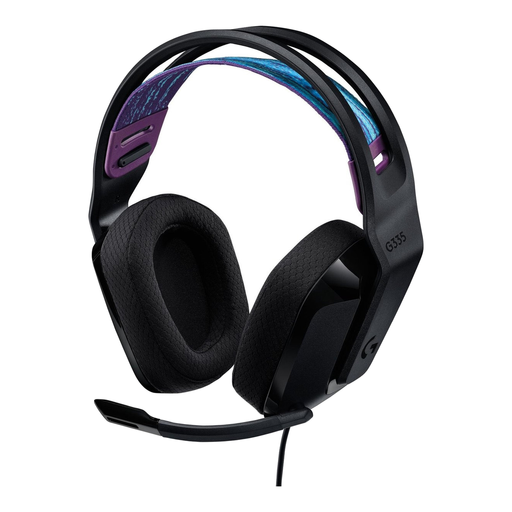
Logitech G G335 gaming headset

Logitech G G335

An option for anyone looking for a wired 3.5 mm headset with controls on the ear cup.

Logitech lists a weight of 240 g for the G335. The product description mentions an adjustable headband and memory foam ear cushions.

View at Joybuy
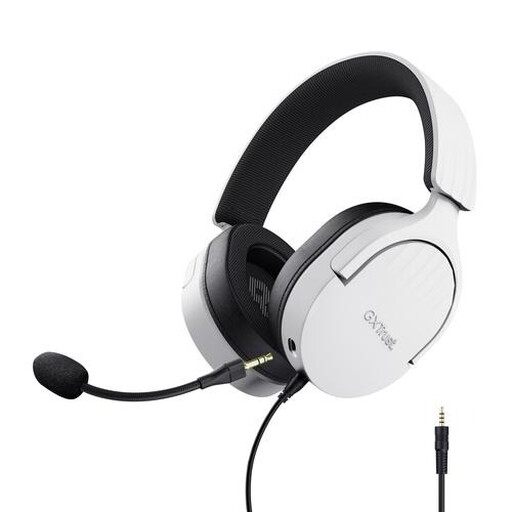
Trust GXT 489W Fayzo wired white gaming headset

Trust GXT 489W Fayzo, wired, white

A wired option to consider if you’re looking for a detachable microphone and volume controls.

The product description lists a 3.5 mm connection, stereo sound, microphone mute, breathable ear cushions and an adjustable headband.

View at Joybuy

Razer BlackShark V2 X 7.1 wired gaming headset

Razer BlackShark V2 X 7.1, wired

An option to consider if you’re looking for closed-back ear cups and a wired connection; Razer describes the isolation as passive.

The product description lists a 3.5 mm connection and microphone mute. According to Razer, the 7.1 feature is only available on Windows 11.

View at Joybuy

Frequently asked questions

Will a headset with a 3.5 mm plug work with every PC?

Not always. Check which ports your PC has and which connection the headset version uses. SteelSeries lists a four-pole 3.5 mm connection for the Arctis Nova 1; if your PC has separate audio and microphone ports, you may need a splitter.

How can you keep the volume at a sensible level during long puzzle sessions?

Keep the volume low and take breaks. The WHO recommends a maximum of 40 hours per week at an average sound level of 80 dB; according to the WHO, listening time falls to four hours per week at 90 dB. This doesn’t set a fixed safe volume level for every headset.

What if the fit isn’t right after buying online?

For online consumer purchases in the Netherlands, you generally have a statutory cooling-off period of up to 14 days after delivery. Check which exceptions apply and follow the instructions for trying the product and returning it.

Should you buy an extended warranty?

No, you don’t need to buy additional cover to have statutory rights. The Dutch Government states that there is no fixed statutory warranty period in the Netherlands and that the seller must provide a solution if a product is faulty. Check whether additional cover offers anything beyond those rights.

Which product safety rule is relevant when buying in the Netherlands?

The Dutch Government states that electrical products placed on the market in the EU must meet the applicable safety requirements and carry a CE marking. Check the information for the exact version; a model name on a product page alone doesn’t confirm that it carries this marking.
