What should you look for in a headset for squad matches?
First, check the connection to your console, controller or PC. Then consider the chat controls, audio settings and fit. Manufacturers such as Microsoft, PlayStation, SteelSeries and HyperX specify platform support for each model or variant.
| What to consider |
What to look for |
Who is this most important for? |
| Platform and chat compatibility |
Check the exact headset variant and how it connects to your console or PC; make sure it supports both game audio and the microphone. |
When I play with my squad, I want to know that chat works through my own console. Around 25% of consumers put compatibility first. |
| Team communication |
Check the microphone, mute controls and whether a game/chat balance control works on your platform. |
I want to be able to mute quickly and adjust the balance between chat and game audio during a match. Around 25% of consumers prioritise clear team chat. |
| Locating in-game sounds |
Check which platforms offer spatial audio and equaliser settings; a surround-sound label alone doesn’t prove it will help in every game. |
I want to be able to pinpoint important in-game sounds, without assuming that surround sound is always necessary. Around 20% of consumers give sound positioning top priority. |
| Comfort during long sessions |
Consider the materials, adjustability and clamping force; comfort is personal. |
I want my headset to stay comfortable during long matches. Around 15% of consumers put comfort above other buying considerations. |
| Freedom to move from the sofa |
Consider the distance to your console and controller, and check the required receiver, connection and quoted battery life for each connection mode. |
I want to play from the sofa without a cable running to my controller. Around 15% of consumers put freedom of movement and seating distance first. |
Headsets at Joybuy
This selection includes wired gaming headsets with, among other things, a 3.5mm connection, and a wireless headset with a 2.4GHz receiver. Check the exact platform variant for each model and make sure both game audio and the microphone work with your system.
 No image available
JBL Quantum 300
A wired option if you want to use a 3.5mm connection for game audio and squad chat.
The product information lists a flip-up microphone and 50mm drivers. According to the product information, JBL QuantumSURROUND and equaliser settings via PC software are available on PC only.
View at Joybuy
 No image available
Turtle Beach Stealth 600 Gen 3 Xbox
A wireless option if you don’t want a cable running to your controller while chatting with your squad.
The product information lists a 2.4GHz receiver, Bluetooth, game and chat volume controls, and a flip-to-mute microphone. Check that the exact Xbox variant is compatible with your device.
View at Joybuy
 No image available
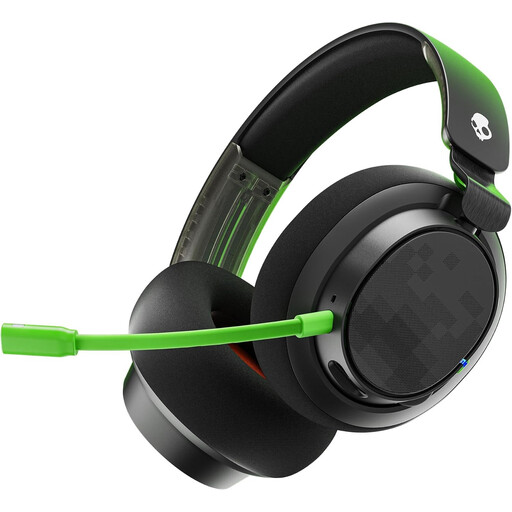
Skullcandy Slyr Pro Xbox
A wired option if easy-to-reach volume and mute controls are important to you while playing.
The product information lists 3.5mm and USB cables, a detachable microphone, a mute button and soft memory foam ear cushions. Check which connection works with your console or PC.
View at Joybuy
 No image available
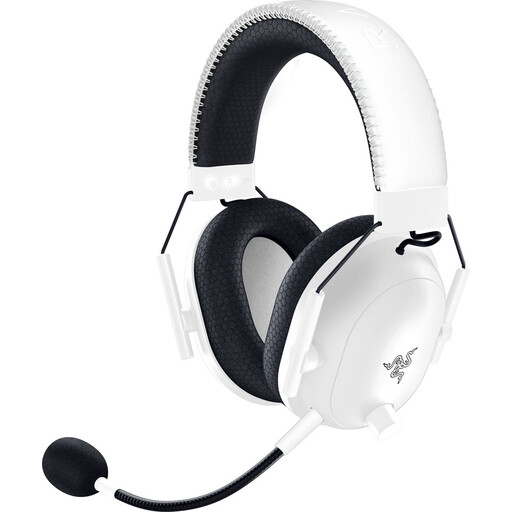
Razer BlackShark V2 Pro (Xbox Licensed), white
A wired option with a 3.5mm connection if you’re looking for the Xbox variant and want a microphone with easy-to-reach controls.
The product information lists a HyperClear cardioid microphone, volume control and memory foam ear cushions. Check that it’s compatible with your controller’s connection.
View at Joybuy
 No image available
HyperX Cloud III Gaming Headset
A wired option if you want to connect game audio and microphone audio via the listed platforms.
The product information lists PC, PS5 and Xbox Series X|S, 3.5mm, USB-A and USB-C connections, and a detachable microphone with a mute function. The product information describes DTS Spatial Audio for PC.
View at Joybuy
Frequently asked questions
Can I connect a wireless headset to my TV and use it to talk to my squad?
Check the chat connection through your console or PC; audio through the TV alone doesn’t confirm that the microphone will work in-game. PlayStation describes an adapter that connects to the PS5 for compatible wireless headsets, while Microsoft describes direct pairing for the Xbox Wireless Headset. Check the instructions for your specific headset.
How do I set up a wireless PlayStation headset?
For a headset that supports this connection method, follow PlayStation’s pairing steps: charge the headset, plug the supplied USB adapter into the PS5 and switch on the headset. For a headset from another brand, follow that model’s compatibility and set-up instructions.
Do I have to pay for squad chat on Xbox?
It depends on the voice chat feature. Microsoft states that some features on supported consoles may require Xbox Game Pass Ultimate, Premium or Essential; these subscriptions are sold separately. Check what applies to your use with the game or chat service in question.
Am I always limited to a two-year warranty on a headset in the Netherlands?
No. ACM ConsuWijzer distinguishes between a manufacturer’s or retailer’s warranty and the legal guarantee: when used normally, a product must meet what you could reasonably expect from it. If a product is faulty, the seller may be responsible for providing a solution at no cost; the applicable period isn’t automatically two years for every headset.
How can I listen safely during long matches?
The World Health Organization advises keeping the volume low, taking regular breaks and considering both sound levels and listening time. The WHO gives a maximum of 60% of your device’s volume as a practical guideline, not a Dutch legal requirement or a guarantee against hearing damage.


