Who is a gaming headset suitable for?

Shooter player who wants to pick up in-game cues

You want to be able to distinguish footsteps and other directional cues while practising, without assuming that this will improve your aim. RTINGS lists the ability to pinpoint sounds as a factor to consider when choosing a gaming headset.

Player who practises for long periods

You pay attention to fit and ear cushions, and don’t want to keep turning up the volume to drown out background noise. The World Health Organization highlights volume and listening time, while VeiligheidNL points to the benefits of a well-fitting pair of headphones.

Player who games on multiple devices

You want to check in advance that the connection, dongle and microphone work with your PC or console. The right model variant and connection method matter more than simply choosing something described as ‘wireless’.

Which factors should you consider?

Wired listening

A good fit if: you usually practise in one place and don’t want to charge a headset battery. Check that the connection and microphone work with your device.

Trade-off: the cable limits your movement. According to Razer, the Razer BlackShark V2 X’s virtual 7.1 feature is only available on Windows 11.

Wireless via a dongle

A good fit if: you want to play without a cable. Check the exact console version and included dongle; SteelSeries says the Arctis Nova 7X supports Xbox, PC and PlayStation via its dongle.

Trade-off: you’ll need to charge the headset. PlayStation warns that a Bluetooth audio device is not necessarily compatible with a PS5.

Your existing headphones and microphone

A good fit if: you already have headphones you enjoy using and a separate microphone for team chat. Compare this set-up before choosing a combined headset.

Trade-off: you’ll be managing two devices instead of one. RTINGS lists a separate microphone as one possible pairing with wired headphones.

Factor to consider What to check before buying Who should consider this?
Distinguishing in-game cues Compare how clear and directional sounds are in your game and on your own platform; listen at a comfortable volume. I want to pinpoint cues while playing shooters without relying on a surround-sound label as proof of better aim. Around 29% of consumers put in-game cues first.
Comfort and listening volume Check the adjustability and ear cushions; keep an eye on volume and listening time, and take regular breaks. For long practice sessions, I want a fit that stays comfortable and a volume that doesn’t need to be turned up to drown out background noise. Around 23% of consumers prioritise comfort and a manageable volume.
Compatibility Check the full model name, console version, available port and any dongle or adapter you may need. I want to know in advance whether the headset works with my PC or console, rather than having to find out after buying it. Around 18% of consumers prioritise compatibility.
Team communication Check microphone support for your chosen connection, as well as its positioning and mute controls. When practising together, I want to be able to speak and mute the microphone easily. Around 18% of consumers put clear team chat first.
Wireless use Check which dongle is supported and the stated battery life of the exact model variant. I want to move around freely and don’t mind charging the headset, provided the wireless connection works on my platform. Around 12% of consumers prioritise freedom of movement.

Common buying mistakes

  • Assuming a surround-sound label means better aim

    The availability of an audio feature doesn’t prove that it will help you learn to aim more accurately. Razer also states that the Razer BlackShark V2 X’s virtual 7.1 feature is limited to Windows 11.

    Choose a headset with a connection that works and audio you can comfortably follow. Compare surround settings on your platform, without treating them as a guarantee of better performance.

  • Assuming every wireless headset works with every console

    Not every Bluetooth audio device is compatible with the PS5, and some models are available in separate versions for different consoles.

    Before buying, check the full model name, the console you plan to use and the connection method, such as a compatible USB dongle.

  • Turning the volume up again and again to hear cues

    The World Health Organization identifies sound level and listening time as factors that together determine your exposure. According to VeiligheidNL, well-fitting headphones can help keep out more background noise.

    Adjust the headset for a good fit, keep the volume at a manageable level and take breaks during long sessions.

  • Confusing a manufacturer’s warranty with all your legal rights

    A manufacturer’s warranty does not replace your legal rights if a product is faulty. The Dutch government says the retailer is your point of contact for a solution.

    Check the retailer’s terms and conditions, and contact them if your product is faulty.

Brands to consider

HyperX

The wired Cloud III is worth considering if you’re looking for a choice of connections and an integrated microphone.

  • HyperX lists 3.5 mm, USB-C and USB-A connections, a detachable microphone and memory foam ear cushions for the Cloud III.
  • These specifications alone don’t prove improved aiming performance or personal comfort.

Razer

The wired BlackShark V2 X is worth considering if you’re looking for a 3.5 mm connection and a flexible microphone.

  • Razer lists a weight of 240 g and passive noise isolation for this model.
  • According to Razer, the virtual 7.1 feature is only available on Windows 11; it doesn’t prove an aiming advantage.

SteelSeries

The Arctis Nova 7X is worth comparing if you’re looking for a wireless headset with a dongle for Xbox, PlayStation and other devices.

  • SteelSeries describes simultaneous 2.4 GHz and Bluetooth audio, and a stated battery life of 38 hours for the original 7X.
  • These features don’t automatically apply to the Nova 7, 7P or Gen 2. Check the exact model variant.

Logitech G

The PRO X 2 LIGHTSPEED is a wireless option to compare if you also want to explore alternative connections and ear cushion materials.

  • Logitech G lists LIGHTSPEED, Bluetooth, 3.5 mm and a battery life of up to 50 hours. According to Logitech G, the ear cushions are available in leatherette or velour.
  • The stated battery life doesn’t guarantee the same usage time in every situation.

Audeze

The Maxwell 2 is a wireless option to compare; make sure you check the PlayStation and Xbox versions separately.

  • Audeze lists planar drivers and a stated battery life of more than 80 hours. RTINGS includes the model as an all-round gaming headset.
  • An all-round gaming recommendation doesn’t prove improved aim; check which console version you need.

Joybuy headsets for practising shooters

This selection includes wired headsets for use with a compatible PC or console connection, and a wireless headset for PlayStation via a dongle. Check the connection, model variant and supported features for each model.
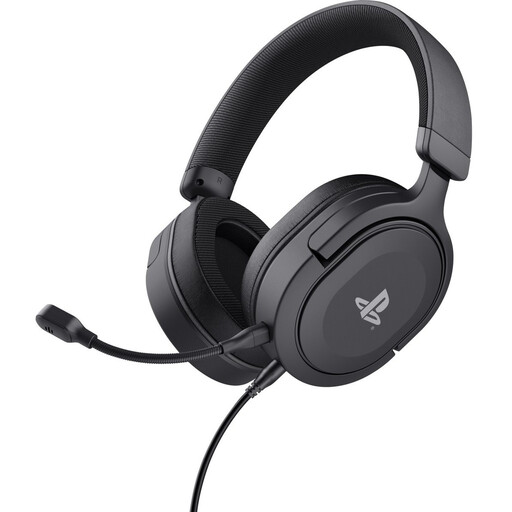
Trust GXT 498 Forta wired gaming headset, black

Trust GXT 498 Forta wired gaming headset for PS5

A good fit for practising on PS5 or PS4 if you’re looking for a wired connection and a microphone.

The product description lists a 1.2 m cable, a 3.5 mm connection, a detachable microphone, and volume and microphone mute controls on the ear cup. It also mentions 50 mm drivers.

View at Joybuy
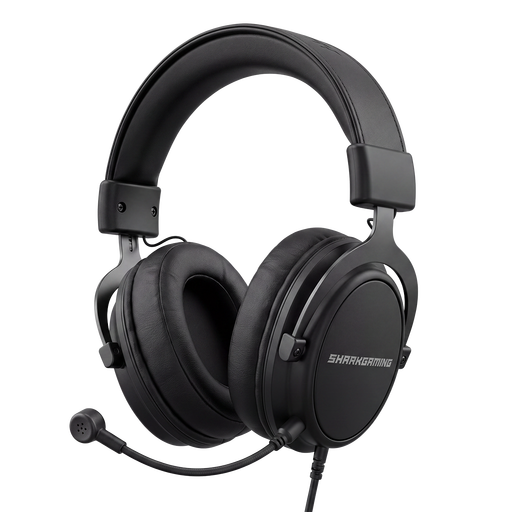
Shark Gaming Receptor H70 wired gaming headset

Shark Gaming Receptor H70

A good fit if you’re looking for a wired headset with connections and settings to check on your own device before buying.

The product description lists USB-C and 3.5 mm connections, a detachable microphone and virtual 7.1 sound with 10-band equaliser software. It also mentions a weight of 250 g, an adjustable headband and two sets of ear cushions. Check the software and audio features for your platform.

View at Joybuy
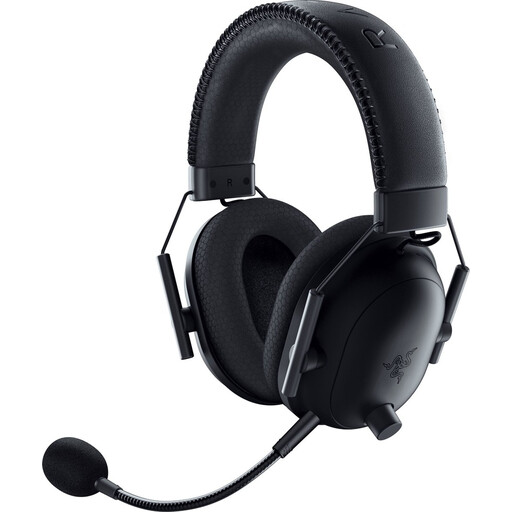
Razer BlackShark V2 Pro wireless gaming headset for PlayStation

Razer BlackShark V2 Pro for PlayStation

A good fit if you want to practise wirelessly on PlayStation and have checked that the dongle connection works with your device.

The product description lists a wireless connection via dongle, a 3.5 mm connection, a detachable microphone and a volume wheel. It also mentions 50 mm drivers and memory foam ear cushions.

View at Joybuy

HyperX Cloud III wired gaming headset

HyperX Cloud III wired gaming headset

A good fit if you’re looking for a wired headset with several possible connections; check which connection is available on your device.

The product description lists 3.5 mm, USB-A and USB-C connections, 53 mm drivers and a noise-cancelling microphone. It also mentions memory foam in the headband and ear cushions.

View at Joybuy

Sony INZONE H3 wired gaming headset for PC and PS5

Sony INZONE H3 for PC and PS5

A good fit if you want to listen using a wired connection on PC or PS5 and check the required software features in advance.

The product description lists a USB audio box and a 3.5 mm connection. 360 Spatial Sound is activated via INZONE Hub software. The description says the headset has a directional microphone that flips up to mute.

View at Joybuy

Frequently asked questions

Do I need to turn on surround sound to learn to aim better?

No, the available information doesn’t show that surround sound improves your aiming skills. Start with a working connection, a comfortable volume and your game’s audio settings. Razer says the BlackShark V2 X’s virtual 7.1 feature is only available on Windows 11.

Will any Bluetooth gaming headset connect directly to my PS5?

No, PlayStation says that a Bluetooth audio device may be incompatible with the PS5. Before buying, check whether the exact headset has a compatible USB dongle or wired connection for the PS5.

How should I use a headset during long practice sessions?

Adjust the fit properly, don’t turn up the volume to drown out background noise, and take regular breaks. The World Health Organization identifies volume, listening time and how often you listen as factors that matter together.

What if a headset I bought online isn’t right for me or turns out to be faulty?

In the Netherlands, online purchases from businesses often come with a 14-day cooling-off period, subject to exceptions; the Dutch government explains this period for distance selling. If a product is faulty, the retailer is your point of contact for your legal guarantee. According to the Dutch government, there is no fixed statutory guarantee period in the Netherlands.
