
Gamer sharing a bedroom
You want to hear map sounds while someone else in the same bedroom is resting or doing something else. Sound leakage, fit and keeping the volume down are therefore important considerations.


Start with a well-fitting closed-back headset if you want to keep as much of the game sound as possible to yourself. Test the microphone with a sample recording, then choose wired or wireless based on where you play. For either type, check the connection, microphone support and exact platform variant.
You want to hear map sounds while someone else in the same bedroom is resting or doing something else. Sound leakage, fit and keeping the volume down are therefore important considerations.
You give short instructions while keeping an ear out for relevant in-game cues. An easy-to-reach mute control and a microphone you can test on your own platform are useful here.
For example, you play on PC and console. Check in advance that the exact headset variant, connection, microphone and any software features work with both devices.
First consider sound leakage and fit, then test the microphone, and finally check that the connection and features work on your platform.
| What to consider | What should you check? | Who should prioritise this? |
|---|---|---|
| Sound leakage and room noise | Compare closed-back and open-back ear cups, and check how the cushions fit around your ears. Don’t turn the volume up to drown out background noise. | If I play while my housemate is resting, I want to keep as much of the game sound as possible to myself. Around 29% of consumers put reducing sound leakage and room noise first. |
| Clear team chat | Check the microphone’s position and make sure the mute function is easy to reach. Make a sample recording on your own platform while speaking at a normal volume. | When I’m discussing routes, I want to be easy to understand without raising my voice. Around 23% of consumers give team chat top priority. |
| In-game cues | Check your platform’s audio settings and try any EQ settings in the game. Don’t treat surround sound or preset claims as proof of an in-game advantage. | When I’m learning an unfamiliar map, I want to pick out relevant cues in the game mix. Around 18% of consumers put recognising map cues first. |
| Comfort | Assess the clamping force, space for your ears and cushion material on your own head. Manufacturer descriptions are no substitute for trying a headset on. | During longer practice sessions, I want a headset that stays comfortable on my head. Around 18% of consumers make comfort their top priority when choosing. |
| Connection and platform features | Compare the full model name with the connections on your PC or console. Check separately that audio, the microphone and any software features work. | If I play on different devices, I want to be sure the version I choose will work with each one. Around 12% of consumers give connection and platform compatibility top priority. |
A feature may vary by device, and it doesn’t prove that you’ll hear cues better or learn a map faster.
Check which features are available on your platform and try the settings in your own game.
A microphone feature doesn’t determine how much noise your voice makes in the room. Closed-back ear cups also don’t automatically limit what the microphone picks up.
Assess sound leakage, speaking volume and the microphone recording separately.
Support can vary by variant. Within the Arctis Nova 5 range, SteelSeries specifically identifies the 5X as the version for Xbox.
Before buying, compare the full model name, the receiver included and support for your platform.
Choosing the wrong variant could mean you need a different headset or connection.
The Dutch government says that your statutory rights for a faulty product don’t depend on buying an additional warranty. The seller is your point of contact if there’s a problem.
Check what an optional paid warranty adds to your statutory rights.
The wired BlackShark V2 X is worth considering if you’re looking for closed-back ear cups and a boom microphone.
The wired Cloud III offers several connection options, while the Cloud III S Wireless is a separate wireless variant.
The wired G432 may suit you if you want a flip-to-mute microphone and can check the connection with your device in advance.
The Arctis Nova 5 range is designed for wireless use with a USB-C receiver and switching to Bluetooth; check the exact variant.
The Quantum range includes wired and wireless models, including the Quantum 120, Quantum 350 Wireless and Quantum 360 Wireless.
This selection includes wired and wireless gaming headsets for team chat and use with different devices. Check that each model’s connection and features suit your platform.
 No image available
A wireless option worth considering if you don’t want to use a headset cable while playing.
For this model, HyperX states up to 120 hours via 2.4 GHz and up to 200 hours via Bluetooth; these figures apply to different modes of use.
 No image available
A wired option if you want to use a mute control on the microphone during team chat.
Logitech lists a 6mm microphone with flip-to-mute and a connection via 3.5 mm or the included USB DAC. According to Logitech, DTS surround sound and EQ require Windows and G HUB.
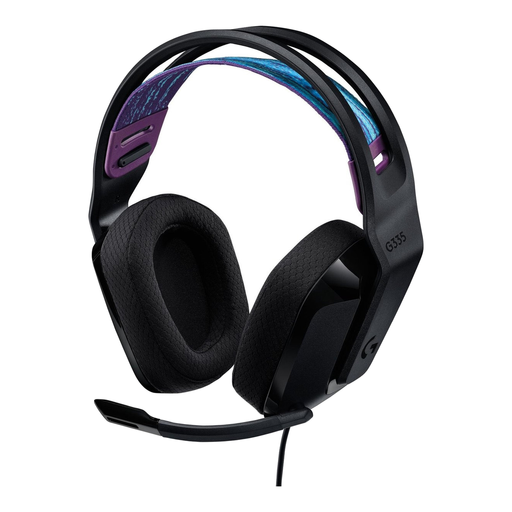 No image available
Consider this model as a possible headset for multiplayer gaming, and check in advance that the connection and microphone work with your PC or console.
 No image available
A wired option to consider if closed-back ear cups and a boom microphone are important to you.
Razer lists closed-back ear cups, a flexible cardioid microphone and a stated weight of 240 g for this model. According to Razer, the 7.1 feature is only available on Windows 11.
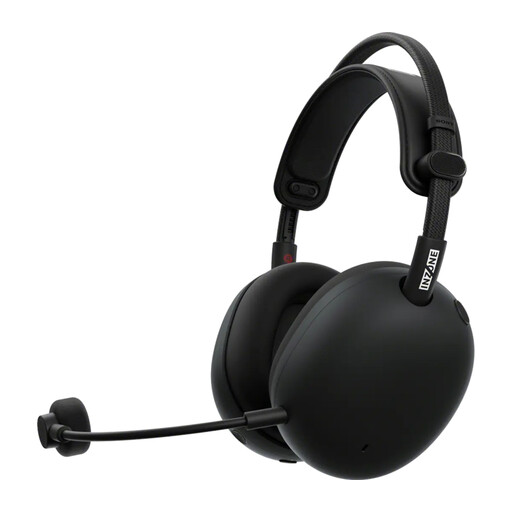 No image available
A wireless headset worth considering if you play on PC or PlayStation 5; check that the connection and microphone suit the way you use it.
No. Treat surround sound as a setting to try, not a requirement or a proven advantage. Check which features work on your platform: Logitech says the G432’s DTS surround sound and EQ require Windows and G HUB.
Check the fit, start at a low volume and make a sample recording of your microphone while speaking normally. The World Health Organization advises keeping listening volume down and taking regular breaks; this is health advice, not a setting that guarantees a particular result with every headset.
For eligible online consumer purchases, you generally have a 14-day cooling-off period; check the terms of your purchase. You also have statutory rights if a product is faulty, and the seller is your point of contact if something goes wrong. The Dutch government says there is no fixed statutory warranty period in the Netherlands that applies to all products.