
Team player who wants to communicate clearly
You practise team communication while someone else may be talking in the room. Pay attention to the microphone position and mute control, and make a test recording in your own room.


Choose a headset with a microphone and connection that work with your PC or console, and test the microphone in the room where you play. A closed-back design usually lets less sound escape than an open-back one, but fit and listening volume still matter. A wired headset means no charging, while a wireless one gives you more freedom to move around.
You practise team communication while someone else may be talking in the room. Pay attention to the microphone position and mute control, and make a test recording in your own room.
You play while someone else is resting and want to limit how much game audio they can hear. Compare closed-back ear cups, the fit and listening volume: closed-back models usually let less sound escape, but this varies from model to model. RTINGS.com discusses these differences.
You use a PC, console or both, and want both game audio and team chat to work. Check the full model variant, connection and any software features, as these can vary between devices.
Choose this if: team chat and reduced sound leakage matter, and connecting a cable to your device is practical.
The trade-off: you won’t need to charge the headset, but the cable will restrict your movement.
Choose this if: you want to play without a cable and the full model variant works with your PC or console.
The trade-off: you’ll need to charge the headset and check that the receiver and connection are compatible with your device.
Choose this if: being able to hear your surroundings matters more to you than keeping things quiet for your roommate.
The trade-off: open-back designs usually let more sound out and more ambient noise in than closed-back designs.
| Consideration | What to look for when buying | Who is this important to? |
|---|---|---|
| Clear team chat | Check whether you can adjust the microphone and mute it quickly. Test it with a recording while someone is talking in the room. | If I want to give clear instructions during practice and mute quickly when talking to my roommate, I’ll look at the microphone and mute button. Around 33% of consumers give clear team chat and muting top priority. |
| Keeping things quiet for your roommate | Compare sound leakage from the exact model, check the fit and listen at a moderate volume. The WHO also recommends taking listening breaks. | When someone is resting next to me, I want as little game audio as possible to escape from the ear cups and I need to keep the volume under control. Around 27% of consumers put keeping things quiet for their roommate at the top of their list. |
| Connection and compatibility | Check that both audio and the microphone work with your device, and that the correct splitter or wireless receiver is included. | If I want to use my headset with a specific PC or console, both the game audio and microphone need to work. Around 20% of consumers make compatibility their main reason for buying. |
| Comfort and ease of use | Check the fit, ear cushions and adjustability. For wireless use, weigh the need to charge it against the freedom to move around. | During longer practice sessions, I don’t want an annoying cable or a flat battery, and the headset needs to feel comfortable. Around 20% of consumers give wearing comfort and practical everyday use top priority. |
Microphone noise filtering, blocking ambient noise for the wearer and sound leaking out are different features. A claim about the microphone doesn’t tell you how much game audio your roommate will hear.
Check exactly which feature is meant, then test the microphone and listening volume in your own room.
Connections and included accessories can vary by version. For example, SteelSeries says the PC version of the Nova 1 includes a Y-splitter, while the console version does not. SteelSeries also says that only the 5X in the Nova 5 range is designed for Xbox.
Compare the full model name, what’s in the box and support for both audio and the microphone on your device.
If your PC has separate headphone and microphone ports, check that the version you choose includes the required splitter.
According to SteelSeries, the Nova 5 switches between 2.4 GHz and Bluetooth; the Nova Pro Wireless supports simultaneous playback of mobile and game audio, according to the manufacturer.
Check whether you want to hear both sources at once or simply switch between connections, then choose a version that supports this.
The wired Cloud III could be a good fit if you’re looking for different connection types and a physical mute control.
The Nova 1 is wired, while the Nova 5 and Nova Pro Wireless offer different wireless connection and control options.
The wired G PRO X could be worth considering if you want to use PC software for voice filters.
According to JBL, the wired Quantum 100M2 has a detachable directional microphone and a 3.5 mm connection.
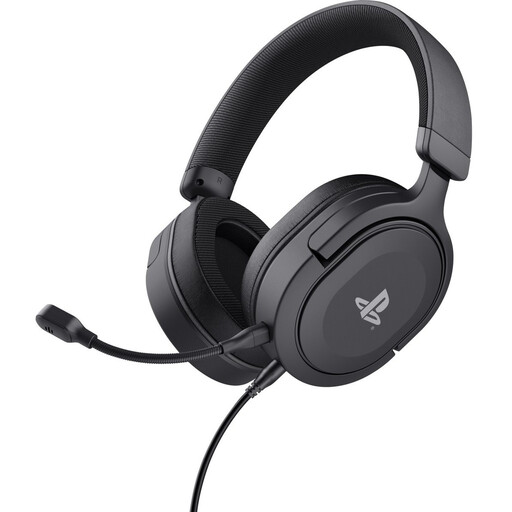
These Joybuy products are gaming headsets with a microphone for team chat. The selection includes wired models and one wireless option. Check that both audio and the microphone work with your device for each model.
 No image available
A wired option for team chat. The description lists a detachable microphone and a mute control.
3.5 mm connection; according to the product information, it’s compatible with PS5 and PS4. The stated cable length is 1.2 m.
 No image available
A wired headset for team chat on PC, with a flip-to-mute microphone.
3.5 mm connection; the description also lists compatibility with PS5, PS4, Switch and mobile devices.
 No image available
A wired option for team chat on a Nintendo Switch, with a flip-to-mute microphone.
3.5 mm connection; according to the product information, it’s compatible with Nintendo Switch, Switch Lite and Switch OLED.
 No image available
A wired headset with a flip-to-mute microphone for team chat on a compatible device.
3.5 mm connection; the description lists compatibility with PC, PS5, PS4, Switch 2 and Xbox Series X|S.
 No image available
A wireless option for team chat, with a flip-to-mute microphone.
The description lists a 2.4 GHz USB receiver and compatibility with Xbox, PC and Switch. This model has a rechargeable battery.
Make a test recording on the device you’ll be playing on while someone talks from a normal distance. Check that the correct microphone is selected and test the mute button too. A product description can’t replace a practical test in your own room.
A combined four-pole 3.5 mm plug won’t always connect directly to a PC with separate headphone and microphone ports. Check whether your headset version includes a Y-splitter and whether the correct microphone input is selected.
No. According to SteelSeries, the Nova 5X is the Xbox version. Check the full model name before ordering.
Keep the volume under control and take listening breaks. The World Health Organization (WHO) points out that both sound level and exposure time matter; turning the volume up to drown out ambient noise isn’t a safe solution.
According to the Dutch government, online purchases from a business often come with a 14-day cooling-off period, although there are exceptions. If a product breaks, the seller is your point of contact for a solution, such as a repair or replacement. Check the relevant seller’s information for the terms that apply to your purchase.