
Console gamer on the sofa
You want to play from your seat without an unsuitable cable or dongle; the console determines which connection makes sense. Sony, SteelSeries and Microsoft describe different connection options for their models.


First, choose a headset with a connection or dongle that works with the console or PC you use. Then consider how far you sit from the big screen to decide whether a cable is practical. For long gaming sessions, compare comfort and controls too, and check whether spatial audio works with your platform and game. Logitech pairs DTS Headphone:X 2.0 on the G432 with Windows and G HUB, while Sony says PULSE Elite’s 3D audio works with supported PS5 games.
You want to play from your seat without an unsuitable cable or dongle; the console determines which connection makes sense. Sony, SteelSeries and Microsoft describe different connection options for their models.
You wear your headset for extended periods, so comfort and ear cushions are worth comparing. With wireless models, the stated battery life may also be a factor; Sony and Microsoft publish battery life figures for specific models.
You want to be able to talk and mute yourself while playing with others. Check the microphone controls and chat features on your platform; HP describes a detachable microphone for the Cloud III, while Microsoft lists game/chat balance for the Xbox Wireless Headset.
Choose this if: you’re close enough to a compatible connection and don’t want to charge your headset. HP lists 3.5 mm, USB-A and USB-C for the Cloud III; check which connection suits your device.
Bear in mind: a cable limits your freedom of movement. Logitech lists a 3.5 mm cable and USB DAC for the G432.
Choose this if: you want to play from the sofa without running a headset cable to the screen. Sony lists the included PlayStation Link USB adapter for PULSE Elite, while SteelSeries lists a USB-C dongle for the Arctis Nova 5 Wireless.
Bear in mind: you’ll need to charge it, and the adapter and connection must be compatible with your device.
Choose this if: you play on Xbox Series X|S or Xbox One and want to use the described game and chat balance controls. Microsoft lists up to 20 hours of battery life for the Xbox Wireless Headset.
Bear in mind: Xbox compatibility does not confirm that the headset also works wirelessly with PS5.
| What to consider | What to look for when buying | Who should consider this? |
|---|---|---|
| Platform and connection | Check the exact console or PC, the available port and any adapter you might need; manufacturers describe different connection methods. | I want to know for certain that the headset works with my console or PC before I buy. Around 36% of consumers prioritise platform and connection. |
| Comfort and freedom of movement | Compare the headband and ear cushions, and try the fit for yourself. Weigh up the cable against the need to charge a wireless model. | During long gaming sessions, I want my headset to feel comfortable and not unnecessarily restrict where I sit. Around 29% of consumers focus mainly on comfort and freedom of movement. |
| Game audio and spatial audio | Check that the specific game and platform support the feature you want. Logitech pairs DTS Headphone:X 2.0 on the G432 with Windows and G HUB. | For a story-rich RPG, I want to know whether the spatial audio I want works on my gaming system and in the game. Around 21% of consumers prioritise game audio and spatial audio. |
| Microphone and voice chat | Check whether microphone controls and chat features are available on your platform; Microsoft lists game/chat balance for the Xbox Wireless Headset. | When I play with others, I want to be able to mute the microphone and adjust game and chat audio. Around 14% of consumers focus mainly on microphone and chat controls. |
Features can depend on the platform. Logitech says DTS Headphone:X 2.0 and EQ presets on the G432 only work with Windows and G HUB; this doesn’t confirm that the same features are available on a console.
Check the manufacturer’s requirements for the exact model, and don’t treat a general mention of surround sound as confirmation that it works with your platform.
The PlayStation, SteelSeries and Xbox models described use different connection methods. Choosing an incompatible version or not having the right adapter could prevent you from making the connection you want.
Before you buy, check the full model name, the platform you’ll use it with and which adapter is included with that version.
ACM ConsuWijzer distinguishes between your statutory rights and any additional warranty that may be offered.
Check what an additional warranty covers, and remember that it is separate from your statutory rights as a customer of the retailer.
The wired G432 is worth considering if you want to compare different connections and audio modes.
The wired Cloud III is an option to consider if you’re looking for one headset with different connections for PC or console.
The Arctis Nova 5 Wireless is worth considering if you want to play wirelessly using a dongle on a platform listed by SteelSeries.
PULSE Elite is worth considering if you’re looking for a headset with PlayStation Link for PS5.
The Xbox Wireless Headset is worth considering if you want to connect wirelessly straight to a compatible Xbox console.
This selection includes gaming headsets for different setups and platforms. Check the connection, compatibility and features for your setup for each model.
 No image available
A good fit if you want to play from your seat without a headset cable; check that the wireless connection works with your device.
 No image available
A wireless option to consider if you have long gaming sessions. This model is listed as offering up to 200 hours via Bluetooth and up to 120 hours via 2.4 GHz; the described DTS Spatial Audio feature is linked to PC and doesn’t confirm console support.
 No image available
The product name lists PC, PS5 and Xbox Series X|S; check which connection and chat features suit your specific setup. The described DTS Spatial Audio feature is linked to PC and doesn’t confirm console support.
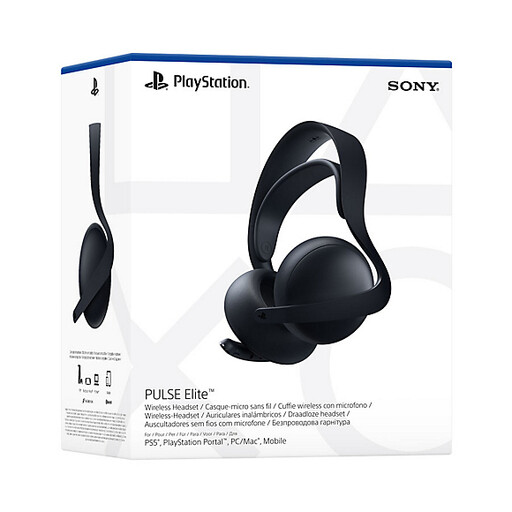 No image available
Worth considering for a PS5 setup with PlayStation Link. Sony lists up to 30 hours of battery life and 3D audio for PS5 games that support the feature.
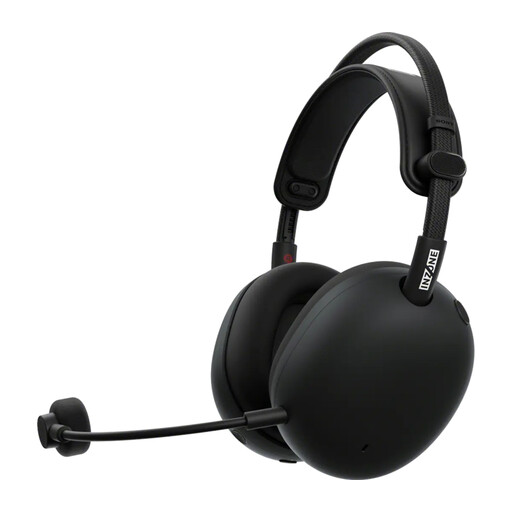 No image available
A wireless model to consider if you want to avoid running a headset cable between your seat and the screen. Check the connection and platform features for your setup.
Start with the connection the manufacturer specifies for your console or PC. For example, Sony lists the PlayStation Link USB adapter for PULSE Elite on PS5; don’t assume that any TV connection will offer the same game and microphone features.
According to PlayStation, go to Settings > Sound > Audio Output and select the output device. The available settings depend on the device and configuration.
The World Health Organization advises keeping the volume low and giving your ears regular breaks; the risk is linked to volume, listening time and how often you’re exposed to loud sounds. This doesn’t prove that a particular headset model is safe at every volume.
According to ACM ConsuWijzer, online product purchases generally come with a statutory 14-day cooling-off period after delivery, with some exceptions. Your statutory rights are separate from any manufacturer’s warranty that may be offered: if, under normal use, a product doesn’t meet what you could reasonably expect, the retailer must resolve the issue in line with the applicable terms.