First, choose a headset that connects to your PC or console and feels comfortable during your gaming sessions. Then compare how dialogue, music and effects sound. A wired headset means you won’t need to charge a battery, while a wireless one gives you more freedom to move around. Only choose a microphone or extra connectivity options if you’ll use them. In a dark room, easily accessible controls are practical, but lighting isn’t essential.
Who is this buying guide for?
Story-focused solo player
Wants to follow dialogue, music and ambient sounds without prioritising a microphone or competitive sound profiles. RTINGS.com highlights clear sound and suitable sound tuning as factors to consider when choosing a gaming headset.
Long-session player
Focuses on fit, ear cushions and controls that are easy to reach without navigating on-screen menus. A specification alone can’t prove that a headset will feel comfortable on every head.
Multi-platform player
Wants to know in advance which connection or wireless option works with their PC and console. Connections and compatibility vary by model and variant.
What should you look for?
Start with the connection and fit, then assess sound, chat features and controls based on what you actually use while gaming.
| What to consider |
What should you check? |
Who should prioritise this? |
| Clear, immersive sound |
Compare listening reviews or sound settings, and pay attention to dialogue in a game you know. |
If dialogue, music and effects are all important to your RPG experience, sound should be a priority. Around 28% of consumers say sound is their main consideration. |
| Comfort during long sessions |
Look at adjustability and ear cushions. If possible, try the headset with your own glasses and for a suitable length of time. |
If you play for long stretches, fit may matter more than extra features. Around 22% of consumers put comfort at the top of their list. |
| Connection to your platform |
Check the connection, any dongle and support for your PC or console for the exact variant. |
If you switch between PC and console, you’ll want to avoid choosing a connection that doesn’t work with one of your devices. Platform compatibility is also a top priority for around 22% of consumers. |
| Chat and controls |
Check whether the headset has a microphone and easy-to-reach mute and volume controls, and whether chat works on your platform. |
Quick muting can be useful when playing with others, while in a dark room you’ll want to find the buttons without looking through a menu. Around 17% of consumers prioritise chat and controls. |
| Features and additional cover |
Compare the features you’ll use and check exactly what any additional warranty covers. |
If you mainly play solo, you may not want to pay for wireless or chat features you won’t use. Around 11% of consumers put cost at the top of their list. |
Common pitfalls
-
Assuming compatibility means wireless use is supported too
A headset may work with a particular device via a cable, without supporting a wireless connection to it.
Check the full model variant and the connection you want to use with your PC or console.
-
Treating a manufacturer’s sound claim as a personal listening test
Product descriptions and sound tuning can’t predict exactly how balanced dialogue and effects will sound to you.
Where possible, compare independent listening reviews and try dialogue from an RPG or a similar game for yourself.
-
Confusing an additional warranty with your statutory rights
Additional cover is not the same as your statutory rights. The Dutch government states that there is no fixed statutory warranty period in the Netherlands.
Check what the additional cover includes. If there’s a fault the seller is responsible for, contact the seller.
Relevant brands
HyperX
The Cloud III Wired is a wired option for anyone looking for connectivity across multiple devices.
- HyperX says that 3.5mm, USB-C and USB-A connections are included. Volume and microphone mute controls are on the ear cup.
- This information applies to the Cloud III Wired and not automatically to wireless Cloud III variants.
SteelSeries
The Arctis Nova 7 Wireless Gen 2 is worth considering if you want to combine game audio via a dongle with mobile audio via Bluetooth.
- SteelSeries lists simultaneous use of these connections and a battery life of over 50 hours. Battery life is a manufacturer claim.
- Check whether you’re choosing the 7, 7P or 7X variant before assuming it’s compatible with your platform.
PlayStation
PULSE Elite is designed for PS5 use and PlayStation Link.
- PlayStation says a Link USB adapter and control buttons are included. The manufacturer quotes a battery life of up to 30 hours.
- The stated PS5 3D audio feature applies to games that support it. The information provided doesn’t confirm compatibility with Xbox.
Logitech G
The G435 is a lightweight wireless option for PC or PlayStation players who also want to use Bluetooth.
- Logitech G lists LIGHTSPEED support for PC, Mac, PS4 and PS5, and a battery life of 18 hours.
- Don’t assume from the listed platforms that LIGHTSPEED also works with Xbox.
Audeze
Maxwell 2 is worth comparing if game audio and microphone performance are important to you.
- RTINGS.com rates this model positively for sound, wireless latency and microphone performance.
- That rating doesn’t establish that every platform variant is suitable for every console.
Headsets at Joybuy
These models are suited to wired gaming or wireless connections. Check that each headset’s connection matches your gaming platform.
 No image available
Turtle Beach Airlite Fit Gaming Headset, Wired (3.5mm Jack), Blue/Red
A wired option if chat and in-game controls matter to you. The product information lists a flip-to-mute microphone and a volume wheel on the ear cup.
The product name specifies a 3.5 mm connection.
View at Joybuy
 No image available
Razer Kraken V3 X Headset, Black
Worth comparing if comfort and voice chat are important to you. Check that the audio features you want to use are compatible with your device.
The product information specifies that 7.1 surround sound is for Windows 10 64-bit.
View at Joybuy
 No image available
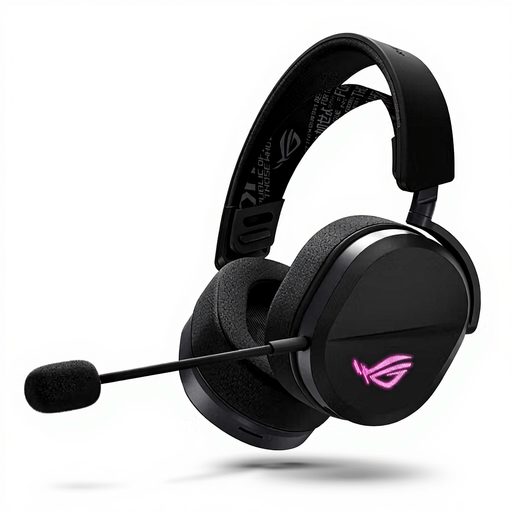
ASUS ROG Pelta Headset, Wired & Wireless, Black
Worth considering if you want several connection options and a microphone for chat. The product information lists 2.4 GHz via a USB receiver, wired use via USB-C and Bluetooth.
View at Joybuy
 No image available
HyperX Cloud III S Gaming Headset, Black/Red
A wireless option worth comparing if you want to adjust the volume or mute the microphone quickly while gaming. The product information lists 2.4 GHz and Bluetooth.
The product information specifies a volume control and mute button on the headset.
View at Joybuy
 No image available
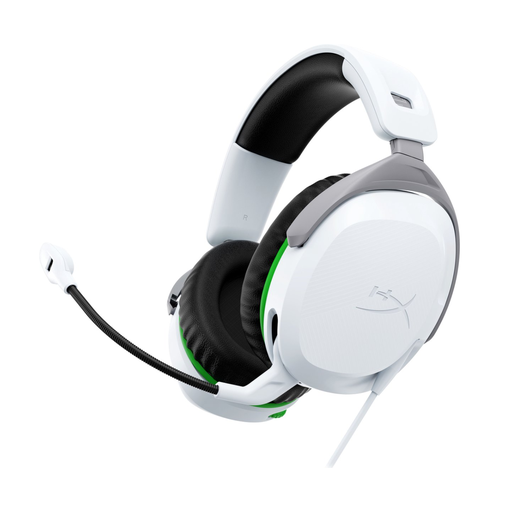
HyperX CloudX Stinger II Gaming Headset, Wired, White, Xbox Series X|S/Xbox One
A wired option for Xbox players who want chat controls on the headset. The product information lists a flip-up-to-mute microphone and volume control on the headset.
The product name specifies Xbox Series X|S and Xbox One.
View at Joybuy
Frequently asked questions
Does an RPG headset need surround sound?
Not necessarily. First, assess clarity, fit and support for your platform. For spatial audio, check that the feature is available on both your platform and in the game. PlayStation lists 3D audio for PS5 games that support it.
How can you avoid connection surprises?
Compare the available ports and wireless options on your device with the exact headset variant. HyperX says the wired Cloud III comes with 3.5 mm, USB-A and USB-C connections. PULSE Elite uses the included PlayStation Link USB adapter with PS5, Windows and Mac.
How can you listen safely during long sessions?
Keep the volume low and take breaks. The World Health Organization gives 40 hours per week at an average of 80 dB as an example; at 90 dB, that falls to four hours. This doesn’t prove that a particular headset automatically provides a safe listening level.
What returns and warranty rights apply to an online purchase in the Netherlands?
Many distance purchases usually come with a 14-day cooling-off period. The Dutch government advises checking for exceptions and conditions. There is no fixed statutory warranty period in the Netherlands. If a product is faulty, contact the seller.


