Who is this guide for?

Ranked player who pays attention to sound

You want to distinguish important in-game sounds, and you also check your own game settings. HyperX, Razer and SteelSeries describe different connections and audio features, but those specifications alone don’t prove you’ll get better results in a match.

Player who makes lots of call-outs

Look for a microphone you can position easily and a mute button that’s quick to reach during team chat. HyperX and Razer list microphone controls on specific models; check how clearly your voice comes through in your own gaming environment.

Player with long sessions or multiple platforms

Consider the fit, ear cushions and connection for the exact PC or console version. For example, SteelSeries lists the Nova 5X specifically for Xbox; compatibility doesn’t automatically apply to every version in the same product family.

What should you look for?

What to consider What should you check? Who is this important for?
Audible in-game information Compare stereo sound and available audio profiles with your game settings; check which software features work on your platform. If I play tactical matches, I want to distinguish relevant sounds and check my game settings myself. Around 33% of consumers rank game audio as their top buying priority.
Clear team chat Check the microphone position, mute controls and how it sounds in the chat app you actually use. If I make lots of call-outs, I want to position my microphone properly and mute it quickly during a match. Around 27% of consumers put team chat first.
Comfort during long sessions Consider adjustability, pressure around your ears and glasses arms, and the material and shape of the ear cushions. If I play for long stretches, I want the headset to feel comfortable with my head shape and any glasses I wear. Around 20% of consumers rank comfort as their top buying priority.
Connection and console version Make a note of your platform and available ports; check the full model name and whether both audio and the microphone work with your setup. If I play on a specific PC or console, I want to make sure the connection and version are suitable. Around 20% of consumers put platform compatibility first.

Things to consider before buying

  • Don’t assume a feature such as ‘7.1’ is available on every platform

    Razer lists the 7.1 feature for the BlackShark V2 X for Windows 11 only. If you can’t use a feature on another platform, that doesn’t necessarily mean you should choose that particular version.

    Check your platform and any required software before factoring an audio feature into your decision.

  • Don’t choose a wireless console headset based on the product family alone

    SteelSeries lists the Nova 5X specifically for Xbox. The name Nova 5 alone won’t tell you which version you need.

    Compare the full model name and supported connection with your console.

  • Don’t confuse a manufacturer’s warranty with your statutory rights

    A manufacturer’s warranty is separate from your statutory rights. The retailer is responsible for your statutory guarantee; the ACM explains that the law does not set a fixed period of exactly two years.

    Keep your proof of purchase and speak to the retailer about any fault that develops during normal use.

Brands to consider

HyperX

The wired Cloud III is worth considering if you want to use 3.5 mm and are also weighing up USB connections.

  • HyperX lists a mute control, a 10 mm microphone and memory foam ear cushions for the Cloud III.
  • Connections and included accessories may vary by version, so check the exact model and fit.

Razer

The wired BlackShark V2 X is worth considering if you’re looking for a 3.5 mm headset with a flexible microphone.

  • Razer lists a weight of around 240 g, passive noise isolation and a 1.3 m cable for this model.
  • Razer lists the 7.1 feature for this model for Windows 11 only; check whether it’s available on your platform.

SteelSeries

The wireless Arctis Nova 5 family is worth a look if you want to compare a gaming dongle with Bluetooth. SteelSeries lists the Nova 5X specifically for Xbox.

  • SteelSeries lists 60 hours of battery life and switching between connections for the Arctis Nova 5.
  • The stated battery life comes from the manufacturer and doesn’t mean that connections can be mixed simultaneously. Check compatibility for the exact version.

Logitech G

The PRO X 2 LIGHTSPEED is a wireless option to compare if Bluetooth and 3.5 mm connections matter to you.

  • Logitech lists up to 50 hours of battery life per charge for this model, along with memory foam ear cushions in different materials.
  • The stated battery life hasn’t been independently measured; fit and battery life depend on the headset you choose and how you use it.

Audeze

The Maxwell 2 is worth looking into if you’re after a gaming dongle and a specific console version.

  • Audeze lists PlayStation and Xbox versions, and more than 80 hours of battery life for the Maxwell 2.
  • The stated battery life hasn’t been independently measured. Check the compatibility of the Maxwell 2 version itself.

Gaming headsets at Joybuy

This selection includes wireless headsets with a gaming dongle and wired 3.5 mm versions. Check the full model name, connection and any version limitations for your platform.
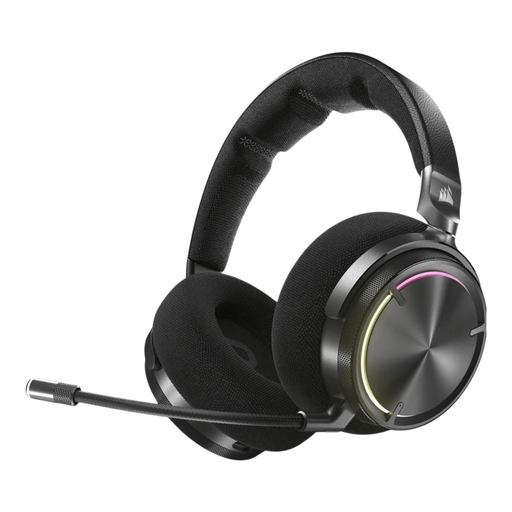
Corsair VIRTUOSO MAX Wireless Gaming Headset - Carbon

Corsair VIRTUOSO MAX Wireless Gaming Headset

A wireless option to compare if you play on PC, PS4 or PS5 and need a microphone with a mute function.

The product description lists an RF receiver, Bluetooth and USB-C charging. It also mentions the built-in microphone, mute function and volume control on the ear cup; wireless use requires the RF receiver and charging.

View at Joybuy
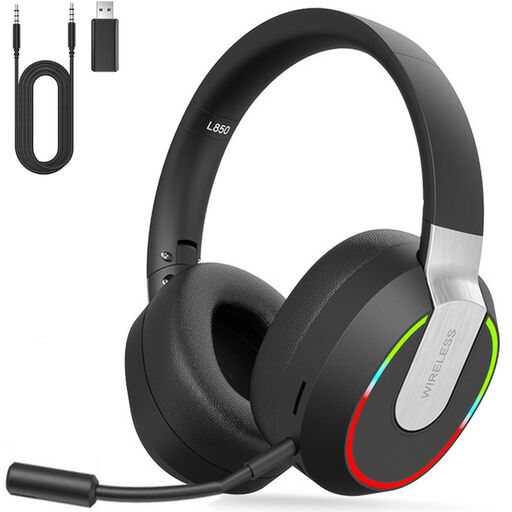
2.4 GHz Wireless Gaming Headset for PC, PS4, PS5, Mac, Switch

2.4 GHz Wireless Gaming Headset

An option to compare if you need the listed compatibility with PC, console or Switch and want to explore different connection modes.

The description lists a 2.4 GHz dongle, Bluetooth, a wired 3.5 mm mode and a detachable microphone. According to the description, Bluetooth doesn’t connect directly to PS4, PS5 or PC; use the dongle or cable mode instead.

View at Joybuy

HyperX Cloud III S Wireless Gaming Headset

HyperX Cloud III S Wireless

A wireless option to compare if you need the listed compatibility with PC, PlayStation, Switch or mobile devices.

The product information lists a 2.4 GHz connection, Bluetooth, USB-A and USB-C, a detachable 10 mm microphone and memory foam ear cushions. The stated maximum battery life varies by connection mode: up to 120 hours via 2.4 GHz and up to 200 hours via Bluetooth.

View at Joybuy
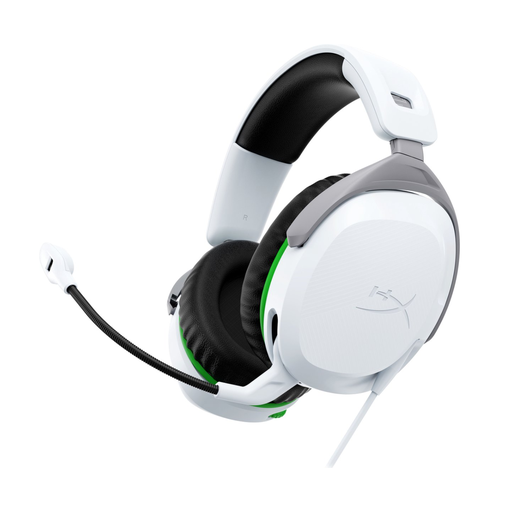
HyperX CloudX Stinger II wired gaming headset for Xbox

HyperX CloudX Stinger II

A wired option for Xbox players looking for a 3.5 mm connection and a microphone with a swivel-to-mute function.

The product description lists Xbox Series X|S and Xbox One, memory foam ear cushions, on-headset volume controls and a 1.2 m cable. This version is identified as an Xbox model.

View at Joybuy

HyperX Cloud Stinger II wired gaming headset for PS4 and PS5

HyperX Cloud Stinger II

A wired option to compare if you play on PS4 or PS5 and want a microphone with a swivel-to-mute function.

The description lists a 3.5 mm connection, memory foam ear cushions, on-headset volume controls and a weight of 275 g. This version is identified as a PS4 and PS5 model.

View at Joybuy

Frequently asked questions

Does a bright room help you decide which headset you need?

Not directly: light doesn’t, by itself, change the connection, microphone or fit you need. If your screen is reflecting light, look at its position and the lighting separately; this isn’t an audio feature of the headset.

Can every Arctis Nova 5 connect wirelessly to Xbox?

SteelSeries lists the Nova 5X specifically for Xbox. Before buying, check the full version name and how it connects to your console.

How can you avoid audio and team chat problems during setup?

Select the correct audio output and microphone on your device or in your chat app, position the microphone properly and test a recording before playing ranked. If the sound is distorted or unclear, Razer recommends checking that the audio plug is fully connected and keeping the ports clean, among other steps.

Is listening at a high volume for a long time a good way to hear footsteps?

No, listening at a high volume for a long time isn’t a safe solution. The World Health Organization stresses that both sound level and listening time matter, and recommends keeping the volume lower and taking listening breaks.

What product safety rule applies to headsets in the Netherlands?

According to the Dutch Authority for Digital Infrastructure, electrical and electronic equipment, including headphones, must carry the correct CE marking. A brand name or online shop listing alone doesn’t confirm that the item supplied has the marking.
