
Vandaag of morgen in huis

Kwaliteit gegarandeerd

Welkomstaanbiedingen ontgrendelen: GRATIS bezorging | Tot 80% korting | Gratis 30 dagen JoyPlus-proefperiode
Download de app
A headset may look impressive on paper yet disappoint in everyday use. Cables that get in the way, a microphone that picks up background noise or a wireless connection that does not work with your console are all common causes of a poor purchase. This guide helps you compare gaming headsets and microphones based on verifiable specifications.
The selection is relevant to gamers, streamers, content creators, home workers and professionals who want to use one audio solution for gaming, meetings and content creation.
A Bluetooth gaming headset does not automatically work with every PlayStation, PC or Nintendo Switch. Some models use Bluetooth exclusively for smartphones and tablets, while a USB dongle is required for low-latency gaming. Therefore, check the following for each platform:
A wired gaming headset with a 3.5mm connection is often easy to connect, but the cable limits your freedom of movement. A wireless gaming headset offers greater flexibility, but needs charging and may use a different connection method depending on the device.
Terms such as “surround”, “noise cancelling” and “professional microphone” do not say much on their own. Look at the underlying specifications. A headset with virtual surround sound may require software and may not work on every platform. With a noise-cancelling headset, noise reduction may apply only to the microphone, not to the sound you hear yourself.
According to Razer’s own product information, the Barracuda has built-in microphones with noise reduction. The Corsair VOID RGB V2 mentions NVIDIA Broadcast noise reduction for compatible NVIDIA GeForce RTX systems. This does not mean that every computer supports the same feature.
Low weight helps, but does not tell you everything about wearing comfort. Also consider:
A lightweight 240-gram headset, such as the Logitech G G335 or Razer BlackShark V2 X, may be a good choice for long sessions. A heavier model may offer more features, but will not feel the same to everyone.
A wired gaming headset avoids charging breaks and usually works straight away via a 3.5mm jack. The Logitech G G335 and Corsair HS55 use this connection and are suitable for multiple platforms. A splitter may be required for a PC with separate connections.
A wireless model often uses 2.4GHz for a low-latency connection and Bluetooth for mobile devices. According to its product description, the Razer Barracuda X supports 2.4GHz, Bluetooth 5.2 and a 3.5mm cable. However, check which mode is compatible with your PlayStation, PC or phone.
A gaming headset with a microphone is practical for team chat and online meetings. For streaming or voice-overs, a separate USB microphone generally gives you more freedom over positioning. Pay attention to the pickup pattern:
According to the product information, the Razer Seirēn V3 Mini uses a supercardioid pickup pattern and has a tap-to-mute button. The microphone works via USB and is designed for PC and Mac. A microphone arm can help create a tidy setup.
With a wireless headset, the stated battery life is an important indication, but actual usage time depends on factors such as RGB lighting, volume and connection mode. The Razer Barracuda states up to 40 hours of battery life. According to its technical product information, the Corsair VOID RGB V2 offers up to 70 hours in 2.4GHz mode and has a fast-charging function.
When charging, use a suitable USB-C cable and keep a wireless headset dry and away from heat. Also check whether you can continue listening in wired mode while charging if that is important to you.
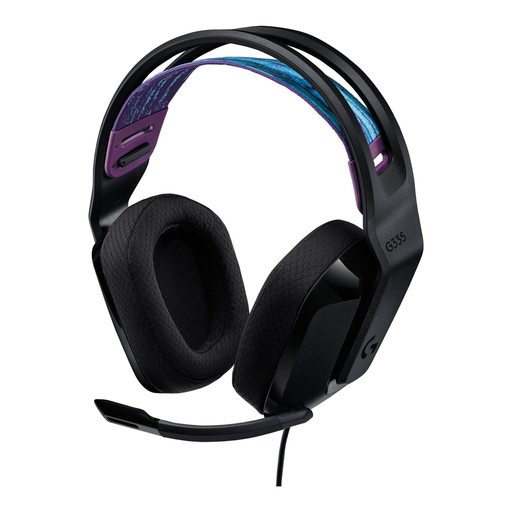
Why it suits this profile: The 3.5mm connection makes the headset easy to use with PC, PlayStation, Xbox and Nintendo Switch. This is convenient if you do not want to manage multiple dongles.
Compatibility and plug-and-play connectivity are clearly specified. However, bear in mind the 1.8-metre cable and check your PC connection.
240 grams, memory foam ear cushions, volume control on the ear cup and a fold-away microphone.
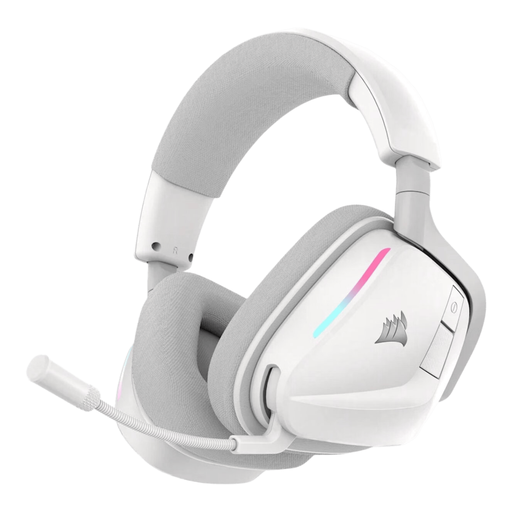
Why it suits this profile: The combination of 2.4GHz and Bluetooth 5.3 suits users who game on PC or console and also want to use mobile audio.
The connection modes, battery life and included USB receiver are specified. Features such as NVIDIA Broadcast require a compatible PC.
50mm drivers, physical controls on the ear cup, USB-C charging and stated battery life of up to 70 hours in 2.4GHz mode.
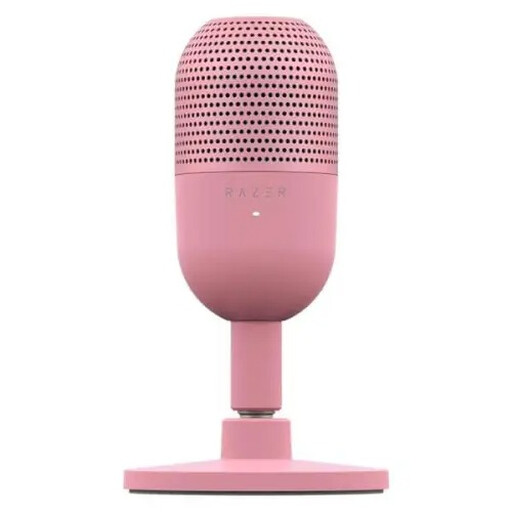
Why it suits this profile: Streamers, home workers and creators who want a separate microphone get a compact USB solution for PC and Mac, with quick muting via the tap button.
The USB connection avoids the need for a separate audio interface. However, position the microphone carefully and check which input device is active in your software.
Supercardioid pickup, compact design, plug-and-play USB and physical tap-to-mute controls.
We have put together a complete, up-to-date list of products that fully meet these strict selection criteria and the applicable European safety regulations.
For gaming alone, a gaming headset with a microphone is often sufficient. If you also use a webcam, streaming software or a meeting platform, a separate streaming microphone may be more practical. A microphone arm keeps the microphone at a fixed distance and frees up space on your desk.
According to the product description, the Kensington A1020 Boom Arm supports 3/8, 1/4 and 5/8 inch threads, rotates 360 degrees and can be attached to desks up to 88.9 mm thick. Its maximum height is 109.5 cm and its maximum load capacity is 2 kg. Before installation, check the weight of your microphone and tighten the clamp securely.
Check whether the model explicitly supports both platforms. A headset with a 3.5mm jack, such as the Logitech G G335 or Corsair HS55, is widely compatible. With wireless models, check whether the included dongle is suitable for your PlayStation and PC.
That depends on how you plan to use it. A headset microphone is compact and convenient for team chat. A USB microphone gives you more control over positioning and may be better suited to streaming, online meetings or voice-over work. A microphone arm can help you maintain a consistent distance from your mouth.
The usage time per charge is usually stated as battery life, but the battery’s overall lifespan depends on charging habits, heat and intensity of use. Charge the headset with a suitable cable, avoid prolonged exposure to heat and store it somewhere dry. Keep the volume at a comfortable level and take regular breaks when listening for long periods.
