
Players who enjoy long sessions
You want the headband and ear cushions to stay comfortable, even after a long time. RTINGS.com discusses comfort during long sessions; a manufacturer claim, such as one from HyperX, isn’t a personal fit test.


Start with a headset that feels comfortable on your head and is confirmed to work with your PC or console. Then check whether dialogue sounds clear to you at a moderate volume. A wired headset means no charging breaks, while a wireless one gives you more freedom to move around but means checking the platform version, connection and battery information. Manufacturer claims and specifications help you compare models, but they can’t prove that a headset will be comfortable for everyone.
You want the headband and ear cushions to stay comfortable, even after a long time. RTINGS.com discusses comfort during long sessions; a manufacturer claim, such as one from HyperX, isn’t a personal fit test.
You want to hear spoken dialogue clearly without constantly turning up the volume. SteelSeries lists adjustable EQ for the Arctis Nova 7 Wireless Gen 2; listen to the dialogue yourself if you have the chance to try the sound.
You might play on a PC and console, or switch devices during a session. PlayStation Support refers users to the manufacturer’s instructions for compatible third-party headsets, so check the exact version and connection type.
First, check the fit and connection for your gaming device. Then weigh up sound, battery life and features based on how you actually play.
| What to consider | What should you check? | Who is this more important for? |
|---|---|---|
| Comfort | Assess how the headband and ear cushions feel on your own head; treat weight as a point of comparison, not a guarantee of comfort. | I want my headset to stay comfortable throughout a long story; around 31% of consumers prioritise comfort. |
| Hearing dialogue | Listen to spoken dialogue and check whether you can adjust the sound balance with EQ, if needed. | I want to follow voices clearly without constantly turning up the volume; around 25% of consumers prioritise clear dialogue. |
| Platform connection | Check the full model name, platform version and the cable or dongle required for your device. | I want to know in advance whether the headset works with my PC or console; around 19% of consumers put compatibility first. |
| Playing without recharging | Choose a wired headset if you want to avoid charging breaks. For wireless use, compare the battery information with the stated test conditions. | I don’t want to interrupt a long session to recharge; around 13% of consumers focus on uninterrupted use. |
| Features and cost | Decide whether you’ll actually use features such as a microphone, lighting or additional software functions. | I don’t want to pay for features that add little to the way I play; around 12% of consumers prioritise the usefulness of extra features. |
Brands sometimes release different versions for different platforms. A wireless headset may also need a specific dongle; seeing Bluetooth in the product name or on the packaging isn’t enough to confirm console compatibility.
Before buying, check the full model name, platform version and the cable or adapter required. PlayStation Support refers users to the manufacturer’s instructions for third-party headsets.
Claimed battery life can depend on your settings. For example, Logitech’s claim of more than 29 hours for the G733 is based on 50% volume with the lighting switched off.
Read the conditions attached to the battery figure and consider whether a wired headset would suit you better if you want to avoid charging breaks.
An additional service doesn’t replace the rights you already have. ACM ConsuWijzer states that your statutory guarantee exists alongside any manufacturer’s warranty.
Check exactly what an additional service covers and compare it with your statutory rights before choosing it.
The wired Cloud III is an option if you want to play without charging breaks and your device has a suitable connection.
The Arctis Nova 7 Wireless Gen 2 is worth considering if you want to combine wireless game audio with audio from a mobile device.
The Stealth 600 (Gen 3) is worth considering if you’re looking for a wireless headset and want to switch between devices.
The wireless G733 may suit you if you’re considering a lightweight model with adjustable lighting.
The BlackShark V2 HyperSpeed is a wireless option if you want to compare its stated weight and range of connection methods.
This selection includes wired and wireless gaming headsets for long sessions. Check each model’s connection and features to make sure they suit your gaming device.
 No image available
The wired design means you won’t need to recharge the headset during a long session, although the cable may restrict your movement.
50mm drivers, over-ear design and officially licensed for PS5.
 No image available
This wireless version is an option if you don’t want to play with a headset cable; check the connection and compatibility for your device.
Gaming headset in black and red.
 No image available
A wired model may suit you if you want to avoid charging breaks; check which connection is suitable for your gaming device.
7.1 surround sound.
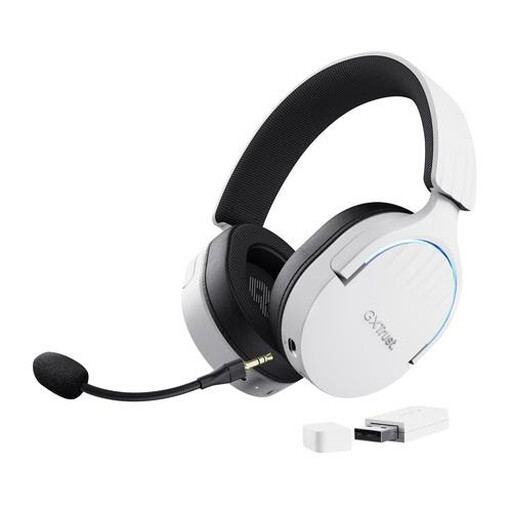 No image available
This model is an option if you want to listen wirelessly while playing and switch between devices; check which connection is suitable for your device.
7.1 surround sound, over-ear design and white finish.
 No image available
The wired design is worth considering if you want to avoid charging breaks; check the connection for the device you play on.
7.1 surround sound and described as multiplatform in the product name.
Check the instructions for the exact headset version and the USB adapter it requires. PlayStation Support refers users to the manufacturer’s instructions for compatible third-party headsets; don’t assume it’s compatible based on Bluetooth alone.
A microphone isn’t essential if you’re playing solo without voice chat. If you also use the headset for calls or voice chat, check that the microphone and mute controls work with your platform.
Keep the volume low enough and take regular listening breaks. The World Health Organization gives the example of a maximum of 40 hours per week at an average of 80 dB, or four hours per week at 90 dB. This is general health advice, not a maximum volume or safety certification for a specific model.
Contact the seller. ACM ConsuWijzer states that your statutory guarantee exists alongside any manufacturer’s warranty. If a product doesn’t meet what you could reasonably expect during normal use, the seller must provide an appropriate solution free of charge. In the Netherlands, there is no general fixed warranty period of two years.
For many distance purchases from a business, you have a 14-day cooling-off period. Check the terms and any applicable exceptions; according to the Dutch government, buying something online from a private individual is a different situation.