
Long solo sessions
You play for hours at a time and want a comfortable headset that lets you follow dialogue and hear quiet clues. Fit is personal, and specifications alone can’t tell you how a headset will feel on your head.


Start with a fit that feels comfortable during a long session, then check that you can hear dialogue and subtle clues clearly on your gaming platform. A wired connection means you won’t need to charge your headset; wireless gives you more freedom to move. Simultaneous game and mobile audio is only useful if you’ll genuinely use both. Check the connection type for each model and which features work with your device.
You play for hours at a time and want a comfortable headset that lets you follow dialogue and hear quiet clues. Fit is personal, and specifications alone can’t tell you how a headset will feel on your head.
You might switch between a PC and a console, for example. Check the connection and which features are available for your chosen headset variant on each device.
You discuss clues with others and want to know whether the microphone, mute controls and connection suit the way you play.
Choose this if: you play long sessions and don’t want to manage battery life.
Bear in mind: the cable limits your freedom to move; check that the headset and device use compatible connections.
Choose this if: you don’t want a cable while you play.
Bear in mind: you’ll need to charge it, and your device must support the receiver.
Choose this if: you want to hear mobile audio or phone calls while gaming.
Bear in mind: extra connections add little if you only use game audio.
When choosing a headset for long mystery-solving sessions, the main considerations are comfort, clear audio, a suitable connection and, if needed, voice chat.
| What to consider | What to look for | Who should pay extra attention? |
|---|---|---|
| Comfort | Consider the headband, ear cushions and pressure points; try the headset on yourself where possible. | If I play for hours, I want a headset that doesn’t press uncomfortably. Around 36% of consumers put comfort first. |
| Dialogue and subtle cues | Check which audio features work with your game, software and platform. | If I want to follow dialogue and quiet clues, I focus more on clarity than on a surround sound label. Around 29% of consumers give following clues top priority. |
| Connection and battery life | Check the available ports or wireless support, and the conditions used to calculate the stated battery life. | If I want to use a headset with a specific device or avoid interruptions, I check the connection and whether it needs charging. Around 21% of consumers put connectivity or battery life first. |
| Voice chat | Check the microphone, mute controls and any software requirements for your platform. | If I discuss clues during a game, I want the microphone to be easy to use and mute. Around 14% of consumers give voice chat top priority. |
Virtual spatial audio depends in part on the headset, software, game and platform. That doesn’t mean stereo is automatically unsuitable.
Check which features work on your device, and focus on whether you can clearly follow dialogue and relevant sound cues.
A USB receiver, Bluetooth and a cable are different types of connection. Even models with similar names may use different connections.
Check the full model name, connection method and microphone performance on every device you plan to use.
If the connection isn’t compatible, you may need a different model variant.
Logitech bases the stated battery life of the G733 on 50% volume with the lighting switched off; your settings may differ.
Read the testing conditions and factor in charging if you choose a wireless headset.
According to the Government of the Netherlands, there is no fixed statutory warranty period for all products in the Netherlands. If a product is faulty, the seller must offer an appropriate solution.
Check what additional cover offers and compare its terms with your existing statutory rights.
The wired Cloud III is worth considering if you don’t want to charge your headset and need a choice of connections.
The Arctis Nova 7 Wireless Gen 2 is worth considering if you want to listen to mobile audio while gaming.
The G733 is a wireless option worth considering if you’re looking for a USB receiver and an adjustable headband.
The wired Quantum 200 is an alternative worth considering if a flip-up microphone and memory foam ear cushions suit your needs.
This selection includes wired headsets for anyone who wants to avoid charging, and a wireless headset for cable-free gaming.
 No image available
A wired option if you’re looking for a 3.5 mm connection and a microphone with a mute function.
The product name lists compatibility with Nintendo Switch, Switch Lite, Switch OLED, PC and mobile devices.
The cable stays connected while you play.
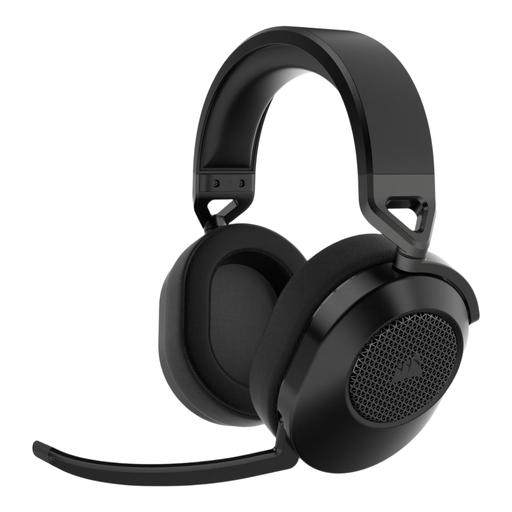 No image available
A wireless option if you want to play without a cable and are looking for a flip-up microphone with a mute function.
The description lists a 2.4 GHz USB receiver, Bluetooth and a stated battery life of up to 24 hours.
You’ll need to charge the headset; check that the connections work with your platform.
 No image available
A wired option if you want volume controls and a flip-up microphone with a mute function.
The description lists a 3.5 mm connection or USB DAC, and ear cushions designed for extended wear.
Check which connection is compatible with your device; surround sound doesn’t guarantee that clues will be easier to follow.
 No image available
A wired option if you’re looking for a 3.5 mm connection, memory foam ear cushions and a microphone with a mute function.
The description lists a weight of 240 grams. That figure alone doesn’t tell you how the headset will feel to wear.
The cable stays connected while you play; check your device’s connection.
 No image available
A wired option if you’re looking for several connection options and a detachable microphone with a mute function.
The description lists 3.5 mm, USB-A and USB-C connections, and memory foam in the headband and ear cushions.
The product name lists PC, PS5 and Xbox Series X|S; check which connection and features work with your device.
Not necessarily. Virtual spatial audio can be created using software, and the features available depend on the headset, game, software and platform. Above all, check that you can clearly follow dialogue and relevant sound cues on your device.
Compare your PC or console’s connections with the exact model variant. HyperX lists 3.5 mm, USB-C and USB-A for the wired Cloud III; SteelSeries lists game audio through a USB-C receiver and mobile audio via Bluetooth for the Arctis Nova 7 Wireless Gen 2.
Keep the volume moderate and take listening breaks. The World Health Organization explains that both exposure time and sound level matter. As examples, it gives a maximum of 40 hours per week at an average of 80 dB and four hours at 90 dB. This is general health advice, not a measurement of any specific headset model.
For many online consumer purchases, you generally have 14 days to change your mind, according to the Government of the Netherlands. There is no fixed statutory warranty period for all products in the Netherlands: you’re entitled to a product that works as it should, and can contact the seller if there’s a fault. A manufacturer’s warranty doesn’t replace your statutory rights.
Radio equipment placed on the European market must meet the applicable European requirements. The Dutch Authority for Digital Infrastructure states that equipment must meet these requirements and carry a CE marking. This doesn’t confirm that an individual listing or product has been checked.