A wired headset with a connection that works with your PC or console doesn’t need its own battery, so it could suit you if you have limited charging space; however, you’ll still be tethered by a cable. A wireless headset with a dongle lets you play without an audio cable, but it needs a USB port and will need charging. A base station can be useful if you switch between systems, but it takes up extra space and needs a power connection.
Who is this relevant to?
Player with limited charging space
You want to play squad matches without having to connect your headset to a charger or use an extra base station during every session. Compare a wired connection with the battery and charging method of a wireless model.
Squad player who values communication
You want to hear your team clearly and be able to speak or mute yourself quickly. Check the microphone, mute controls and connection to your platform. HyperX lists a microphone with a mute indicator for the wired Cloud III.
Player using multiple systems
You might switch between a PC and console, for example. Check the full model variant and connection method; a base station can make switching easier, but adds more to your set-up.
What should you look for when choosing?
Wired
Choose this if: you want to avoid charging a headset battery and your device supports the chosen connection for both listening and speaking. According to HyperX, the wired Cloud III offers 3.5 mm, USB-C and USB-A connections.
The trade-off: you’ll be tethered by the cable while playing; having a connection alone doesn’t guarantee that all software features will work on every platform.
Wireless with USB dongle
Choose this if: you want to play without an audio cable and have a suitable USB port available. Check the exact platform variant; SteelSeries specifically lists the Nova 5X for Xbox.
The trade-off: the dongle uses a USB port and the headset needs charging. Sony’s stated maximum of 30 hours for the INZONE H9 II applies with Noise Cancelling off.
Wireless with base station
Choose this if: you regularly switch between gaming systems and have the space and power supply for a base station. Logitech describes the Astro A50 Gen 5 as connecting to systems via its base station.
The trade-off: the station adds another component, cables and a power connection to your set-up.
| Priority |
What to look for |
Who is this important to? |
| Playing without an extra charging point |
Check which audio and USB ports are available, how the headset charges, and whether a base station needs space and power. |
If I have few spare plug sockets, I don’t want an awkward charging set-up between matches. Around 26% of consumers prioritise playing without an extra charging point. |
| Distinguishing in-game sounds |
Look for reviews of sound positioning for the exact model and the games where direction matters; also check which audio features your platform supports. |
If I want to pinpoint relevant sounds in a survival match, I look beyond a general surround sound claim. Around 21% of consumers prioritise distinguishing in-game sounds. |
| Clear team chat |
Check the microphone type, mute controls, and whether the microphone and chat work with your platform via the chosen connection. |
If I want to talk tactics or mute myself quickly while playing with my squad, the controls need to be clear during a match. Around 21% of consumers prioritise team communication. |
| Compatibility with your gaming system |
Note your PC or exact console model, available ports and the full headset variant; check whether you need a dongle or controller connection. |
If I play on my own system, I want to know in advance that the chosen connection will work. Around 16% of consumers prioritise platform compatibility. |
| Comfort during long sessions |
Compare the weight and cushion material of the exact version, and try the fit for yourself if possible. |
If I play several matches in a row, I want my headset to feel comfortable. Around 16% of consumers place the greatest importance on long-term wearing comfort. |
Common buying mistakes
-
Assuming a high battery figure guarantees that much play time
Sony’s stated maximum of 30 hours for the INZONE H9 II applies with Noise Cancelling off. Battery life therefore depends on the stated conditions.
Read the battery-life figure alongside the test conditions, and plan when you’ll be able to charge between gaming sessions.
With different usage, you may need to charge more often than the maximum suggests.
-
Assuming every wireless variant works with your console
Compatibility can vary by version. SteelSeries specifically lists the Nova 5X for Xbox; another variant in the same product family isn’t automatically equivalent.
Before buying, check the full model name, your console and the receiver included in the box.
-
Choosing a base station without considering your set-up
According to Logitech, the Astro A50 Gen 5 uses a base station to connect to gaming systems. You’ll need space for it, as well as a suitable connection and power set-up.
Check the available ports, cable routing and space for the station in advance.
You’ll need extra space, cables and a power connection.
Brands to consider
HyperX
According to HyperX, the wired Cloud III offers several connection options. The Cloud III Wireless is a separate version.
- HyperX lists a microphone with a mute indicator for the wired Cloud III.
- A review of the Cloud III Wireless doesn’t automatically apply to the wired Cloud III. Tweakers rated the wireless version’s in-game sound positioning positively, but noted that the tested model didn’t support Xbox.
SteelSeries
The Arctis Nova 5 family includes wireless models with a dongle.
- SteelSeries states that the Nova 5 offers up to 60 hours of battery life and can switch between 2.4 GHz and Bluetooth.
- These are manufacturer specifications; check the exact variant and don’t treat the stated battery life as a measured real-world figure.
Sony
Sony describes the INZONE H9 II as a wireless gaming headset with a 2.4 GHz dongle and Noise Cancelling.
- Sony specifies a weight of around 260 g without the microphone.
- The stated maximum battery life of 30 hours applies with Noise Cancelling off; don’t assume you’ll get this maximum without meeting that condition.
Logitech G / Astro
The Logitech G435 is a lightweight dongle headset; the Astro A50 Gen 5 uses a base station. These features apply to different models.
- Logitech lists the G435 at 165 g, with 18 hours of use from a full charge. For the A50 Gen 5, Logitech describes switching between systems.
- The A50 Gen 5’s base station makes the set-up more involved and needs space and connections.
Gaming headsets at Joybuy
This Joybuy selection includes wired headsets and wireless models for gaming and team chat. Check the connection method, compatibility and charging method for each version.
 No image available
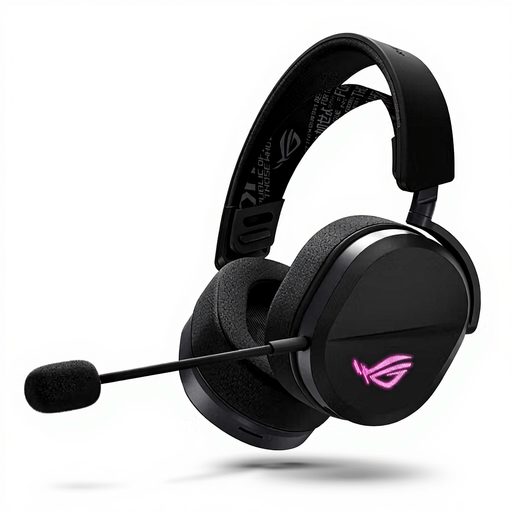
ASUS ROG Pelta, wired and wireless
Suitable if you want to switch between wired and wireless connections, provided they work with your set-up.
The product information lists USB-C, a 2.4 GHz USB receiver and Bluetooth. For wireless use, the headset needs to be charged via USB-C.
The information also lists a boom microphone and microphone controls.
Joybuy
 No image available
Razer Barracuda X, wireless, white
Suitable if you don’t want to use an audio cable while playing and the listed wireless connections work with your system.
The product information lists 2.4 GHz wireless, Bluetooth and a detachable microphone. It charges via USB-C.
Joybuy
 No image available
HyperX Cloud III S, wireless
Suitable if you’re looking for a wireless headset and the listed connections and charging times fit your gaming schedule.
The product information states up to 120 hours via 2.4 GHz and up to 200 hours via Bluetooth. These are stated maximums, not guaranteed battery life.
According to the product information, the headset has a detachable microphone with a mute indicator; wireless use requires charging.
Joybuy
 No image available
Logitech G G432, wired, 7.1 Surround Sound
Suitable if you don’t want to charge a wireless headset battery and a wired connection works with your set-up.
The product information lists a flip-to-mute microphone and volume control. The wired connection keeps you tethered while playing.
Joybuy
 No image available
HyperX Cloud III, wired, black and red
Suitable if you’re looking for a wired headset and want to avoid charging a headset battery.
HyperX lists 3.5 mm, USB-A and USB-C connections for the wired Cloud III. The product information for this version lists a detachable microphone with a mute function.
Check which connection on your device supports both audio and the microphone; you’ll remain tethered by the cable while playing.
Joybuy
Frequently asked questions
Do you need to free up an extra plug socket for a wired gaming headset?
A wired headset doesn’t have a wireless headset battery that needs charging. HyperX lists 3.5 mm, USB-C and USB-A connections for the wired Cloud III; check that your device supports both audio and the microphone via your chosen connection.
How do you set up a headset for team chat?
Connect the cable, dongle or base station as directed for the exact model. Then select the correct audio input and output on your gaming system, and test the microphone and mute button before a match.
How long does the Sony INZONE H9 II last without charging?
Sony specifies up to 30 hours with Noise Cancelling off and a charging time of around 3.5 hours. With different usage, don’t assume the headset will reach that maximum battery life.
Is it a good idea to turn the volume up to hear opponents better?
Turning the volume up isn’t a reliable solution. The World Health Organization gives an average of 80 dB for up to 40 hours a week as an example of safe listening; at higher volumes, safe listening time decreases. This is health advice, not a statutory volume limit in the Netherlands.


