First, choose a headset that works with the devices you use to play and chat. Then decide whether you need easy-to-use microphone controls, freedom to move around or comfort during a long session. A wired headset means you won't need to charge it, while a wireless one makes it easier to move around. Check which connections and audio sources work with each model and device. Before your games night, make a test recording in your own studio and check that the microphone is easy to use and your guests can hear the shared game audio.
Who is this choice for?
Host with an online team chat
You want to give instructions while guests are talking in the studio. Check how the microphone is controlled and test how clearly you can be heard in your own space. A manufacturer's claim about microphone technology doesn't guarantee how it will sound in your set-up.
Host using several devices
You may switch between a PC, console and phone. Check which connection works with each device and whether you can hear audio sources one at a time or simultaneously; the latter depends on the headset variant.
Host of a long gaming session
You'll be wearing the headset for a while, so consider the fit, controls and any breaks needed for charging. Manufacturers list materials or a stated battery life for some models, but fit and battery life depend on your circumstances.
What should you look for when buying?
| What to consider |
What should you check? |
Who is this important for? |
| Microphone and chat |
Check how to mute or move the microphone out of the way, and make a test recording while people are talking in the room. |
If I want to talk to players online while guests are here, I want to hear in advance how my voice comes across in my own space. Around 36% of consumers say being clearly understood is their top priority. |
| Connections and devices |
Check that both game audio and the microphone work with each device. Find out whether you can hear sources simultaneously or only switch between them. |
I want to use my headset with the devices I have for games night and know which features are available on them. For around 29% of consumers, compatibility with their own devices comes first. |
| Comfort and battery life |
Consider the fit for extended wear and, for a wireless headset, check the stated battery life and charging options. |
If I'm gaming for a long time, I want to know whether the headset is comfortable and whether charging will interrupt the session. Around 21% of consumers say extended wear and uninterrupted use are their main considerations. |
| Wired or wireless |
Think about whether you want to stand up and move around while hosting or stay in one place. Check that a wireless receiver is compatible with your device. |
I want to be able to move around without a cable, or avoid having to charge my headset if I'm staying at my desk. This trade-off matters most to around 14% of consumers. |
Common pitfalls
-
Assuming a 7.1 label confirms support for all PS5 features
MediaMarkt includes the Logitech G432 in its PS5 surround sound selection, but Logitech says DTS Headphone:X 2.0 and EQ presets are only available on Windows with G HUB.
Check the manufacturer's information for each feature. Don't assume that software features available on Windows will also work on PS5.
-
Confusing Quick-Switch with hearing two sources at once
Switching between connections and listening to two audio sources simultaneously are different features. SteelSeries describes Quick-Switch for the Nova 5, and simultaneous game and mobile audio for the Nova 7 Gen 2.
If you want to hear phone audio while gaming, check that the exact headset variant supports simultaneous audio.
-
Assuming one headset will also play game audio for the room
A headset is designed for personal listening. Guests who want to listen together may need a separate shared audio set-up. Also check whether its sound feeds back into your microphone.
Before games night, test the audio outputs you plan to use and make a test recording while the shared audio is playing.
Brands worth comparing
HyperX
The Cloud III Wired is a wired option for hosts looking for several connection options and easy microphone controls.
- HyperX lists 3.5 mm, USB-C and USB-A connections for the Cloud III Wired, as well as a mute indicator.
- A cable limits how freely you can move around. The stated materials and features don't confirm how comfortable the headset will feel or how clearly you'll be heard in a busy studio.
SteelSeries
The Arctis Nova range includes several wireless options, with features varying by model.
- SteelSeries lists Quick-Switch for the Nova 5. For the Nova 7 Gen 2, the manufacturer describes simultaneous game audio via a USB-C dongle and mobile audio via Bluetooth.
- Don't assume features are the same across variants. Check support for your platform and remember that wireless headsets need charging.
Logitech G
The wired G432 and wireless G733 are different options for those who want a fixed set-up or prefer not to have a headset cable.
- Logitech lists DTS Headphone:X 2.0 and EQ presets for the G432.
- According to Logitech, these G432 software features are only available on Windows with G HUB. This doesn't confirm that they work on PS5.
JBL
The Quantum 200 is a wired option with a flip-up microphone and straightforward controls.
- JBL describes the microphone as directional and flip-up, and lists memory foam ear cushions.
- JBL Support says the microphone isn't detachable. The product description doesn't prove how well it will pick up voices in your studio or how the headset will fit.
Headsets at Joybuy
This selection includes wired and wireless gaming headsets for hosts who chat online. Choose based on your devices and how much freedom to move around you need.
 No image available
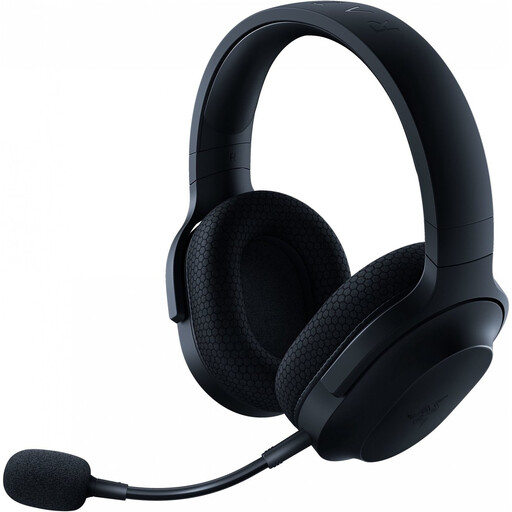
Razer Barracuda X Wireless Headset, Black
Worth considering if you want to game wirelessly and might also use the headset on the go while hosting. Check which connections and microphone features work with your devices.
View at Joybuy
 No image available
HyperX Cloud III S Gaming Headset, Black/Red
A possible choice for online chat during a longer session. Before buying, check the microphone controls, connection and support for your devices.
View at Joybuy
 No image available
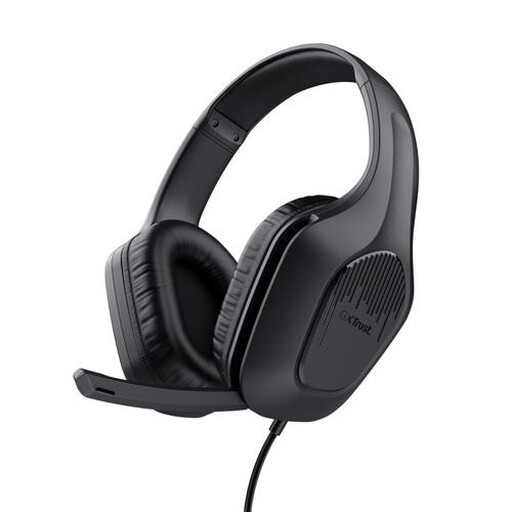
Trust GXT 415 Zirox Wired Gaming Headset, 50 mm Drivers, Over-Ear, Black
The wired design suits a fixed set-up if you don't want to charge your headset, although the cable will limit your freedom to move around. The product name lists 50 mm drivers and an over-ear design.
View at Joybuy
 No image available
Trust GXT 491 Fayzo Wireless Gaming Headset, 7.1 Surround Sound, Over-Ear, Black
Consider this wireless option if you want easy chat controls and freedom to move around while hosting. Check that the connection and features work with your platform. The product name lists 7.1 Surround Sound and an over-ear design.
View at Joybuy
 No image available
HyperX Cloud III Gaming Headset, PC, PS5, Xbox Series X|S, Black
An option for a fixed set-up if you want to be able to mute quickly during an online chat. Check which connection supports microphone audio on your device.
View at Joybuy
Frequently asked questions
Will a Bluetooth headset connect directly to a PS5?
Not necessarily: Sony says Bluetooth audio devices paired directly aren't compatible with the PS5. Check whether your specific headset works via a USB receiver or audio connection supported by the manufacturer.
How can I check whether guests will disrupt my online chat?
Make a short test recording in the room where you'll be playing, while someone is talking and the shared game audio is on. Also check that you can quickly mute the microphone when talking to guests. A directional or muteable microphone doesn't guarantee that background noise will be eliminated.
How should I prepare a wireless headset for a games night?
Charge the headset beforehand and test the connection and microphone on the device you'll be using. If your headset has a USB receiver, check that it's connected properly. Sony also recommends this when troubleshooting connection issues with PlayStation headsets.
What returns and warranty rules apply to online purchases in the Netherlands?
For distance purchases, the Dutch government says you usually have 14 days to change your mind, although there are exceptions. You're also entitled to a product that works as it should; the Netherlands has no fixed statutory warranty period. Check the seller's terms and whether an additional manufacturer's warranty applies.


