Gaming headsets at Joybuy
This selection includes wired and wireless gaming headsets to compare for replay viewing. Check each model’s connection, platform requirements and any charging needs.
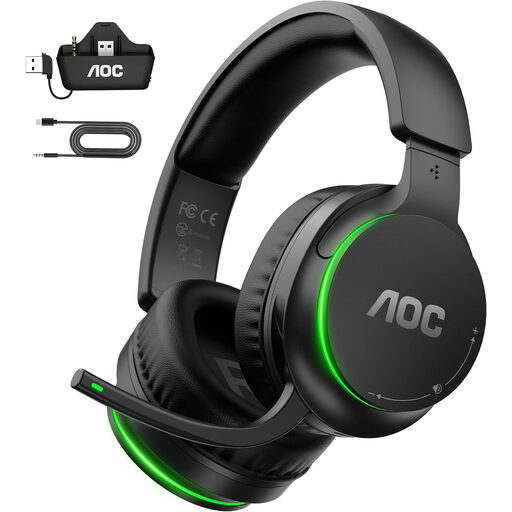 Image unavailable
AOC Wireless Gaming Headset for Xbox Series X|S, Xbox One, PS5, PC and Switch
A wireless option to consider if you want more freedom to move; the product description mentions a 2.4 GHz transmitter.
The product title lists Xbox Series X|S, Xbox One, PS5, PC and Switch. Check which connection method and variant are right for your device.
View at Joybuy
 Image unavailable
Razer Kraken V3 X, black
A gaming headset to consider if the stated Windows requirement for the audio feature suits the device you use to watch replays.
The product information limits the 7.1 feature to Windows; don’t assume it’s available on every platform.
View at Joybuy
 Image unavailable
Razer Barracuda X, white
A wireless option if you want more freedom to move; remember that it has a battery and will need charging.
The product description mentions USB-C charging and 2.4 GHz and Bluetooth connections. Check which connection is suitable for your device.
View at Joybuy
 Image unavailable
HyperX Cloud III S, black/red
A wireless option to compare if you’re looking for a Cloud III model with a wireless connection; this is not the wired Cloud III.
The product description mentions 2.4 GHz and Bluetooth. DTS Spatial Audio is listed for PC; check that this suits the way you’ll use it.
View at Joybuy
 Image unavailable
Logitech G G432, wired
A wired option if you don’t want to charge a battery; the product description mentions a 3.5 mm connection and USB DAC.
Logitech says DTS Headphone:X 2.0 and EQ are only available on Windows with G HUB. Check the connection and software requirements for your replay device.
View at Joybuy
Frequently asked questions
Do I need virtual 7.1 surround sound to assess replays?
The specifications listed don’t establish that you do; first check which connection and audio settings work on your device. Logitech limits the G432’s surround feature to Windows with G HUB, while Razer lists the BlackShark V2 X’s 7.1 feature for Windows 11.
Why might a 3.5 mm headset’s microphone not work straight away on my PC?
A single four-pole plug won’t automatically work with a PC that requires separate headphone and microphone connections. SteelSeries says the PC version of the Arctis Nova 1 includes a splitter, which may need to be purchased separately for a console version; also check the selected input device in your audio settings.
Can I use Bluetooth and the Arctis Nova 5’s 2.4 GHz receiver at the same time?
No. According to SteelSeries, you can switch between Bluetooth and 2.4 GHz, but only one connection can be active at a time.
How can I reduce the risk of hearing damage during long replay sessions?
Avoid listening unnecessarily loudly or for too long, and take symptoms such as ringing or muffled hearing seriously. Thuisarts explains that the risk increases the louder the sound and the longer you listen.
Do I automatically get exactly two years of statutory warranty on a headset in the Netherlands?
No. According to the Dutch government, there is no fixed statutory warranty period in the Netherlands; you’re entitled to a product that works as it should, depending on what you could reasonably expect. If there’s a problem, contact the seller; a manufacturer’s guarantee is separate.


