
Console gamers who play from the sofa
You want to practise on a big screen and check that your headset, controller and console work well together where you sit.


First, choose a headset that works with your console or PC and suits where you sit: wired, using a suitable connection, or wireless, using a connection supported by your platform. Then compare directional audio settings, comfort during longer sessions, and the controls for your microphone and chat. A specification on its own is no guarantee of better gaming performance.
You want to practise on a big screen and check that your headset, controller and console work well together where you sit.
You want to learn to recognise sounds and movement, and compare the audio settings available on your platform, without assuming that a 3D audio label gives you a performance advantage.
You practise with others and want clear communication, an easy-to-use microphone mute and a comfortable fit for extended use.
First, check the connection to your platform and the distance from your screen. Then consider directional audio, comfort and team chat.
| What to consider | What should you look for? | Who is this most important for? |
|---|---|---|
| Connection and seating distance | Check your console or PC, your controller’s connection and the headset’s exact compatibility. Also consider whether a cable will restrict your movement. | When I play from the sofa, I want to know whether my headset works with my console and whether a cable will limit where I can play. Around 33% of consumers put connection and seating distance first. |
| Directional audio | Compare stereo with your platform’s spatial audio settings, and check whether the game supports the feature. | When I want to learn to recognise the direction of sounds while practising, I want to compare the settings in my own game. Around 27% of consumers give directional audio their highest priority. |
| Comfort | Look at adjustability, the headband and the ear cushions; fit is a personal matter. | For longer practice sessions, I want a headset that feels comfortable, not just a model that claims to be comfortable. Around 20% of consumers put comfort first. |
| Team chat | Check that the microphone, mute button and any game-chat balance controls work with your platform. | When I practise with a team, I want to be able to mute my microphone and communicate clearly. Around 20% of consumers say team chat is their main reason for buying. |
Compatibility varies by model and variant. For example, the HyperX Cloud III S Wireless does not list Xbox support, while the Arctis Nova 7P Wireless Gen 2 is described as being for PlayStation and PC.
Check the full model name and compatibility list for your console before choosing.
If the platform variant is not compatible, you may need a different headset.
You can adjust headphone audio settings on PS5, but the available feature alone does not show how well you can identify direction in a particular game.
Compare stereo with the spatial audio setting available in your own game and on your own platform.
According to Logitech G, the Astro A50 X uses a base station and HDMI connections for the system switching described. The connections between the console, base station and screen also matter.
Map out the full signal route before buying and check the connections on your equipment.
Your setup may need extra HDMI cables or a different arrangement of your devices.
A microphone feature does not automatically mean the earcups have active noise cancellation.
Check the microphone and headphone specifications separately.
The Cloud III offers a wired option for platforms including PS5 and Xbox. The Cloud III S Wireless is a wireless option for the platforms listed for that variant.
The Arctis Nova 7P Wireless Gen 2 is a wireless variant for platforms including PlayStation and PC.
The updated Xbox Wireless Headset is designed for people who mainly play on an Xbox console.
The Astro A50 X is a headset with a base station for a setup involving Xbox, PS5 and PC.
The PULSE 3D is a PlayStation headset with controls for game audio and chat.
This selection includes wired and wireless gaming headsets. Check each model’s connection and compatibility with your console or PC.
 No image available
A wireless option to consider if you want to control game audio and team chat on a listed platform.
The product information lists 2.4GHz connectivity for platforms including Xbox and PS5, a flip-to-mute microphone, and controls for game and chat volume. The product name also lists Xbox Series X|S, Xbox One, PS4, PC, Switch 2, Steam Deck and mobile; check compatibility with your device.
 No image available
A wireless option to consider if you want to play on one of the listed devices without a headset cable.
The product name lists PC, PS5, PS4, Switch and mobile, a detachable 10mm microphone and memory foam ear cushions. Battery life varies by connection: up to 200 hours over Bluetooth and up to 120 hours over 2.4 GHz. HyperX does not list Xbox compatibility for this model.
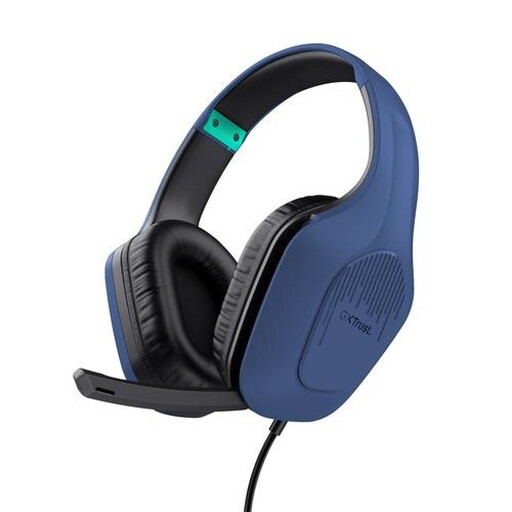 No image available
A wired option to consider if your device or controller has a suitable 3.5mm connection.
The product information lists a 2-metre cable, 50mm drivers, an adjustable headband and a weight of 244 grams. The headset is described as having a microphone and volume and mute controls; check the connection on your own device.
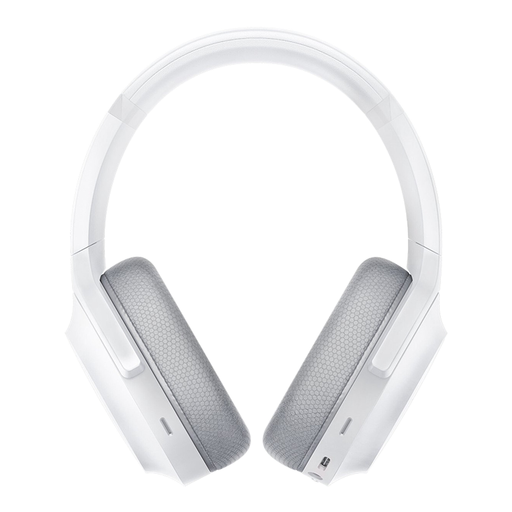 No image available
A wireless option to consider if you want to check whether the connection and features suit your platform.
The product information lists 2.4GHz and Bluetooth connections, a built-in microphone and a mute control. The product name lists PC, PlayStation, Switch and Android; THX Spatial Audio is listed for Windows 10. Spatial audio compatibility is no proof of better positional accuracy in a game.
 No image available
A wired option to consider if you can match the connection to your console, PC or controller.
HyperX lists 3.5mm, USB-C and USB-A connections for the Cloud III. The product information lists compatibility with PC, PS5 and Xbox Series X|S, 53mm drivers and DTS Headphone:X. The microphone is described as having a mute indicator; check which connection suits your setup.
The PS5 offers 3D audio settings for headphones, including a personal profile and presets. Choose a headset with a connection and fit that suit your setup; the setting alone is no proof of a competitive advantage.
According to PlayStation, you can find the 3D audio settings for headphones under Settings, Sound and 3D Audio (Headphones). Choose a preset or create a personal profile, then compare what you hear for yourself; the setting for TV speakers is a different option.
That depends on your controller and how you play. According to Microsoft, compatible Xbox controllers have a 3.5mm headset socket, so the cable runs between your head and controller rather than necessarily all the way to the TV. Check the connections on your own controller and headset.
Check the stated battery life for each connection and how to charge the model. HyperX lists different figures for 2.4 GHz and Bluetooth for the Cloud III S Wireless; battery life may depend on the connection you use and how you use it.
The World Health Organization advises considering both sound level and listening time, and keeping the volume down. The stated guideline of 80 dB for up to 40 hours a week relates to exposure; it is not a proven safe volume setting for a particular headset.