
Vandaag of morgen in huis

Kwaliteit gegarandeerd

Welkomstaanbiedingen ontgrendelen: GRATIS bezorging | Tot 80% korting | Gratis 30 dagen JoyPlus-proefperiode
Download de app
A gaming headset may seem straightforward at first: choose a model with large earcups, a microphone and an attractive price. However, problems often only become apparent during use. The cable may be too short, the connection may not suit your PC, or the ear cushions may become uncomfortable after an hour.
Joybuy Product Recommendation Officer therefore filters the most important product specifications and turns marketing terms into practical considerations. This makes it easier to compare a wired gaming headset based on features you will notice in everyday use.
A surround sound gaming headset sounds appealing, but check how this feature works. Some models simply provide stereo sound through two channels. Others use virtual 7.1 or 3D audio through software, a USB adapter or console settings.
That difference matters. The Logitech G G432, for example, uses a USB DAC and Logitech software for its stated 7.1 function. Via the 3.5 mm connection, the model works as a wired headset, but not every surround feature is available. The Trust GXT 415 Zirox and GXT 489W Fayzo are more straightforward: these models provide stereo sound rather than virtual 7.1 surround.
“Multi-platform” does not always mean that every function is available on every platform. A 3.5 mm gaming headset will generally work through a controller, laptop or combined audio connection. However, a PC with separate audio and microphone ports may require a splitter.
Also check whether features such as USB audio, a software equaliser or virtual surround are available on your device. For a PS5 headset, you will usually connect a suitable model to the controller. With Xbox, Nintendo Switch and PC, the available port may vary from one device to another.
A lightweight headset can feel comfortable, but the fit also depends on the headband, ear cushions and clamping force. On-ear models rest on your ears and are often more compact. An over-ear gaming headset surrounds your ears and may passively reduce background noise, but it takes up more space.
Pay attention to the materials. Memory foam or soft synthetic cushions can be comfortable, while faux leather may feel warmer during long sessions. The size of the earcups and the adjustability of the headband ultimately determine whether the model suits you.
A wired headset does not need a battery and is ready to use straight away. A 3.5 mm connection is practical for PC, PlayStation, Xbox, Nintendo Switch and mobile devices, provided the device has the correct port.
A USB headset, such as the Logitech PC 960 USB or Logitech H340, uses digital audio via the USB port. This is convenient for a computer, but less suitable if you want to use one headset directly with several consoles.
For online multiplayer, look for a gaming headset with microphone featuring an adjustable boom, mute function and volume control. A flip-to-mute microphone mutes the sound when you move the boom upwards. A detachable microphone is useful if you also want to use the headset for music or films.
Bear in mind that “noise-cancelling microphone” refers to recording your voice and does not automatically mean that background noise will disappear completely. According to the product descriptions from the relevant brands, these microphones are designed to support voice communication; the experience may vary depending on the room and device.
A larger driver size, such as 40 mm or 50 mm, tells you about the speaker units, but it does not determine sound quality on its own. Also check whether the model uses stereo or virtual surround sound.
Weight can help when comparing models for extended use:
A 1.2-metre cable can be convenient when connecting to a controller. For a PC under or next to your desk, a cable measuring 1.8 to 2 metres gives you more freedom of movement. When using a PC, check whether a splitter or extension cable is included.

Why it suits this profile: According to the product information, this over-ear gaming headset uses a fixed 3.5 mm cable and works with PC, laptop, PlayStation, Xbox and Nintendo Switch.
The specifications clearly state stereo rather than surround sound. You therefore do not pay for a feature you do not need.
50 mm drivers, 244 grams, over-ear ear cushions, volume control and a foldable microphone.
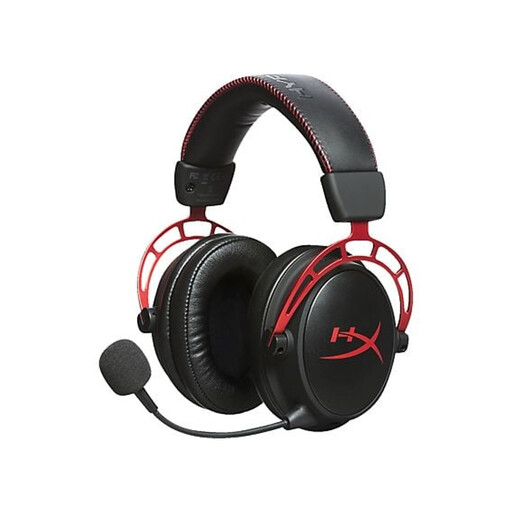
Why it suits this profile: This model combines an aluminium frame, memory foam ear cushions, a detachable cable and a removable microphone.
The detachable components make replacement, storage and use without the microphone easier.
Closed-back over-ear design, 5 cm drivers, 298 grams and compatibility with PC, PS5, Xbox and Switch according to the product information.

Why it suits this profile: This model is designed for players looking for a wired headset with a microphone and software-based 7.1 functionality.
The product information lists the 3.5 mm connection and the software required to activate 7.1 separately.
50 mm drivers, cardioid microphone, memory foam ear cushions, 240 grams and compatibility with multiple platforms.
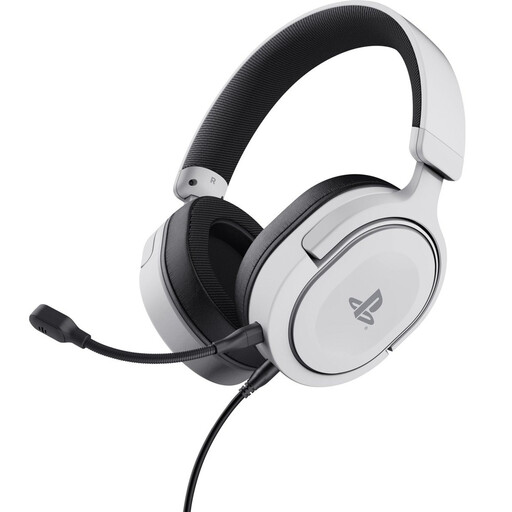
Why it suits this profile: According to the product information, the headset is officially licensed for PS5 and also works with PS4 via the detachable 3.5 mm cable.
The product description distinguishes between stereo and 3D audio on PS5. Do not therefore expect a standalone surround processor.
50 mm drivers, detachable microphone, swivelling earcups and a weight of 253 grams.
We have put together a complete, up-to-date list of products that fully meet these strict selection criteria and the applicable European safety regulations.
That depends on the connection. A model with a 3.5 mm jack will usually work on PC, PlayStation, Xbox and Nintendo Switch, but a PC with separate microphone and headphone ports may require a splitter. Also check the platform list for the specific product.
A wired gaming headset does not need charging or a wireless connection. This makes it practical for permanent gaming setups and consoles. A wireless model gives you more freedom of movement, but requires a battery and may involve additional connection steps. Choose based on how you plan to use it, rather than the marketing term alone.
The lifespan mainly depends on how you handle the cable, hinges, microphone boom and ear cushions. Keep the headset in a designated place after use, do not pull on the cable and keep it dry. Many of the models mentioned come with a legal guarantee of at least two years under EU consumer law. This is separate from normal wear and tear or damage caused by incorrect use. You should also keep the volume at a safe level and take regular breaks.
